There could be a Samsung Galaxy Fold Lite, specs and price look pretty good

Saying that the Samsung Galaxy Fold had a rocky start is probably the understatement of the decade. However, Samsung’s first foldable device is quite revolutionary — if you can afford it. Thankfully, it seems there could be a Samsung Galaxy Fold Lite on the way to help the less-wealthy consumers try out a foldable.

According to reliable leaker Max Weinbach, the Samsung Galaxy Fold Lite could be a hodgepodge mixture of parts from the past two years. It would cut some corners to keep the device from getting too expensive, but interestingly would also be better than the original Galaxy Fold in a few ways.

Check out the rumored specs table of the Samsung Galaxy Fold Lite below. Remember, these are rumored specs, so don’t take them as fact:

The two most interesting aspects of these rumored specs for the Samsung Galaxy Fold Lite are the lack of UTG (ultra-thin glass) on the display and the inclusion of the Qualcomm Snapdragon 865 processor.

Let’s start with the UTG aspect. One of the biggest blunders of the original launch of the Galaxy Fold was how easily one could break the plastic display. Samsung scrambled to put a UTG layer on it to make it more durable, and that same tech worked well in the Samsung Galaxy Z Flip. To not have that in the Galaxy Fold Lite would, theoretically, make the foldable phone just as easily breakable as the original Fold.

As far as the Snapdragon 865 processor goes, it’s an interesting choice to include this for two reasons. The first is that the Galaxy Fold and the Galaxy Z Flip both have (on paper) weaker processors than the Samsung Galaxy Fold Lite is rumored to have. The second is that the Snapdragon 865 is, at its core, 5G-capable, meaning that Samsung would actually be manually preventing the Galaxy Fold Lite from connecting to 5G networks. In other words, it would be less work for Samsung to just let the Fold Lite use 5G. Of course, that would make the device seem more premium, so that’s likely why Samsung would do that.

Either way, the $1,099 asking price for a phone like this is really good. That would make it the cheapest foldable from a major manufacturer yet and a solid option for people thinking about buying other Sammy flagships, such as the Galaxy S20 or upcoming Galaxy Note 20.

Asus ROG Strix XG17AHPE 240Hz Portable Monitor Review: Expensive Innovation

Having a portable monitor is a lifesaver. Whether your laptop’s screen just doesn’t give you enough space or you’re looking for something to connect to a smartphone or tablet, having an extra screen can instantly boost your productivity. But what if that lightweight screen wasn’t all business? What if it had a fun side too? 

The Asus ROG Strix XG17AHPE is just that, bringing a pro-level 240 Hz refresh rate to a portable screen for the first time. The 17.3-inch monitor (DisplayPort Alt Mode over USB Type-C or HDMI) delivered most of what I wanted and needed for both work and gaming and made its mark as a one-of-a-kind product. But that innovation comes at a $500 price tag that leaves us wondering if you’re better off just buying one of the best gaming monitors instead. 

Design of Asus ROG Strix XG17AHPE

With speedy specs, there’s no doubt that the Asus ROG Strix XG17AHPE is for gamers, but with portable monitors offering little space to work with, gamer aesthetics are only embodied by a pair of watchful eyes that are the Asus ROG logo. With black the dominating color, the overall look here is pretty mute, but Asus found subtle ways to include premium touches. 

With its subtle placement, smooth feel and silver look, the Asus ROG logo actually looks good in a bottom bezel that also manages to fit in two 1W front-firing speakers without taking up too much room. The back of the Asus ROG Strix XG17AHPE is its fanciest looking part. A diagonal line starkly divides two contrasting brushed finishes that makes one half look darker than the other. Here lies another ROG eye that glows when the monitor’s on. I’m not usually a fan of massive branding, but when the logo looks this good and gives out a vibe this creepy, I can’t help but appreciate it. 

The 17.3-inch Asus ROG Strix XG17AHPE will naturally take up more desk space than the 15.6-inch MSI Optix MAG161V (15.7 x 9.9 x 0.4 inches for the Asus versus 14.05 x 8.94 x 0.43 inches with the MSI), but it’s still comparably thin and even thinner than the Lenovo ThinkVision M14 (12.7 x 8.2-8.7 x 3.8 inches). However, with its larger size, the Asus is also heavier than those non-gaming portable displays (2.3 pounds versus the MSI’s 2 pounds and the Lenovo’s 1.3 pounds). But if you want larger screen size, which is handy for immersing yourself in the game as much as possible, the extra screen real estate will be worth the extra pound, and pixel density is still fantastic at 127.3 pixels per inch. 

A small way the Asus ROG Strix XG17AHPE starts earning its price tag is through versatile connectivity options. If you have a laptop or desktop with a USB-C port that supports DisplayPort Alt Mode, you can connect to the monitor that way. If your computer’s USB-C port can charge other devices, you can even use the ROG Strix XG17AHPE without ever having to worry about it running out of battery. Through USB-C, the monitor can receive up to 12V at 2A (with USB Power Delivery 3.0). With my laptop’s Thunderbolt port, I was able to use the ROG Strix XG17AHPE with a single (included) USB-C to USB-C cable for hours without its battery life ever dropping. USB-C also serves to connect tablets and smartphones, including a Samsung Galaxy S10 I connected to it effortlessly.

Either of the two USB-C ports can power the monitor, so if none of your system’s ports can’t do that, you can use one to connect to your device and the other to supply it power. The Asus ROG Strix XG17AHPE comes with a USB-C to USB-A adapter, which plugs into an included power brick. That adapter also means the monitor can connect to your system’s USB-A port and receive power. 

In addition to USB-C or USB-A, you also have the option to connect to a device’s HDMI port via a MicroHDMI to HDMI cable. This opens up possibilities in the world of Raspberry Pi, gaming consoles and even cameras. If you use HDMI, it’ll either run on battery (see the Battery Life section) or you could simultaneously give the monitor power through a USB-C cable. There’s also a 3.5mm headphone jack for plugging in your best gaming headset. 

The panel’s left side holds all the ports and controls. Controls come in the form of a power button located higher than the rest of the inputs and lights up when on or charging, plus three additional buttons. They’re all pretty shallow but worked on the first try.

Origami Stand on Asus ROG Strix XG17AHPE

Like with many portable monitors, the Asus ROG Strix XG17AHPE uses an origami-style stand that you must fold a certain way to prop up the monitor. It felt a little more intuitive to fold than the one found on the Optix MAG161V, and the Asus has a magnetic hard bit that secures under the bottom bezel for added stability. But the stand was still a pain in the butt. 

The origami stand does allow for different levels of back tilt, but I sometimes wished I could get the monitor closer to 90 degrees to better line it up with a connected laptop. If my table started shaking due to aggressive typing, I’d notice the XG17AHPE wobbling too. But the monitor never came crashing down, even if I slid it across my desk (putting pressure on the top bezel was a different story though). 

In portrait mode, the stand never failed me, but I felt nervous the whole time. The stand just doesn’t provide enough of a foundation for me to feel safe using it that way long-term or with a wobbly table. But I have to admit that having this much vertical screen space is fantastic for reading and something missed with the vast majority of laptops. 

We wish more monitors would employ a reliable and sturdy kickstand like Lenovo does with the ThinkVision M14, which has not one, but two built-in stands. Portable monitors are just too delicate and, in the XG17AHPE’s case, expensive to bet it all on thin, bendy stand-sleeves. The monitor will eventually be available as a different SKU (XG17AHP) with a tripod stand, (plus the same sleeve and a bag), but that ups the monitor’s price to $600.

As bad as this thing is as a stand, it’s even worse as a protective case. While the cover makes a debatably safe stand, it’s an undeniably flawed protector that leaves the sides and back of the monitor exposed. Since this monitor’s meant for traveling, we expected Asus to provide a sleeve that covered all bases without easily sliding off.

Gaming Performance of Asus ROG Strix XG17AHPE

A 240 Hz monitor opens up a world of potential for first-person shooters and other eSports. While even the best graphics cards for gamers can’t always push AAA titles at a frame rate of 240 frames per second (fps) and high settings, eSports games look extra smooth at 240 fps with low latency and the elimination of disastrous distractions, like ghosting. The Asus ROG Strix XG17AHPE’s FreeSync fights off screen tearing, which happens when your GPU’s frame rate doesn’t match up with the display’s refresh rate, but that only works with AMD graphics cards.

Unfortunately, with New York City in lockdown we couldn’t use our lag tester on the Asus ROG Strix XG17AHPE; however, I put it through its Overwatch paces, paired to a gaming laptop running an Nvidia GeForce GTX 1060 mobile GPU. I used the monitor’s out-of-the box settings, so overdrive was set to Level 3. 

As I played Overwatch for a few hours, I didn’t notice any input delay with the monitor with the game set to run at 1920 x 1080 at 240 Hz, but with a GTX 1060 GPU, I was only able to hit a frame rate of about 63-85 fps. To maximize the screen’s potential, I’d need a more-powerful GPU that can push out 240 fps with this game. 

Still, images on the ROG Strix XG17AHPE appeared smooth, even during Sigma’s most intense and fastest moments of battles or when enemies filled the screen. Trotting around felt very smooth and realistic. Ocean waves in the distance moved smoothly without stuttering. I’m used to gaming on a 17.3-inch 144 Hz screen, so I didn’t notice a grand improvement in quality when graduating to a 17.3-inch 240 Hz display. But if you’re moving from a standard 60 Hz screen, your experience may differ. 

On-Screen Display, Calibration on Asus ROG Strix XG17AHPE

The Asus ROG Strix XG17AHPE’s on-screen display (OSD) is surprisingly navigable for a portable monitor settings menu. Pressing the menu button on the side brings up icons on the display that align with the corresponding buttons for activating. This makes it easy to know where the buttons for scrolling, selecting and back are. It’s no joystick, but the pop-ups are large and proved helpful in navigation. 

Asus also surprised me with a large number of calibration options on the ROG Strix XG17AHPE. The Gaming menu features overdrive (five levels of overdrive, plus off), an option for toggling FreeSync and the GamePlus menu, which has a crosshair, timer, FPS counter and display alignment. In the GameVisual section, you can pick from eight image modes. Racing is the default, but there’s also Scenery, Cinema, RTS/RPG, FPS, sRGB, MOBA and User. The Gaming section also has Shadow Boost, which, according to Asus, “clarifies dark areas of the game without overexposing brighter areas” with three levels, including 0, the default.

The Image section of the ROG Strix XG17AHPE’s OSD provides control over things like brightness, contrast and the blue light filter, depending on the mode selected. Meanwhile, the Color menu has options for Color Temp (cool, normal, warm, or user with red, green and blue sliders from 0-100%), Gamma (2.2, the logic default, or 1.8 or 2.5) and Saturation. 

Other menu sections include Power, Input Select (HDMI or USB Type-C), My Favorite, for shortcuts and customized settings and System Setup, with standards like language, volume, key lock, OSD setup and reset. There’s also an Auto Rotation feature, but to use it you must download Asus’ DisplayWidget software. 

Image Quality on Asus ROG Strix XG17AHPE

We did our testing with out-of-the box image settings, so the Asus ROG Strix XG17AHPE was in Racing Mode with contrast set to 80 and the blue light filter and Shadow Boost off. 

The ROG Strix XG17AHPE worked great as my general second display with plenty of brightness. Even when I was facing a sunny window, the screen was bright enough for productivity use at 50% max brightness, and games were playable at this setting, albeit more dull. 

Word documents were luminous enough to edit while looking at the monitor head on, and when I turned it perpendicular from me, I could still view documents and games, but with just a touch of reflection in the further third of the screen. When I boosted brightness up to 100%, that reflection was barely noticeable. Additionally, with the screen completely flat, I could comfortably view documents and movies, only sacrificing a small amount of brightness. Credit is due to Asus’ use of IPS, a panel tech known for strong viewing angles.

Overwatch, a particularly colorful game, looked properly saturated on the Asus ROG Strix XG17AHPE, and dark colors were distinct. Different shades of dark green topiaries and a yellow sunflower were apparent in shadowed corners. Colors on the movie Mission: Impossible Fallout were also strong, from green poplars that looked exuberant and vivid as Ethan and Ilsa walked past them, to differing shades of gold and rust in a club scene. Even the secretly olive green in Ilsa’s jacket was discernible on the ROG Strix XG17AHPE. 

The ROG Strix XG17AHPE proved pleasantly bright in our testing but fell short of Asus’ 300-nit max brightness claim. Still, 285.6 nits is plenty and still brighter than the next runner up by 117.2 nits, as well as the average of the comparison group by 81.6 nits.

Asus claims that the ROG Strix XG17AHPE covers 100% of the sRGB color space, but our review unit actually surpassed that slightly. Colors on the Asus should look more saturated than those on the MAG161V or the 15.6-inch Asus ZenScreen MB16AC. The Lenovo fell behind the XG17AHPE by 11.5%. When it came to the wider DCI-P3 space, the XG17AHPE hit an impressive 77.5% coverage, significantly better than what MSI’s MAG161V or Asus’ MB16AC can do here. 

Battery Life on Asus ROG Strix XG17AHPE

The Asus ROG Strix XG17AHPE runs on a 7,800mAh battery. If you have a USB-C or USB-A port with Power Delivery 3.0 support, it can provide the monitor enough power to save you from having to get a charger. When I used it with a Thunderbolt port, battery life never fell below 100%, and when I used it with a supporting USB-A port for 7 hours at max brightness, the battery life only dropped to 97%.

But if your device doesn’t have a Power Delivery port, the monitor will be running off battery power. With the Asus ROG Strix XG17AHPE running at 240 Hz and using the speakers at max volume, it lasted about 2 hours at 80% brightness. At 100% brightness and without using the speakers, it lasted about 3 hours and 30 minutes. 

At 60 Hz, the display uses less battery power. With brightness maxed out, but rarely using the speakers, the Asus ROG Strix XG17AHPE lasted 3 hours. When I used the XG17AHPE at 50% brightness at this refresh rate, the portable monitor lasted about 4.5 hours. 

Asus claims that the ROG Strix XG17AHPE can get enough juice to game for 2 hours at the max 240 Hz refresh rate with an hour of charging.

Audio on Asus ROG Strix XG17AHPE

It’s not the primary reason people buy portable monitors, but the Asus ROG Strix XG17AHPE’s two 1W stereo speakers are shockingly loud and might outblast a connected phone, tablet or disappointing laptop speakers. The ROG Strix XG17AHPE’s speakers were especially handy when I played emulated N64 games off a Raspberry Pi, which, of course, doesn’t include speakers, as would also be the case if you connected the XG17AHPE to a gaming console. 

Because the speakers on my laptop are particularly bad, the Asus ROG Strix XG17AHPE’s speakers were actually an upgrade when I played Overwatch. With front-firing speakers, audio from the monitor never sounded muffled. During battle, I could make out the differences in sound effects from various weapons and still clearly hear characters’ voices and even that of my teammate, who wished something bad would happen to me in real life (I hope you live a long life, pal!). Overall, the Asus ROG Strix XG17AHPE provided fuller sound, even allowing me to hear wind blowing in the background during a quiet training session that I couldn’t hear when I toggled audio back to my lackluster laptop speakers. 

Hearing Mission: Impossible Fallout was also easy, even with the windows in my Brooklyn apartment open. Ethan and Ilsa’s whisperings were hard to make out, but gunshots were booming, and I could even follow the echo of Luther’s pained voice traveling down a tunnel. 

You can also plug a pair of cans into the display’s 3.5mm headphone jack, which uses an integrated ESS ES9118 digital-to-analogue (DAC) converter. For audiophiles, the SoC drives 24-bit, 192 kHz lossless playback that Asus promises delivers “unprecedented dynamic range and ultra-low distortion.” 

Bottom Line

The Asus ROG Strix XG17AHPE is an amazing portable monitor for gamers with the need for it. Nothing can compete for pairing with a good graphics card or gaming console or just packing up for a LAN party, thanks to its thin build and 2.3-pound weight. And with great viewing angles, it’s also a great second screen for work.

But $500 is a steep price to pay for a portable monitor considering that some of the best full-sized PC gaming monitors are available for less. 240 Hz monitors are so speedy that they’re in their own category, but our favorite 240 Hz desktop monitor right now is the Samsung 27-inch CRG5, which as of this writing is a mere $400. Looking around online, I also found a 27-inch LG 240 Hz monitor for pre-order at $279 and a 240 Hz Acer 25-inch available now for $300. At $500, then, the XG17AHPE isn’t for gamers seeking an inexpensive way to add a 240 Hz display to their setup. 

Therefore, this monitor’s best audience is those who need a monitor they can easily pick up. If you travel a lot, the Asus ROG Strix XG17AHPE will make sure you’re never stuck gaming on a lackluster screen or, even worse, not gaming at all.

If you’re just looking for a quality portable display, the Lenovo Thinkvision M14 isn’t fit for gaming, but is half the price ($250) and has a built-in kickstand rather than an annoying origami stand. That said, you can’t get this level of color saturation from Lenovo’s monitor. And the ROG Strix XG17AHPE’s port selection brings valuable versatility, including console gaming, connecting to a Raspberry Pi and getting power and data from one cable. 

If you need a gaming monitor that can move with you while delivering very high refresh rates, the Asus ROG Strix XG17AHPE is a premium option, but it’s also the only option we know of.
The Nokia 9.3 PureView will record 8K video and have exclusive ZEISS effects

HMD is taking the time to get the Nokia 9.3 PureView right and a lot of effort is going into the camera. We already heard that it will use a 108MP sensor, now sources are claiming that the camera may record 8K video at 30fps, reports Nokia Power User.

This is only if the engineers are happy with the results, of course, so they are reportedly hard at work, trying to finalize the image processing algorithms. Part of what makes 8K possible in the first place is the Snapdragon 865 chipset, which replaced the S855 that the phone was going to use initially (this phone has been delayed several times already).

As for still photography, the HMD team is focusing mainly on the Pro and Night modes. For Pro mode, they are refining the image processing algorithms and manual controls. Night mode will get the benefit of larger pixels (presumably thanks to binning) and OIS.

ZEISS will also be contributing to the camera with exclusive “ZEISS effects”. The exclusivity bit is important since Sony is about to release a phone in partnership with ZEISS too.

After all these leaks, there’s little in the way of official confirmation that the phone even exists. Juho Sarvikas did tease possible color options and the phone is supposed to come out in August or September, but that’s still months away.

AMD leaks a Ryzen-powered Lenovo Chromebook

Evidence that OEMs have plans to release Ryzen-powered Chromebooks has been around for a while now, but AMD may have just straight-up confirmed it. Most recently, several listings for a Ryzen-powered 2-in-1 Pixelbook appeared on Geekbench, codenamed Zork.

Now, AMD may have confirmed that at least Lenovo is close to releasing a Ryzen-powered Chromebooks. Spotted by u/Jakel856 on Reddit, AMD has listed a Ryzen 5 PRO 3500U version of the Lenovo Chromebook C330 under “Shop AMD-powered laptops”.

Originally released with a MediaTek 8173C processor, the C330 seems an unlikely candidate for the first Ryzen-powered Chromebook. Priced at US$303.99, the embedded CDW listing is actually for the MediaTek model, pointing to AMD having made a mistake.

Alternatively, we may be looking at the specifications for a new 11-inch Chromebook. Lenovo did release the Chromebook C340-11 over a year ago, so it is overdue a refresh.

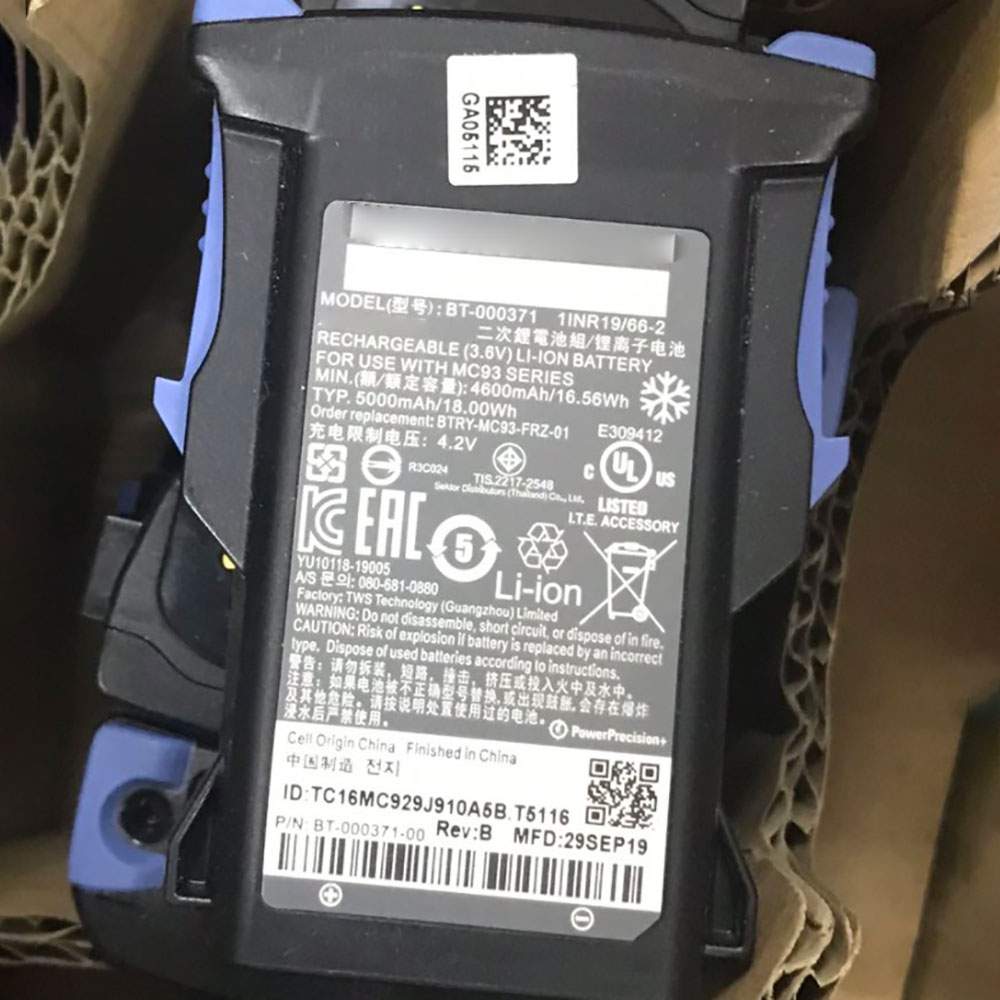
Battery BT-000371 Replacement For Zebra Scanner ZEBRA MC9300

Find the right battery for ZEBRA MC9300 to solve your power issues. Our Zebra BT-000371 batteries are manufactured to precisely fit just as your original battery.

We use the highest quality Li-ion cells and components that are lighter weight, charge faster and last longer.

US Zebra battery shop – Tech-Battery.com ! Shopping with us is safe and secure! 100% Guarantee Quality and Fully Test!

Zebra BT-000371 Battery For Zebra – Battery For Zebra Scanner Li-ion 5000mah/18WH 3.6V/4.2V. Browse our various categories and find out why we have been the go-to source for our customers.

BT-000371
  • Chemistry: Li-ion
  • Voltage: 5000mah/18WH
  • Capacity: 3.6V/4.2V

Free shipping in most countries. click here to view detailed shipping costs.

We ship to the worldwide,please enquiry shipping & handling if you are out of united states.

What’s the total delivery time? (please use this formula to determine when your order will arrive) total delivery time = packaging time + shipping time.

Replaces the following products:

Fits the following devices:

ZEBRA MC9300

Zebra BT-000371 Zebra battery is replacement for ZEBRA MC9300. The BT-000371 batteries equivalent is guaranteed to meet or exceed Zebra original specifications. All Zebra BT-000371 Battery are brand new, 1 year Warranty, 100% Guarantee Quality and Fully Test!

We deliver quality Zebra Scanner extended batteries online. Purchase your Zebra Scanner battery here.

Zebra BT-000371 Zebra Batteries

  • 100% OEM Compatible with your Zebra Scanner.
  • Lithium Ion battery technology
  • Convenient and secure online purchasing
  • Dependable high quality Zebra batteries
  • Satisfaction guaranteed or your money back
  • 1 Year Warranty on all Zebra Scanner Replacement Batteries

6 tips to increase BT-000371 Zebra Battery lifetime

The performance of your Zebra depends largely on the performance of your battery. And his time of life depends on its users, and that you are. These are the principles that have guided the Zebra , at the head, so you can optimize the performance of Zebra Scanner battery.
New battery still fully charged BT-000371 sold. You must be on the first wheel to be conditioned for optimum performance. Loading and unloading of the battery 4 or 5 times is enough to determine.
The memory effect completely to avoid a full charge and discharge the battery, Zebra BT-000371 twice a month.
The dirt on the Zebra BT-000371 contacts of the battery can power the Zebra Scanner batteries. Clean with alcohol and cotton can look like and function like new.
This method is recommended for those using the AC adapter for long periods. We recommend that you use the Zebra BT-000371 battery at least once in two weeks. Batteries lose its charge when stored for a long time and you need the battery if it does break.
If he does not use a length of time, the Zebra BT-000371 battery will be stored protected from a clean, dry and cool, heat and other metals. A loss of business to charge the battery in time and need a break before reuse.
Power Management Features Battery BT-000371 enable the conservation of energy in the battery of Zebra Scanner. You can control the speed of the processor off, or you can adjust the brightness of the LCD screen to a minimum to ensure low power consumption. 

Why we have been the go-to source for our customers ?

We stock a wide range of rechargeable batteries for Zebra Scanner. Your Zebra Tablet PC is part of your everyday life. Successful communications on a Zebra begin with your battery. When purchasing a replacement battery for your Zebra Zebra, dependability and price are what we have to offer. We’ve been supplying reliable, high quality Zebra batteries for over 10 years. Our goal is to provide high quality aftermarket replacement batteries at a very reasonable price. All of our rechargeable Li-Ion Zebra batteries are backed by a one year warranty.

What is the run time of Zebra battery?

Zebra batteries have two main ratings on them: Volts and Amperes. Because size and weight of batteries is limited when compared to larger batteries such as car batteries, most companies show their ratings with Volts and Milliamperes. One thousand Milliamperes equals 1 Ampere. When buying a battery, select batteries with the most Milliamperes (or mAh). Batteries are also rated by Watt-Hours, perhaps the simplest rating of all. This is found by multiplying the Volts and the Amperes together. For example:

  • 14.4 Volts, 4000mAh (Note: 4000mAh is equal to 4.0 Amperes).
  • 14.4 x 4.0 = 57.60 Watt-Hours

Watt-Hours signifies the energy needed to power one watt for one hour.

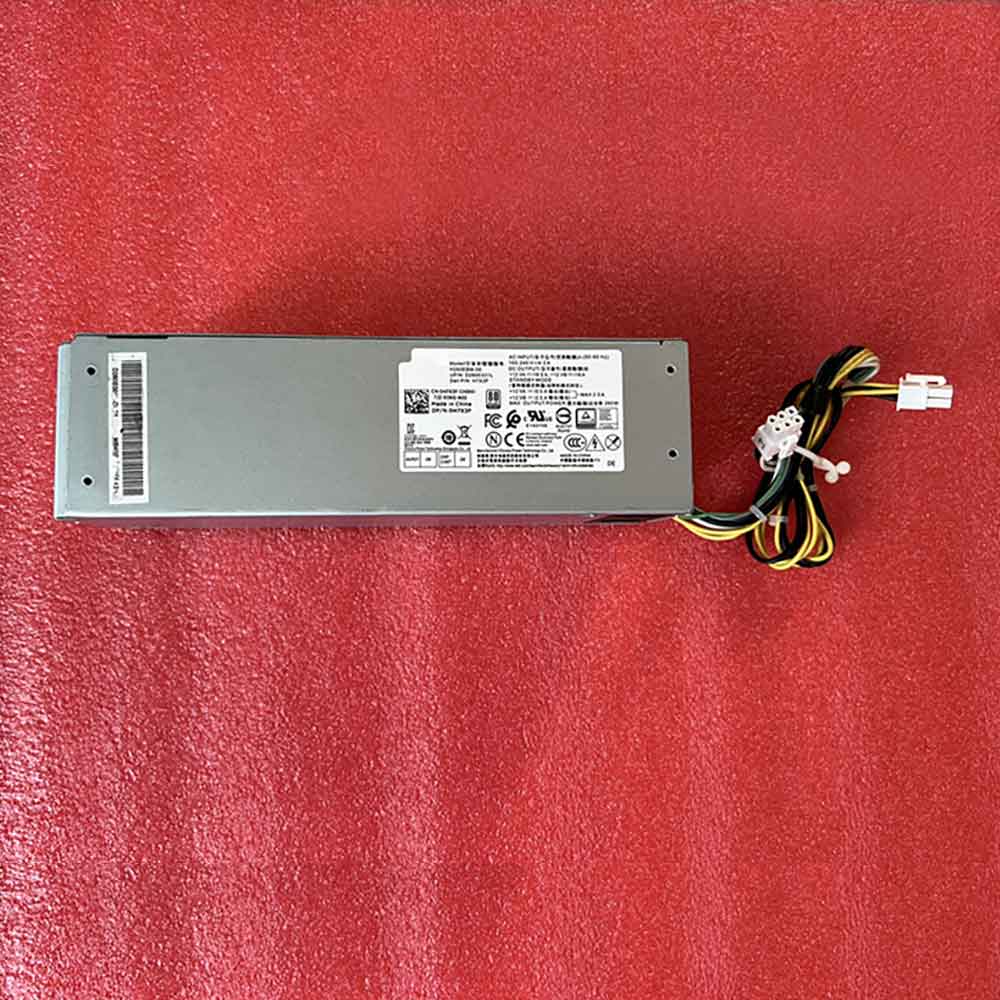
H7X3F 260W Ac Adapter, Replacement Genuine Dell Optiplex 3060 5060 7060 6-pin 4-pin Power Adapter Charger

The DELL H7X3F Servers charger from tech-battery.com delivers power when you need it and where you need it. It has been specially designed to meet the power needs of your DELL Servers and will help you power up your Servers in the office, business trips or vacations. Our H7X3F Servers Adapter is high quality and 1 year warranty. You can get this discount DELL H7X3F Servers Power Supply with Low price. We also can ship H7X3F Adapter worldwide.

H7X3F
  • DC Output: 100-240V~/4.2A 50-60Hz
  • AC Input: +12 VA==/16.5A,+12 VB=16A
  • Power: 260W

* Please ensure the product(s) that you are going to buy fits the brand, model and part number of your device.
Placing order is easy: Add To Cart—> Fill Shipping information—-> Check out—->Finished.
An email include order detais will be sent out after you check out.
Tracking order is easy: An email will be sent out after your order shipping. You can get the Tracking Number, the Tracking Url with order id on your email.

REPLACES THE FOLLOWING PRODUCTS:

H7X3F H260EBM-00 D260E001L

FITS THE FOLLOWING DEVICES:

Dell Optiplex 3060 5060 7060 6-pin 4-pin

H7X3F ac adapter not working?

When the H7X3F AC adapter (charger) fails to work, it will neither charge the Servers battery nor provide power to operate the Servers without battery power. Power issues on a Servers are compounded because a Servers has two power sources: AC adapter (charger) & battery. When H7X3F power is not available, power is provided by the Servers battery.

If you’re having issues with your H7X3F adapter not charging your Servers, please try to follow these steps to solve the problem.

Inspect the H7X3F AC adapter, cables and adapter (DC) port on the Servers for damages

Check if the indicator light on the H7X3F adapter is lit.

Unplug the AC adapter from the wall outlet.

Unplug the H7X3F AC adapter from the Servers.

Check the AC adapter and cables (including the power cable) for signs of physical damage or overheating.

Check if the pin inside the plug or H7X3F adapter port is bent, broken or damaged.

Verify the wall outlet is working:

Unplug the H7X3F AC adapter from the wall outlet.

Connect another device to the wall outlet to verify if the wall outlet is working correctly.

Try a known-good wall outlet.

Plug the H7X3F AC adapter directly into the wall outlet.

Drain remaining power:

Unplug the H7X3F AC adapter from the wall outlet.

Disconnect any external peripherals connected to the Servers.

Press and hold the Power button for 30 seconds to drain a residual power from the Servers.

Plug the H7X3F AC adapter into the Servers.

Turn on the Servers. If your Servers still can’t strat, you need a new H7X3F ac adapter.

11 Tips On Choosing The Correct H7X3F Servers Charger

It is not difficult to find the correct H7X3F Servers charger if you are ready to do a little research. Many people end up purchasing wrong Servers chargers from the internet simply because they do not set aside enough time to look for the correct information. To help you in this regard, the following is a compilation of some important tips on finding the right H7X3F charger for your Servers:

1. Before you make up your mind to buy a new charger, make sure you check the H7X3F Servers power supply and detachable wires for any faults. Just make sure that your charger is indeed faulty before you decide to place an order either online or offline.

2. Serverss in a series may or may not have the same H7X3F charger. Different models manufactured by a company have different specifications. Always keep the compatibility aspect in mind while making such purchases.

3. You must scout for the correct information. Finding Servers chargers can be an extremely convenient process if you have the right information. This information can be found on your Servers or the old Servers charger very easily. Note down the manufacturer’s information labelled on your old H7X3F charger. Use this information when you perform an online search.

4. If you are going to purchase from a local computer or electronics store, look carefully at the list of all computer models compatible with a H7X3F charger under consideration. Servers chargers generally come with a list of various Servers makes.

5. Turn your Servers face down and note the product information stamped by the manufacturer. These specs are provided on different parts of the Servers. Look for the product specification stamp that reads something along the lines of ‘AC Adapter.’ That is where you can easily find the correct model number of all chargers.

6. Make sure you have the right pin connectors while purchasing a H7X3F charger for your Servers. These pins should be compatible with your existing wall sockets. Charging your Servers can be a bother with a new charger if its pins do not fit into your room’s wall sockets.

7. You can find a Servers charger with additional features. These days, it is possible to find chargers that trip the Servers power supply as soon as there is a voltage fluctuation. These chargers are great, especially if you live in an area where power fluctuations are frequent.

8. It is possible to find a universal charger nowadays since many manufactures are selling one-for-all chargers. These Servers chargers are fine as long as you find one that is compatible with your Servers.

9. Always check the voltage, input, and output before buying any charger. These details are labelled on the product packaging. Make sure this information is in keeping with the specs of your Servers.

10. Do not be tempted by unbelievably low prices on some websites as you may end up placing an order for a duplicate product. Always buy Servers chargers from a reputed or professional site.

11. In principle, the more authentication the more reliable the adapter is. Don’t buy a compatible H7X3F adapter with few certifications, it will hurt your machine.

How to do when ac adapter buzzing noise?

Buzzing in an AC adapter can mean a number of things, but often it is related to a damaged adapter, poor grounding or phasing issues with your power. Figuring out exactly why your AC adapter is buzzing will probably require some troubleshooting, but in the end you can probably isolate the problem and get rid of the frustrating noise.

Check for any obvious damage to the adapter. If any of the outer rubber coating has been damaged so that the conductor inside is exposed, this could allow interference to enter the current and cause a buzzing sound. Untie any knots if the cord has become knotted. Make sure that the connection where the cord meets the actual box adapter is still intact; this sometimes can become damaged and make a poor connection.

Repair any damage with electrical tape. Cover all exposed areas.

Plug the AC adapter into the same outlet as the other equipment you are using. Some apartments and houses have multiple phases of power that can create audio interference if mixed together, so running everything off of the same phase might get rid of the buzz.

Run your equipment through a surge protecting power strip or, if necessary, a power conditioner. Audio and video equipment is especially susceptible to interference caused by ground looping. A power conditioner will smooth out the current and protect your equipment from any peaks or spikes in current.

Why laptop adapter light blinks?

Question description:

A few days ago studying in the UH library, I noticed my laptop all of a sudden wasn’t receiving power and the light my AC adapter was blinking. After unplugging it from the laptop, that is, from the power jack, the AC adapter’s light turned solid green again. Then, as you might guess, after plugging it back into the laptop’s power jack, the light on the adapter would again start blinking and no power would circulate.

After brief research, I learned that I could take the battery out and press the power button to relieve all currents and that after that everything would work fine. Well, I did get it to work, however not my this method. After trying it several times and failing, I figured I’d just use the laptop without the battery, since it powered the laptop without the battery in it. Then the idea of just placing the battery back in the laptop while I was receiving power came up. So as the laptop is working I placed the battery in and SUCCESS the AC adapter no longer was blinking and it was successfully transferring power to the laptop and battery.

Now, however, several days later, in a similar library, I noticed I wasn’t receiving power again. When I unplugged the adapter from the laptop, the light on the adapter continued to blink. This was not the case previously. Previously, the light on the adapter would only blink when plugged into the laptop and would turn solid green when I disconnected it from the laptop. Now however, without the laptop ever coming into the picture, the AC adapter, by itself, not plugged into anything other than the wall, constantly blinks. The laptop receives no power, and I’m stuck.

Also, used my sisters AC adapter, she has a similar laptop, and everything worked fine. Meanwhile, my AC adapter, while plugged into the same power jack in the wall, just blinks.. and blinks…

someone help.

Answer:

The AC adapter’s light turned solid green means ac adapter have a solid out put. When the light blinking, it means that the adapter is trying to output again and again, and it keeps flashing to indicate that the output was failed. You need check laptop dc jack or a MOSFET on laptop motherboard. Usually one laptop model develops this kind of fault and then many of the same model start to fail.

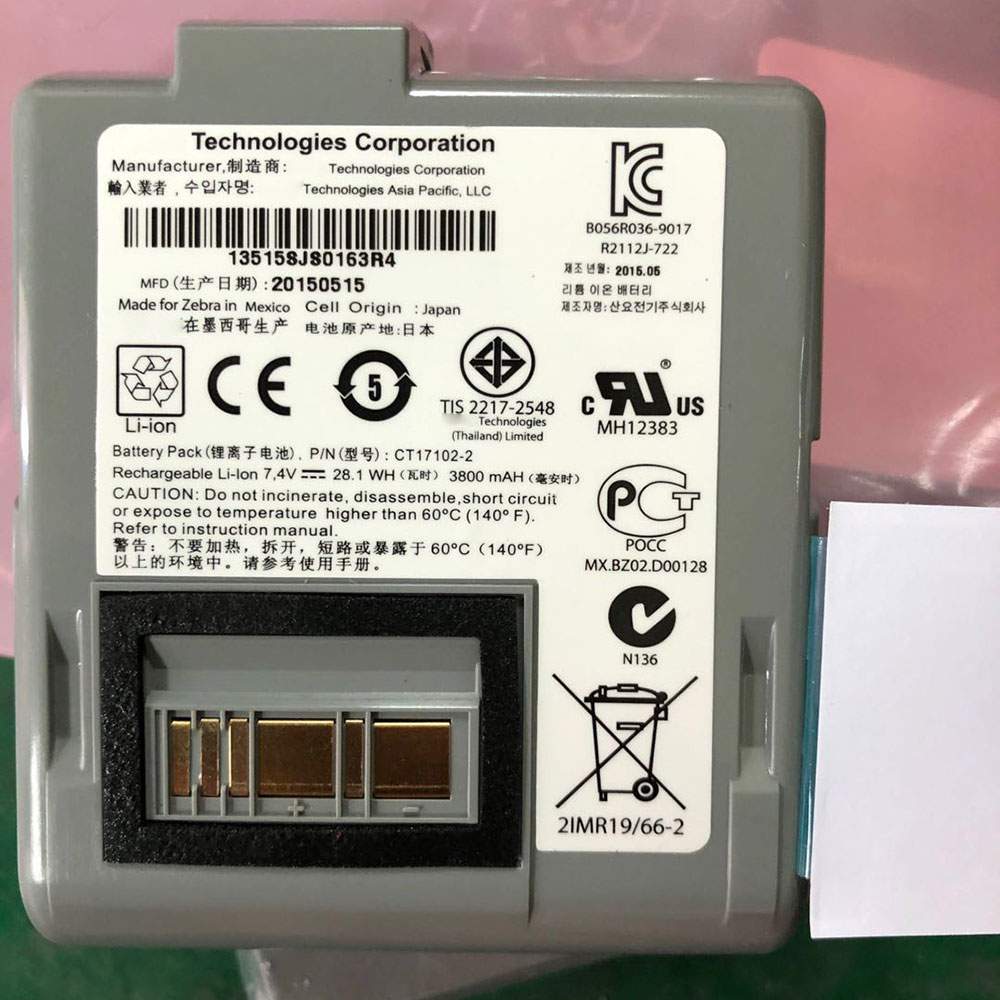
Battery CT17102-2 Replacement For Zebra Scanner Zebra RW420/RW420 EQ Wireless Printer

Find the right battery for Zebra RW420/RW420 EQ Wireless Printer to solve your power issues. Our Zebra CT17102-2 batteries are manufactured to precisely fit just as your original battery.

We use the highest quality Li-ion cells and components that are lighter weight, charge faster and last longer.

US Zebra battery shop – Tech-Battery.com ! Shopping with us is safe and secure! 100% Guarantee Quality and Fully Test!

Zebra CT17102-2 Battery For Zebra – Battery For Zebra Scanner Li-ion 3800mAh 28.1Wh 7.4V. Browse our various categories and find out why we have been the go-to source for our customers.

CT17102-2
  • Chemistry: Li-ion
  • Voltage: 3800mAh 28.1Wh
  • Capacity: 7.4V

Free shipping in most countries. click here to view detailed shipping costs.

We ship to the worldwide,please enquiry shipping & handling if you are out of united states.

What’s the total delivery time? (please use this formula to determine when your order will arrive) total delivery time = packaging time + shipping time.

Replaces the following products:

Fits the following devices:

Zebra RW420/RW420 EQ Wireless Printer

Zebra CT17102-2 Zebra battery is replacement for Zebra RW420/RW420 EQ Wireless Printer. The CT17102-2 batteries equivalent is guaranteed to meet or exceed Zebra original specifications. All Zebra CT17102-2 Battery are brand new, 1 year Warranty, 100% Guarantee Quality and Fully Test!

We deliver quality Zebra Scanner extended batteries online. Purchase your Zebra Scanner battery here.

Zebra CT17102-2 Zebra Batteries

  • 100% OEM Compatible with your Zebra Scanner.
  • Lithium Ion battery technology
  • Convenient and secure online purchasing
  • Dependable high quality Zebra batteries
  • Satisfaction guaranteed or your money back
  • 1 Year Warranty on all Zebra Scanner Replacement Batteries

6 tips to increase CT17102-2 Zebra Battery lifetime

The performance of your Zebra depends largely on the performance of your battery. And his time of life depends on its users, and that you are. These are the principles that have guided the Zebra , at the head, so you can optimize the performance of Zebra Scanner battery.
New battery still fully charged CT17102-2 sold. You must be on the first wheel to be conditioned for optimum performance. Loading and unloading of the battery 4 or 5 times is enough to determine.
The memory effect completely to avoid a full charge and discharge the battery, Zebra CT17102-2 twice a month.
The dirt on the Zebra CT17102-2 contacts of the battery can power the Zebra Scanner batteries. Clean with alcohol and cotton can look like and function like new.
This method is recommended for those using the AC adapter for long periods. We recommend that you use the Zebra CT17102-2 battery at least once in two weeks. Batteries lose its charge when stored for a long time and you need the battery if it does break.
If he does not use a length of time, the Zebra CT17102-2 battery will be stored protected from a clean, dry and cool, heat and other metals. A loss of business to charge the battery in time and need a break before reuse.
Power Management Features Battery CT17102-2 enable the conservation of energy in the battery of Zebra Scanner. You can control the speed of the processor off, or you can adjust the brightness of the LCD screen to a minimum to ensure low power consumption. 

Why we have been the go-to source for our customers ?

We stock a wide range of rechargeable batteries for Zebra Scanner. Your Zebra Tablet PC is part of your everyday life. Successful communications on a Zebra begin with your battery. When purchasing a replacement battery for your Zebra Zebra, dependability and price are what we have to offer. We’ve been supplying reliable, high quality Zebra batteries for over 10 years. Our goal is to provide high quality aftermarket replacement batteries at a very reasonable price. All of our rechargeable Li-Ion Zebra batteries are backed by a one year warranty.

What is the run time of Zebra battery?

Zebra batteries have two main ratings on them: Volts and Amperes. Because size and weight of batteries is limited when compared to larger batteries such as car batteries, most companies show their ratings with Volts and Milliamperes. One thousand Milliamperes equals 1 Ampere. When buying a battery, select batteries with the most Milliamperes (or mAh). Batteries are also rated by Watt-Hours, perhaps the simplest rating of all. This is found by multiplying the Volts and the Amperes together. For example:

  • 14.4 Volts, 4000mAh (Note: 4000mAh is equal to 4.0 Amperes).
  • 14.4 x 4.0 = 57.60 Watt-Hours

Watt-Hours signifies the energy needed to power one watt for one hour.

LENOVO HAS A NEW TIGER LAKE CHROMEBOOK IN THE WORKS CODE NAMED ‘MALEFOR’

Now that we are in the part of the year where we are finally starting to see some of the new Chromebooks emerge onto the scene, it is time to really begin casting our gaze towards what is next. We’ve outlined it a few times here, but when it comes to the future of Chrome OS and Intel, the new batch of next-gen hardware will be based on Intel’s 11th-gen Tiger Lake chips. These new processors bring a few great things along for the ride, but the main headline here is a 10nm process that first showed up in the Ice Lake 10th-gen chips that Google chose to skip for Chromebooks.

Shrinking the process on the chip speeds up standard functions, but also ends up using less battery, too. ARM processors have already moved past the 10nm process and are moving through 7nm and on to 5nm now. Intel and their x86 architecture is behind on this and the move to 10nm has taken far longer than originally anticipated. Regardless, it is great to see these newer processors from Intel finally hit that 10nm process as performance and battery life will be the primary benefactors. Check out Intel’s quick marketing card for the improvements we can all expect from Tiger Lake chips:

All that stuff is great news, and we’ve already tracked 3 other baseboards being developed with Tiger Lake chips on board in ‘Volteer’, ‘Ripto’ and ‘Deltaur’. Today’s new board – ‘Malefor’ – falls into the same camp as these previous devices, but because of a certain email address attached to many of the commits, it is clear that this particular device will be coming from Lenovo. Xiong Huang is almost completely attached to one device in the repositories: ‘Kodama’. If you aren’t familiar, ‘Kodama’ is the Lenovo 10e that was recently released. He also shows up on ‘Hana’ in a few places and that code name belongs to the Lenovo Yoga N23.

Beyond the knowledge that this is a Tiger Lake Chromebook being developed by Lenovo, there’s little else we can glean from the repositories right now. We’ll keep digging because as we’ve seen with the release of multiple ‘Hatch’-based Chromebooks, having the latest-gen Intel processors does not necessarily mean the device will be top-tier flagship material. The upcoming Lenovo Flex 5 is a perfect example of this. Sure, it is based on the same unibuild baseboard as the Samsung Galaxy Chromebook, but these Chromebooks are simply in different leagues.

While it is certainly possible that this is the next line of Yoga-branded Chromebooks from Lenovo, that is simply a guess at this point. We’ll need more proof that this ‘Malefor’ device will be packing all the latest specs before making that claim. As it stands right now, there’s a good chance that one of the many ‘Hatch’ variants is actually a new Yoga Chromebook, so it’s really tough to sort out at this point. Time will tell, and as always, we’ll keep digging for more clues.

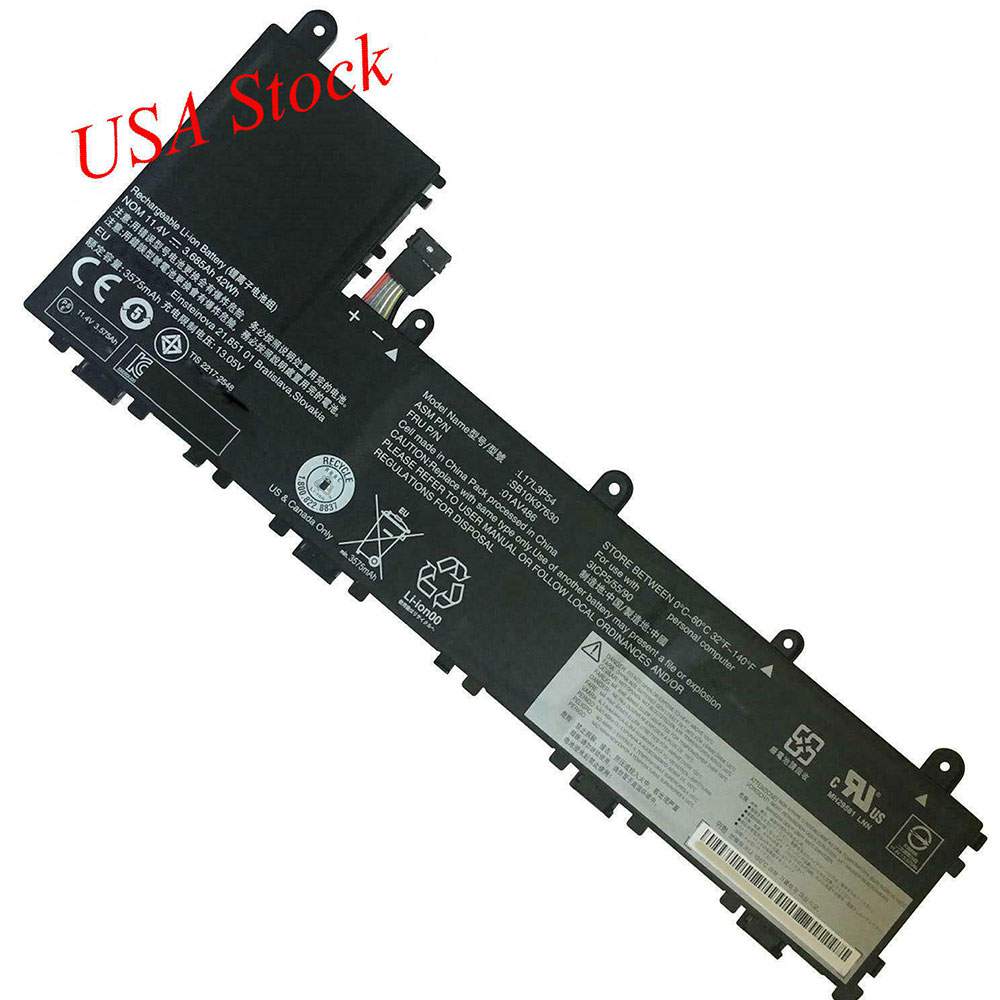
Battery L17L3P54 Replacement For lenovo laptop Lenovo 11e SB10K97631 01AV487 SB10K9763 01AV486

Find the right battery for Lenovo 11e SB10K97631 01AV487 SB10K9763 01AV486 to solve your power issues. Our lenovo L17L3P54 batteries are manufactured to precisely fit just as your original battery.

We use the highest quality Li-ion cells and components that are lighter weight, charge faster and last longer.

US lenovo battery shop – Tech-Battery.com ! Shopping with us is safe and secure! 100% Guarantee Quality and Fully Test!

lenovo L17L3P54 Battery For lenovo – Battery For lenovo laptop Li-ion 42Wh/3685mAh 11.4V. Browse our various categories and find out why we have been the go-to source for our customers.

L17L3P54
  • Chemistry: Li-ion
  • Voltage: 42Wh/3685mAh
  • Capacity: 11.4V

Free shipping in most countries. click here to view detailed shipping costs.

We ship to the worldwide,please enquiry shipping & handling if you are out of united states.

What’s the total delivery time? (please use this formula to determine when your order will arrive) total delivery time = packaging time + shipping time.

Replaces the following products:

Fits the following devices:

Lenovo ThinkPad Yoga 11E 5th Gen Series

lenovo L17L3P54 lenovo battery is replacement for Lenovo 11e SB10K97631 01AV487 SB10K9763 01AV486. The L17L3P54 batteries equivalent is guaranteed to meet or exceed lenovo original specifications. All lenovo L17L3P54 Battery are brand new, 1 year Warranty, 100% Guarantee Quality and Fully Test!

We deliver quality lenovo laptop extended batteries online. Purchase your lenovo laptop battery here.

lenovo L17L3P54 lenovo Batteries

  • 100% OEM Compatible with your lenovo laptop.
  • Lithium Ion battery technology
  • Convenient and secure online purchasing
  • Dependable high quality lenovo batteries
  • Satisfaction guaranteed or your money back
  • 1 Year Warranty on all lenovo laptop Replacement Batteries

6 tips to increase L17L3P54 lenovo Battery lifetime

The performance of your lenovo depends largely on the performance of your battery. And his time of life depends on its users, and that you are. These are the principles that have guided the lenovo , at the head, so you can optimize the performance of lenovo laptop battery.
New battery still fully charged L17L3P54 sold. You must be on the first wheel to be conditioned for optimum performance. Loading and unloading of the battery 4 or 5 times is enough to determine.
The memory effect completely to avoid a full charge and discharge the battery, lenovo L17L3P54 twice a month.
The dirt on the lenovo L17L3P54 contacts of the battery can power the lenovo laptop batteries. Clean with alcohol and cotton can look like and function like new.
This method is recommended for those using the AC adapter for long periods. We recommend that you use the lenovo L17L3P54 battery at least once in two weeks. Batteries lose its charge when stored for a long time and you need the battery if it does break.
If he does not use a length of time, the lenovo L17L3P54 battery will be stored protected from a clean, dry and cool, heat and other metals. A loss of business to charge the battery in time and need a break before reuse.
Power Management Features Battery L17L3P54 enable the conservation of energy in the battery of lenovo laptop. You can control the speed of the processor off, or you can adjust the brightness of the LCD screen to a minimum to ensure low power consumption. 

Why we have been the go-to source for our customers ?

We stock a wide range of rechargeable batteries for lenovo laptop. Your lenovo Tablet PC is part of your everyday life. Successful communications on a lenovo begin with your battery. When purchasing a replacement battery for your lenovo lenovo, dependability and price are what we have to offer. We’ve been supplying reliable, high quality lenovo batteries for over 10 years. Our goal is to provide high quality aftermarket replacement batteries at a very reasonable price. All of our rechargeable Li-Ion lenovo batteries are backed by a one year warranty.

What is the run time of lenovo battery?

lenovo batteries have two main ratings on them: Volts and Amperes. Because size and weight of batteries is limited when compared to larger batteries such as car batteries, most companies show their ratings with Volts and Milliamperes. One thousand Milliamperes equals 1 Ampere. When buying a battery, select batteries with the most Milliamperes (or mAh). Batteries are also rated by Watt-Hours, perhaps the simplest rating of all. This is found by multiplying the Volts and the Amperes together. For example:

  • 14.4 Volts, 4000mAh (Note: 4000mAh is equal to 4.0 Amperes).
  • 14.4 x 4.0 = 57.60 Watt-Hours

Watt-Hours signifies the energy needed to power one watt for one hour.

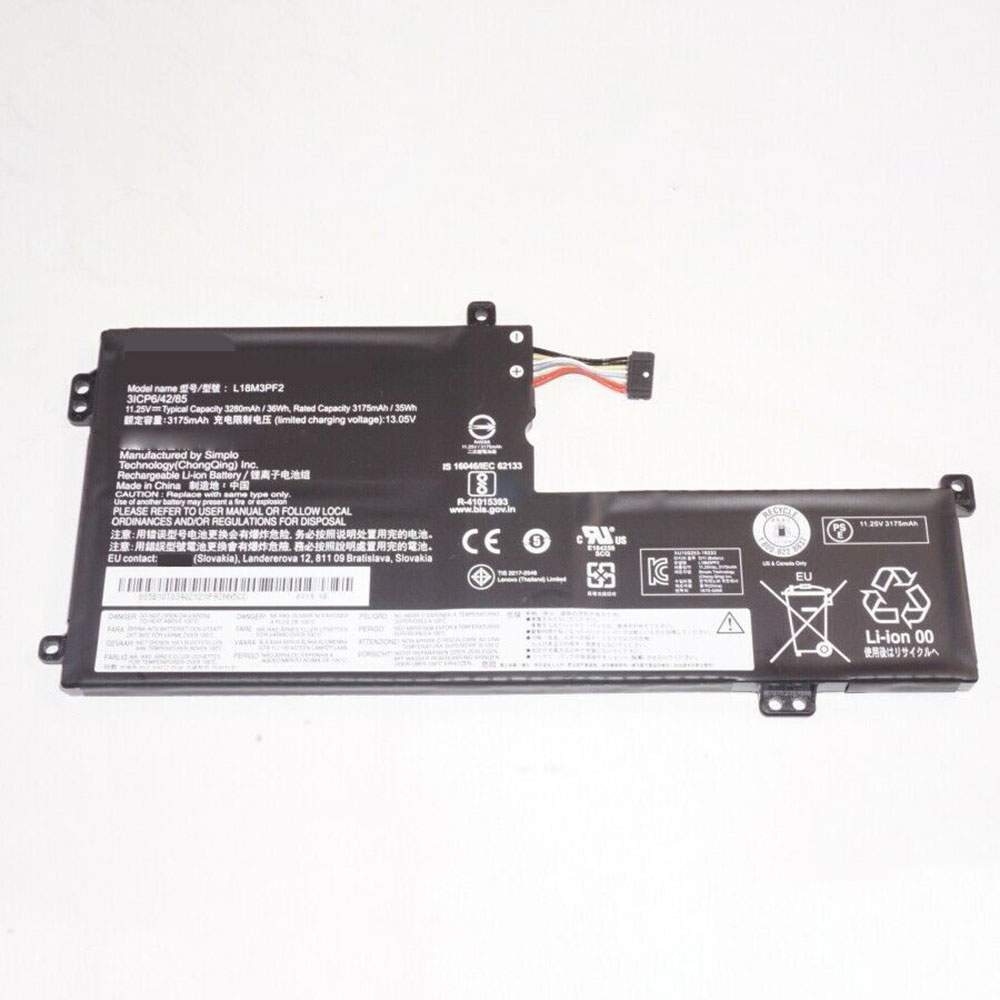
Battery L18M3PF2 Replacement For lenovo laptop LENOVO 81M0S00000 L340-17IWL

Find the right battery for LENOVO 81M0S00000 L340-17IWL to solve your power issues. Our lenovo L18M3PF2 batteries are manufactured to precisely fit just as your original battery.

We use the highest quality Li-ion cells and components that are lighter weight, charge faster and last longer.

US lenovo battery shop – Tech-Battery.com ! Shopping with us is safe and secure! 100% Guarantee Quality and Fully Test!

lenovo L18M3PF2 Battery For lenovo – Battery For lenovo laptop Li-ion 3175mAh/35WH 11.25V/13.05V. Browse our various categories and find out why we have been the go-to source for our customers.

L18M3PF2
  • Chemistry: Li-ion
  • Voltage: 3175mAh/35WH
  • Capacity: 11.25V/13.05V

Free shipping in most countries. click here to view detailed shipping costs.

We ship to the worldwide,please enquiry shipping & handling if you are out of united states.

What’s the total delivery time? (please use this formula to determine when your order will arrive) total delivery time = packaging time + shipping time.

Replaces the following products:

Fits the following devices:

LENOVO 81M0S00000 L340-17IWL

lenovo L18M3PF2 lenovo battery is replacement for LENOVO 81M0S00000 L340-17IWL. The L18M3PF2 batteries equivalent is guaranteed to meet or exceed lenovo original specifications. All lenovo L18M3PF2 Battery are brand new, 1 year Warranty, 100% Guarantee Quality and Fully Test!

We deliver quality lenovo laptop extended batteries online. Purchase your lenovo laptop battery here.

lenovo L18M3PF2 lenovo Batteries

  • 100% OEM Compatible with your lenovo laptop.
  • Lithium Ion battery technology
  • Convenient and secure online purchasing
  • Dependable high quality lenovo batteries
  • Satisfaction guaranteed or your money back
  • 1 Year Warranty on all lenovo laptop Replacement Batteries

6 tips to increase L18M3PF2 lenovo Battery lifetime

The performance of your lenovo depends largely on the performance of your battery. And his time of life depends on its users, and that you are. These are the principles that have guided the lenovo , at the head, so you can optimize the performance of lenovo laptop battery.
New battery still fully charged L18M3PF2 sold. You must be on the first wheel to be conditioned for optimum performance. Loading and unloading of the battery 4 or 5 times is enough to determine.
The memory effect completely to avoid a full charge and discharge the battery, lenovo L18M3PF2 twice a month.
The dirt on the lenovo L18M3PF2 contacts of the battery can power the lenovo laptop batteries. Clean with alcohol and cotton can look like and function like new.
This method is recommended for those using the AC adapter for long periods. We recommend that you use the lenovo L18M3PF2 battery at least once in two weeks. Batteries lose its charge when stored for a long time and you need the battery if it does break.
If he does not use a length of time, the lenovo L18M3PF2 battery will be stored protected from a clean, dry and cool, heat and other metals. A loss of business to charge the battery in time and need a break before reuse.
Power Management Features Battery L18M3PF2 enable the conservation of energy in the battery of lenovo laptop. You can control the speed of the processor off, or you can adjust the brightness of the LCD screen to a minimum to ensure low power consumption. 

Why we have been the go-to source for our customers ?

We stock a wide range of rechargeable batteries for lenovo laptop. Your lenovo Tablet PC is part of your everyday life. Successful communications on a lenovo begin with your battery. When purchasing a replacement battery for your lenovo lenovo, dependability and price are what we have to offer. We’ve been supplying reliable, high quality lenovo batteries for over 10 years. Our goal is to provide high quality aftermarket replacement batteries at a very reasonable price. All of our rechargeable Li-Ion lenovo batteries are backed by a one year warranty.

What is the run time of lenovo battery?

lenovo batteries have two main ratings on them: Volts and Amperes. Because size and weight of batteries is limited when compared to larger batteries such as car batteries, most companies show their ratings with Volts and Milliamperes. One thousand Milliamperes equals 1 Ampere. When buying a battery, select batteries with the most Milliamperes (or mAh). Batteries are also rated by Watt-Hours, perhaps the simplest rating of all. This is found by multiplying the Volts and the Amperes together. For example:

  • 14.4 Volts, 4000mAh (Note: 4000mAh is equal to 4.0 Amperes).
  • 14.4 x 4.0 = 57.60 Watt-Hours

Watt-Hours signifies the energy needed to power one watt for one hour.