I have long known that internet detritus is bad for me. But with microdramas – stories told in episodes under two minutes – I can actually feel the damage being done
Seven or eight years ago, a new kind of televisual entertainment was born in China. Microdramas: over-the-top, soap opera-type series with splashy, schlocky premises such as infidelity, arranged marriage and secret billionairehood, in which each episode is a mere 60-90 seconds long, took off there among an audience of the phone-addicted.
And now, as with many cultural phenomena that start in China, microdramas have made it over here. The form is forecast to take in $1.5bn in revenue in the US by the end of this year. Channel 4 announced recently that it was launching its first microdrama, and the UK is already leading Europe in terms of microdrama-watching, with 8.2 million of us tuning in to these things every month.
Numbers such as this give me a queasy, vertiginous feeling about the vast difference in possible human experiences existing alongside each other at the same time. What do you mean, millions and millions of people are watching this stuff that seems, to me, catastrophically brainless and objectively bad? Who? What do they eat for breakfast? What do they dream of at night?
Before I read those numbers, I had only seen tiny snippets of microdramas embedded into news pieces about the phenomenon. I wanted to know what it was like to actually watch one. I downloaded ReelShort, one of the apps that hosts microdramas exclusively, and flicked through the homepage. Recommended for me were Trapped in the Boss’s Embrace, I Had a Baby Without You and Carrying His Triplets, Becoming His Wifey. I went to the “HOT” tab and selected the one with the most convoluted title, Pregnant By My Ex’s Professor Dad, although Let Me Taste Your Husband also appealed.
In Pregnant By My Ex’s Professor Dad, it is legible right from the get-go who the bad guy is (the ex) and who the good guy is (the protagonist) and what is going to happen, not least because it is right there in the title. The question of “what is going to happen?” that is supposed to drive you into the next episode, the question that has driven all narrative since time immemorial, is rendered oddly moot.
There is no setup, no world-building, no padding whatsoever, just rapidly cut dramatic denouements over and over again: someone being cheated on, someone slapping someone else, a car window getting smashed, a new love interest being introduced, a sex scene. All of this happens in the first three minutes of the series. Helpless women swoon over geometrically jawed hunks on sets lit like a morgue and say exactly what they are thinking in voiceover, so that there is no room at all for nuance to creep in and engage your brain while you watch.You can watch the first few episodes of any given series for free, and then you hit a paywall, which you can get around by watching ads for another form of phone brain rot: colour-matching mobile games. I have been told by loved ones before now that I couldn’t be a newsreader or a jury member because I can’t keep my emotions off my face. This is true. I caught sight of myself in my phone screen reflection while watching microdramas and saw there a person who looked as if they’d just spotted a pile of dog sick on the carpet.
I’m not incapable of enjoying bad television. I do not come here having descended from a lofty perch of only watching heritage BBC adaptations of classic novels or whatever. My appetite for dreck is hearty enough. But, my God – and can there be such an entity in a universe producing microdramas? – this stuff is awful. Flagrantly so, though, to the degree that I start to feel there is something wrong with me for desiring quality in this format.
Or I sense that I’ve done something wrong by intentionally going to watch one. In a piece for the New York Times Magazine, writer Daniel Kolitz described these shows as happening to people “like a food-borne illness”, rather than something that people elect to get into. They appear on your phone screen, and there you are, watching them in a half-conscious malaise while you wait for the day to end.
I would love for this kind of thing to go the way of non-fungible tokens: something we all had to hear about for a short time and that are now patently doomed to the scrapheap of short-lived modern internet detritus.
Maybe this is partly because my own feelings about internet detritus have changed lately. Whereas in the past I had a known, but not felt, understanding that the allure of apps and games and scrolling on my phone was bad for me, nowadays I am regularly experiencing real, bodily panic that my brain is being atrophied. I am scared of my phone, and my sick want for it. So the emergence of an all-new, even more terrible way of being on your phone does provoke the reactionary in me. “Just let people enjoy things!” a better person might think. Not this time.
Month: October 2026
7 privacy settings I change ASAP on every new phone – here’s why
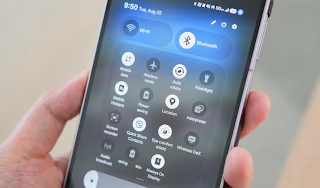
Mobile app permissions can be very convenient, but unless they’re properly managed, you could be granting far more control and access than they need.
Smartphone permissions can quietly invade your privacy.
Reviewing app permissions can help prevent data exposure.
Check these permissions first, then audit them regularly.
Is your smartphone activity being tracked? No matter what mobile device or platform you use — Android, iOS, or a niche operating system — you can leave trails for anyone who knows how to follow.
Every app you use requires some level of permission. When you order takeout or delivery, you’ll likely need to allow GPS to pinpoint your location; a utility app for speeding up mobile performance may need access to files and folders; or a social media platform may need permission to send push notifications.
Such smartphone permissions can be very convenient, but unless they’re properly managed, you could be granting apps far more control than they need — and this opens the door to your private data being exposed.
Take control: You can decide exactly what your smartphone reveals about you, and when. By running a health check and tweaking the permissions outlined below, you can drastically reduce your digital footprint and avoid unnecessary data exposure.
Where do I find my phone permissions?
Before I explore each permission and what you should enable or disable, you need to know where to find the permission settings.
The exact location will depend on the make and model of your smartphone, whether you have an Android or iOS handset, and the version of its operating system your device is running.
However, on Android, you typically need to go to Settings > Security and privacy > More privacy settings > Permission manager. On iOS, you will likely find what you need under Settings > Privacy and Security, or Settings > the app you want to examine.Which permissions should I review or disable?
When you install an app, or it receives a major update, you will be asked which permissions to grant the app. For example, a weather application might ask for location data “all the time” to give you accurate weather reports, and a delivery service might ask you for the same to assist its delivery staff in finding you.
If an app asks for a permission that is considered sensitive, such as access to your location or to your phone’s microphone, you will be asked whether to allow it “all the time,” “while using the app,” “ask every time,” or “never.”
To preserve your privacy, as a general rule, apps you use only casually should be limited to “while using the app” permissions — but I will go into more detail on each permission below and when it may be appropriate to grant wider permissions, or none at all.
1. Location settings
As location permissions rely on GPS and can be used to track you directly or pinpoint your frequent haunts over time, location settings are the first you should audit.
If you leave this permission on all of the time, you may be broadcasting where you are at home, at work, and in areas you frequently visit. This can be especially dangerous in cases of stalking or domestic abuse, although some of us do leave location sharing on so friends and family know where we are.
In general, leave this one to “only when using the app,” or turn it on manually as and when you need to.
2. Camera settings
There’s no need for your phone’s camera to be on all of the time. Not only will this drain your battery, but it’s an invasion of privacy to be watched or recorded when you don’t expect it.
I recommend allowing permissions only “when using the app.” This goes for camera filter apps, video calling, and social media. I have yet to encounter a single mobile app that could justify always-on access to your camera.
3. Microphone settings
Unbridled access to your microphone is another critical permission that could expose your data or invade your privacy.
Unless the app you’ve downloaded has an obvious need for access to your microphone, such as for calls or voice assistance and controls, either say “ask every time” or “never.” For example, a news app should never need to be connected to your microphone or audio recordings.
This can be especially concerning if an app also asks for camera access, unless it is a dedicated and trusted app for purposes such as video calls. Together, they could record your environment, your movements, and what you are saying.
4. Contacts and SMS
Contact and SMS messaging permissions are often requested by a variety of mobile apps, ranging from social media platforms to automotive features, such as Android Auto. Be cautious about allowing this, as it can reveal data about your close family ties, work, friends, and more — as well as what you are saying to each other.
For example, Instagram or TikTok might ask for permission to sync with known contacts and provide friend recommendations — but this data could be used for profiling and targeted demographic advertising.
If you decide to allow this, you can always disable this permission later on.
5. Calendars
Granting every app on your handset access to your calendar could be asking for trouble. Apps like Google and Microsoft services, email, video conferencing, and system apps often require this, but you can opt for “ask every time” or “only while using this app” to limit the flow of your data.
If you aren’t limiting access to your calendar, this could reveal your schedule, where you will likely be, any travel — potentially exposing when you will be away from home — and any medical appointments you have booked.
6. Health data access
Your health and fitness information is a gold mine for companies that may use it for insurance, marketing, and even training large language models.
You should exercise extreme caution in allowing apps access to this data, especially if there doesn’t appear to be any reason for it. For example, why would a shopping app, phone utility, or game ask for it?
By default, say no, unless the request is made by apps specifically focused on health and fitness services.
7. More permissions to check
Photos & videos: Our photos and videos can be personal and sensitive, and some may contain metadata that reveals information about us and our location. Opt for no or limited access when you can.
Physical activity: Access to your physical data and activity, such as what map apps sometimes request, should be treated the same way as access to medical and fitness information, as it can be just as sensitive and personal.
Notifications: Watch out for any app that might ask for notification permissions. While some just want this permission to send you notifications and alerts, others might ask for this to intercept 2FA codes and security messages.
Bluetooth, nearby devices: Bluetooth and nearby devices permissions are often needed for Bluetooth-connected products like home speakers or smart doorbells, but to keep a tight lid on these connections, only allow them when in use.What should I do when apps ask for extensive permissions?
Before you immediately agree to every permission request in order to start using your new software, take a step back and think about why an app wants a specific permission.
Demands for overextended app permissions could indicate that the mobile application you have downloaded is harboring a malicious secret — especially if it asks for worrying combinations, such as access to your files and folders, camera, and microphone. Or, malware aside, the app’s developer simply wants access to as much of your data as possible.
Using a mobile app or smartphone service is your choice, as is the volume of data you share. If it’s too much, uninstall and delete such software, or disable certain features on your handset.How often should I check permissions?
I recommend that you review your app permissions every few months. The more apps you install and use, the more frequently you should run a permissions check.
Even if you don’t often install new software, it’s still worth making sure you understand what apps have access to your data and why. If you haven’t used an app for a while, delete it.
Finally, keep your operating system and apps updated, and install new versions as soon as they are available. An app might be trustworthy, but older software could contain vulnerabilities that can be exploited. You should also take action by deleting software if an app suddenly starts acting strangely, as there have been cases of apps starting off innocently, but later being updated to become malicious.
Google Wallet’s new card picker is making checkout more awkward for some users
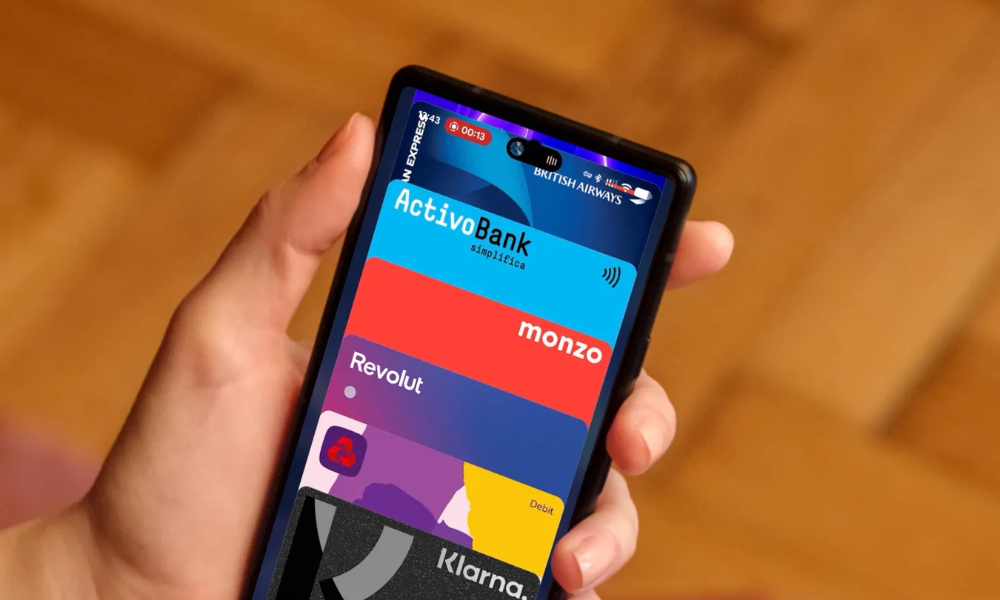
Google Wallet on Android has a new way to show off your payment cards, and it changes how you pick one at the checkout counter. It’s the app’s second makeover this year, following a May update that tidied up everything below your cards.
What’s different about the new Google Wallet design?
Until now, your cards sat side by side in a scrolling row. Only a thin edge of the neighboring cards was visible, and you swiped left or right to move between them.
Google has now piled your cards on top of each other. Open the app, and you will see your main card in full, with just the edge of another one poking out above it. A tap or a downward swipe spreads the whole stack across the screen, so you can see nearly all of every card and pick the one you want to pay with. Reordering cards and changing your default happens from an option at the bottom of the list.
Checking transactions or card info now takes one more tap than before, as Google has tucked them behind a gear icon at the top right. In its defense, the layout is thumb-friendly, especially if your favorite cards sit at the bottom.
Google began testing the design in September, and it’s now showing up on a lot more phones without requiring an app update.Why are users unhappy with the change?
The redesign hasn’t won everyone over. Reddit users say choosing a card has turned into a slower process with an extra step. Swiping up also won’t close the expanded list, so you have to reach for the X in the top-left corner. It’s not a Pixel-only change either, with Motorola and Samsung Galaxy owners seeing it too.
Two cards from the same bank can look identical, too. Dragging the list sideways reveals the final four digits, but users report it doesn’t always work, which is frustrating when there’s a line behind you and your other hand is full. Even custom card nicknames stay hidden until you tap a card.
Still, a few people are fans, particularly those juggling six or more cards. Many others simply want Google to add a setting that brings the old carousel back.