More Canon EOS R6 Specs Leaked: Two SD Card Slots, Oversampled 5K, and More

Canon has teased the Canon ESO R5 multiple times, but the company has stayed completely quiet about the rumored EOS R6—the R5’s little sibling. Fortunately, the latest leaks tell us what we can expect from Canon when the announcement rolls around in July.

It’s been a big day for Canon Rumors. First, the site revealed that the EOS R5, EOS R6, six lenses, and two teleconverters would all be announced “on or around” July 9th. Now, the rumor site is posting an updated list of leaked specs for the more affordable camera: the EOS R6.

According to the most recent update, the 20MP full-frame mirrorless camera will feature:

IBIS

12fps mechanical and 20fps electronic

Oversampled 5K, 4K/60p, and 1080/120p video capability

Canon Log

10-bit video shooting

AutoFocus system identical to the EOS R5

Dual SD UHS-II slots

Head and Animal Detection AF

No top-mounted LCD

Identical 5M-dot EVF as the EOS R5

You can see the first leaked photo of the camera (to our knowledge) in the lineup pic below, published earlier today by CR:

While the camera is said to have lower build quality than the EOS R5 and will not feature RAW video capture, it’s expected to come in at a much more affordable price tag. The latest rumors have the price somewhere around $2,500 or less, putting it squarely in competition with Nikon’s Z6, Sony’s a7III, and Panasonic’s S1.

This is AMD’s secret weapon against Intel and it could change personal computing forever

AMD’s big announcement this week was the launch of the new Ryzen 3000 XT CPUs – a stopgap between the current generation and the Ryzen 4000 series expected to launch later this year.

Tucked away at the foot of the press release is mention of something that might become a fundamental part of AMD’s toolset, sooner rather than later, as it seeks to compete more sustainably with arch nemesis Intel.

TechRadar Pro covered the launch of AMD StoreMi back in April, but version 2.0 has now been announced and will include “a new caching-based acceleration algorithm that enhances data integrity and prioritizes most-used data, speeding up boot times by up to 31% and decreasing game load times by up to 13% vs an HDD only”.

The tests were carried out using a hard drive of unknown capacity (or spinning speed) with a PCIe Gen 4 NVMe SSD, again of unknown origin. In reality, you should be able to mix and match any sort of storage, regardless of whether it is magnetic or not.

No RAMDisk yet

Sadly, this version of StoreMI doesn’t (yet) include the Radeon RAMDisk, which would achieve the Holy Grail of allowing RAM and storage to mix, similar to what Intel has done with Optane.

We still believe this facility will arrive at some point, but why? Well, AMD has been working very closely with Microsoft on the brand new Xbox Series X gaming console and one of the biggest leaps in performance has come from moving to a new storage system that combines software (DirectStorage) with customized hardware. 

It turns out that DirectStorage is something Microsoft plans to bring to Windows as well, as it can reduce the processor overhead from I/O operations from multiple cores to just a fraction of a single core. While it will not be tied to any custom hardware, AMD is likely to benefit due to the modular nature of its CPU architecture.

So where does that leave us? In a not-so-distant future, one can imagine an AMD system that pools together all the available memory/storage resources, managed intelligently in a way that’s far more efficient than what Windows 10 achieves with Virtual Memory, the part of your storage component the operating system uses as RAM.

All this is pure speculation, of course, but the fact AMD has dedicated resources to StoreMi makes us optimistic about its future.

iPhone 12 Pro killer feature confirmed — and Galaxy Note 20 should be nervous

One of the biggest questions we have heading into the iPhone 12 launch is how the iPhone 12 and iPhone 12 Pro phones will be different. And now a new leak has seemingly confirmed one of the top features for the iPhone 12 Pro.

Ross Young, founder and CEO of Display Supply chain Consultants, posted a list on Twitter of phones launching in 2020 that he anticipates will feature 120Hz displays. This includes the Samsung Galaxy Note 20 and Galaxy Note 20 Plus/Ultra but also the iPhone 12 Pro and iPhone 12 Pro Max. 

As initially reported by GSMArena, this is an important development because we have seen rumors that Apple was wavering on whether to add a 120Hz display to the iPhone 12 Pro lineup. According to leaker Max Weinbach back in May, Apple would not adopt 120Hz “unless it is perfect” and that engineers were unhappy with it due to color calibration issues.

So to see the iPhone 12 Pro and iPone 12 Pro on this list is certainly a positive development. Apple already offers a ProMotion display on the iPad Pro that scales up to 120Hz depending on the content that’s on screen.

In this latest Twitter thread, Young said he expects “Apple’s pro’s to have it and to at least switch between 60 and 120Hz.” That’s good, but it won’t match the LTPO technology that will apparently power the Galaxy Note 20 Plus/Ultra. This will reportedly allow Samsung’s flagship to scale from 1Hz to 120Hz, which would presumably save power.

Regardless, the apparent confirmation of ProMotion 120Hz screens on the iPhone 12 Pro will help Apple tick that box in the minds of phone shoppers that care about specs and should give it enough ammunition to battle the Galaxy Note 20 Plus/Ultra. Also note that Young’s list doesn’t include the regular Galaxy Note 20, so the best 120Hz display could be reserved for the pricier flagship phablet.

The GSM Arena report also echoes other iPhone 12 Pro rumors we’ve heard previously. For instance, the 6.7-inch iPhone 12 Pro Max will reportedly be thinner than the iPhone 11 Pro Max at 7.4 mm vs 8.1 mm. And because the iPhone 12 Pro is expected to use a stacked motherboard, Apple should be able to squeeze in bigger batteries this time around.

Other iPhone 12 Pro rumors point to Apple’s more premium phones offering three rear cameras plus a LiDAR sensor for enhanced performance in iPhone AR apps and photography workflows. The regular iPhone 12 handsets are expected to offer just two rear shooters and lack a telephoto zoom. 

In addition, the iPhone 12 Pro should pack in more RAM and support both mmWave and sub-6GHz 5G. The regular iPhone 12 will likely support only the latter 5G flavor. None of the new iPhone 12 phones are expected to come with EarPods in the box, so you’ll likely see Apple push the AirPods and AirPods Pro even more this fall.

As for the Galaxy Note 20 Plus/Ultra, it has a lot more going for it than its own 120Hz display, based on the rumors. This includes a 108MP camera, a dedicated camera sensor for auto focus, an improved S Pen and a bigger battery.

Initial tests shows impressive performance gains with new 5600M AMD GPU in 16-inch MacBook Pro

Apple added this week a new GPU option for the 16-inch MacBook Pro lineup. Customers can now purchase Apple’s high-end notebook with an AMD Radeon Pro 5600M GPU at $800 additional cost from the base model MacBook Pro.

But how does it compare with the other GPUs? YouTube channel Max Tech shows exactly that in its newest video, revealing impressive performance gains with this new model.

In Geekbench 5 Metal tests, the 16-inch MacBook Pro with 5600M graphics scored 43144, while the previous high-end model with an 8GB AMD 5500M GPU scored 28748. The entry model achieved only 21328 with the 4GB 5300M, which is basically half the performance of the new 5600M.

These performance gains should be reflected mostly in 3D intensive graphics tasks. The Unigine Heaven Gaming Test shows that 5300M can only reach 38.4 frames per second in the highest settings, while the 5500M scored 51.1 FPS and the new 5600M got 75.7 FPS. Again, that’s twice the graphics performance of the base model 16-inch MacBook Pro.

However, what’s really interesting in the tests is that the 16-inch MacBook Pro with the 5600M GPU beats the AMD Vega 48 on the latest iMac 5K and the Vega 56 on the iMac Pro.

Other tests show that the new 5600M GPU can render 4K videos in Final Cut Pro without even using its full potential, but the final results were not so different from each model. A 4K video was exported in 3 minutes and 36 seconds with the 5300M, 3 minutes and 21 seconds with the 5500M, and 3 minutes and 3 seconds with the new 5600M.

Although the new AMD Radeon Pro 5600M GPU makes the 16-inch MacBook Pro an even more expensive machine, it can be very useful for professionals who work constantly with 3D graphics. For regular video editing, the base model can still handle the job.

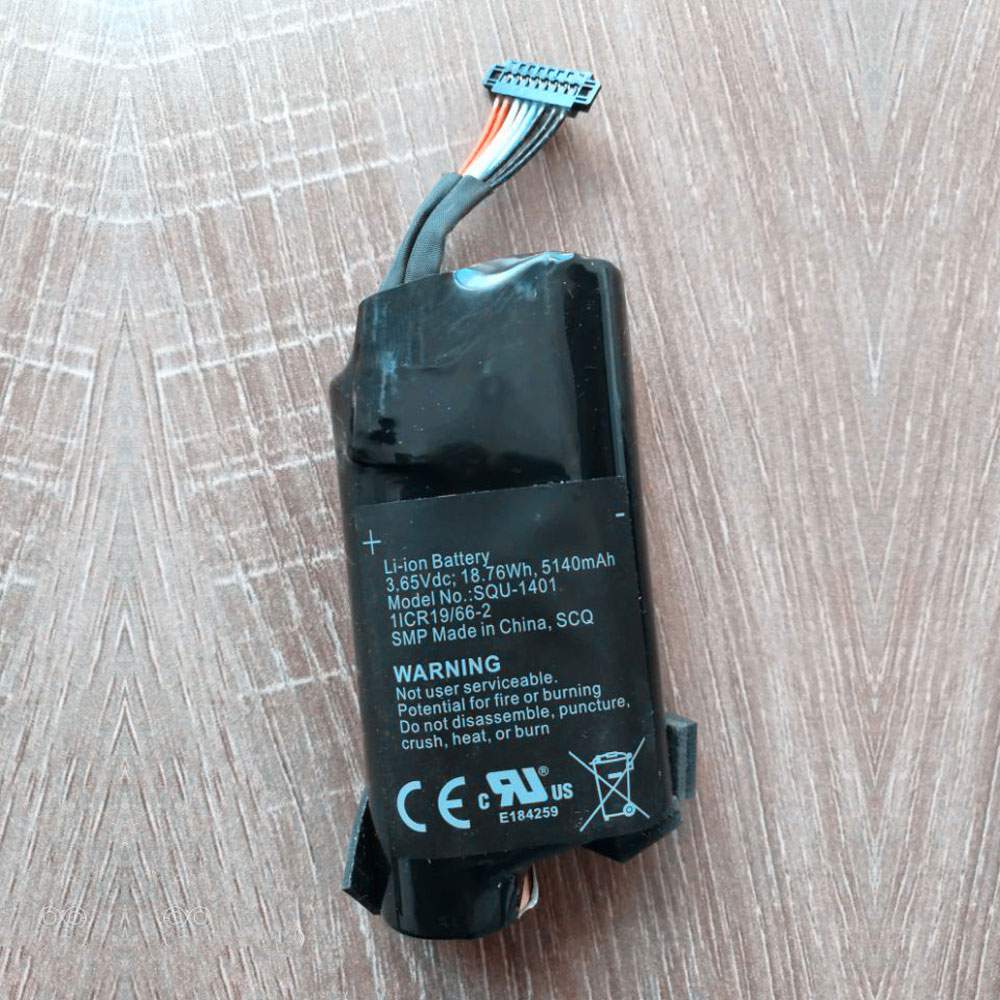
Battery SQU-1401 Replacement For SMP laptop SMP SIMPLO 1ICR19/66-2 Series

Find the right battery for SMP SIMPLO 1ICR19/66-2 Series to solve your power issues. Our SMP SQU-1401 batteries are manufactured to precisely fit just as your original battery.

We use the highest quality Li-ion cells and components that are lighter weight, charge faster and last longer.

US SMP battery shop – Tech-Battery.com ! Shopping with us is safe and secure! 100% Guarantee Quality and Fully Test!

SMP SQU-1401 Battery For SMP – Battery For SMP laptop Li-ion 5140mAh /18.76Wh 18.76V/4.35V. Browse our various categories and find out why we have been the go-to source for our customers.

SQU-1401
  • Chemistry: Li-ion
  • Voltage: 5140mAh /18.76Wh
  • Capacity: 18.76V/4.35V

Free shipping in most countries. click here to view detailed shipping costs.

We ship to the worldwide,please enquiry shipping & handling if you are out of united states.

What’s the total delivery time? (please use this formula to determine when your order will arrive) total delivery time = packaging time + shipping time.

Replaces the following products:

Fits the following devices:

SMP SIMPLO 1ICR19/66-2 Series

SMP SQU-1401 SMP battery is replacement for SMP SIMPLO 1ICR19/66-2 Series. The SQU-1401 batteries equivalent is guaranteed to meet or exceed SMP original specifications. All SMP SQU-1401 Battery are brand new, 1 year Warranty, 100% Guarantee Quality and Fully Test!

We deliver quality SMP laptop extended batteries online. Purchase your SMP laptop battery here.

SMP SQU-1401 SMP Batteries

  • 100% OEM Compatible with your SMP laptop.
  • Lithium Ion battery technology
  • Convenient and secure online purchasing
  • Dependable high quality SMP batteries
  • Satisfaction guaranteed or your money back
  • 1 Year Warranty on all SMP laptop Replacement Batteries

6 tips to increase SQU-1401 SMP Battery lifetime

The performance of your SMP depends largely on the performance of your battery. And his time of life depends on its users, and that you are. These are the principles that have guided the SMP , at the head, so you can optimize the performance of SMP laptop battery.
New battery still fully charged SQU-1401 sold. You must be on the first wheel to be conditioned for optimum performance. Loading and unloading of the battery 4 or 5 times is enough to determine.
The memory effect completely to avoid a full charge and discharge the battery, SMP SQU-1401 twice a month.
The dirt on the SMP SQU-1401 contacts of the battery can power the SMP laptop batteries. Clean with alcohol and cotton can look like and function like new.
This method is recommended for those using the AC adapter for long periods. We recommend that you use the SMP SQU-1401 battery at least once in two weeks. Batteries lose its charge when stored for a long time and you need the battery if it does break.
If he does not use a length of time, the SMP SQU-1401 battery will be stored protected from a clean, dry and cool, heat and other metals. A loss of business to charge the battery in time and need a break before reuse.
Power Management Features Battery SQU-1401 enable the conservation of energy in the battery of SMP laptop. You can control the speed of the processor off, or you can adjust the brightness of the LCD screen to a minimum to ensure low power consumption. 

Why we have been the go-to source for our customers ?

We stock a wide range of rechargeable batteries for SMP laptop. Your SMP Tablet PC is part of your everyday life. Successful communications on a SMP begin with your battery. When purchasing a replacement battery for your SMP SMP, dependability and price are what we have to offer. We’ve been supplying reliable, high quality SMP batteries for over 10 years. Our goal is to provide high quality aftermarket replacement batteries at a very reasonable price. All of our rechargeable Li-Ion SMP batteries are backed by a one year warranty.

What is the run time of SMP battery?

SMP batteries have two main ratings on them: Volts and Amperes. Because size and weight of batteries is limited when compared to larger batteries such as car batteries, most companies show their ratings with Volts and Milliamperes. One thousand Milliamperes equals 1 Ampere. When buying a battery, select batteries with the most Milliamperes (or mAh). Batteries are also rated by Watt-Hours, perhaps the simplest rating of all. This is found by multiplying the Volts and the Amperes together. For example:

  • 14.4 Volts, 4000mAh (Note: 4000mAh is equal to 4.0 Amperes).
  • 14.4 x 4.0 = 57.60 Watt-Hours

Watt-Hours signifies the energy needed to power one watt for one hour.

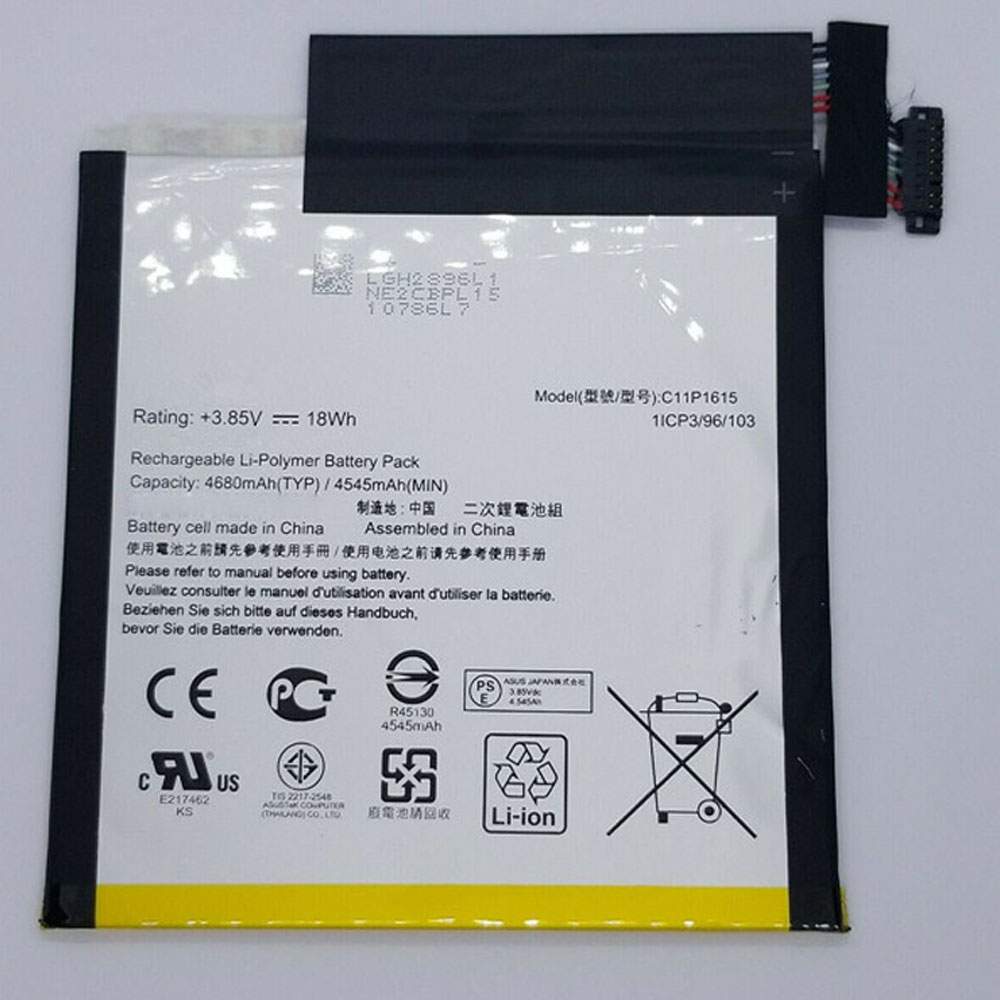
Battery C11P1615 Replacement For ASUS Tablet ASUS ZenPad Z8S P00J ZT582KL

Find the right battery for ASUS ZenPad Z8S P00J ZT582KL to solve your power issues. Our ASUS C11P1615 batteries are manufactured to precisely fit just as your original battery.

We use the highest quality Li-ion cells and components that are lighter weight, charge faster and last longer.

US ASUS battery shop – Tech-Battery.com ! Shopping with us is safe and secure! 100% Guarantee Quality and Fully Test!

ASUS C11P1615 Battery For ASUS – Battery For ASUS Tablet Li-ion 4680mAh/18Wh 3.8V/4.35V. Browse our various categories and find out why we have been the go-to source for our customers.

C11P1615
  • Chemistry: Li-ion
  • Voltage: 4680mAh/18Wh
  • Capacity: 3.8V/4.35V

Free shipping in most countries. click here to view detailed shipping costs.

We ship to the worldwide,please enquiry shipping & handling if you are out of united states.

What’s the total delivery time? (please use this formula to determine when your order will arrive) total delivery time = packaging time + shipping time.

Replaces the following products:

Fits the following devices:

ASUS ZenPad Z8S P00J ZT582KL

ASUS C11P1615 ASUS battery is replacement for ASUS ZenPad Z8S P00J ZT582KL. The C11P1615 batteries equivalent is guaranteed to meet or exceed ASUS original specifications. All ASUS C11P1615 Battery are brand new, 1 year Warranty, 100% Guarantee Quality and Fully Test!

We deliver quality ASUS Tablet extended batteries online. Purchase your ASUS Tablet battery here.

ASUS C11P1615 ASUS Batteries

  • 100% OEM Compatible with your ASUS Tablet.
  • Lithium Ion battery technology
  • Convenient and secure online purchasing
  • Dependable high quality ASUS batteries
  • Satisfaction guaranteed or your money back
  • 1 Year Warranty on all ASUS Tablet Replacement Batteries

6 tips to increase C11P1615 ASUS Battery lifetime

The performance of your ASUS depends largely on the performance of your battery. And his time of life depends on its users, and that you are. These are the principles that have guided the ASUS , at the head, so you can optimize the performance of ASUS Tablet battery.
New battery still fully charged C11P1615 sold. You must be on the first wheel to be conditioned for optimum performance. Loading and unloading of the battery 4 or 5 times is enough to determine.
The memory effect completely to avoid a full charge and discharge the battery, ASUS C11P1615 twice a month.
The dirt on the ASUS C11P1615 contacts of the battery can power the ASUS Tablet batteries. Clean with alcohol and cotton can look like and function like new.
This method is recommended for those using the AC adapter for long periods. We recommend that you use the ASUS C11P1615 battery at least once in two weeks. Batteries lose its charge when stored for a long time and you need the battery if it does break.
If he does not use a length of time, the ASUS C11P1615 battery will be stored protected from a clean, dry and cool, heat and other metals. A loss of business to charge the battery in time and need a break before reuse.
Power Management Features Battery C11P1615 enable the conservation of energy in the battery of ASUS Tablet. You can control the speed of the processor off, or you can adjust the brightness of the LCD screen to a minimum to ensure low power consumption. 

Why we have been the go-to source for our customers ?

We stock a wide range of rechargeable batteries for ASUS Tablet. Your ASUS Tablet PC is part of your everyday life. Successful communications on a ASUS begin with your battery. When purchasing a replacement battery for your ASUS ASUS, dependability and price are what we have to offer. We’ve been supplying reliable, high quality ASUS batteries for over 10 years. Our goal is to provide high quality aftermarket replacement batteries at a very reasonable price. All of our rechargeable Li-Ion ASUS batteries are backed by a one year warranty.

What is the run time of ASUS battery?

ASUS batteries have two main ratings on them: Volts and Amperes. Because size and weight of batteries is limited when compared to larger batteries such as car batteries, most companies show their ratings with Volts and Milliamperes. One thousand Milliamperes equals 1 Ampere. When buying a battery, select batteries with the most Milliamperes (or mAh). Batteries are also rated by Watt-Hours, perhaps the simplest rating of all. This is found by multiplying the Volts and the Amperes together. For example:

  • 14.4 Volts, 4000mAh (Note: 4000mAh is equal to 4.0 Amperes).
  • 14.4 x 4.0 = 57.60 Watt-Hours

Watt-Hours signifies the energy needed to power one watt for one hour.

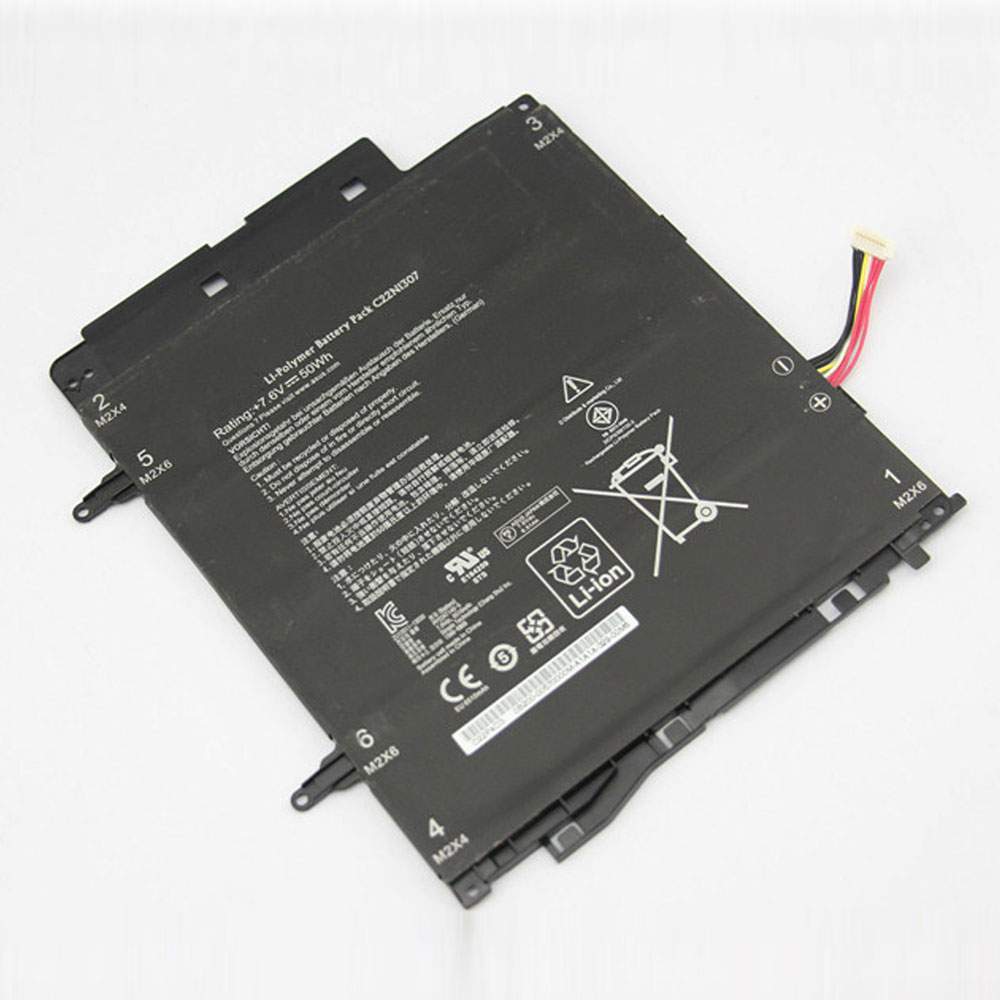
Battery C22N1307 Replacement For ASUS Tablet ASUS Transformer Book T300LA T300LA-BB31T

Find the right battery for ASUS Transformer Book T300LA T300LA-BB31T to solve your power issues. Our ASUS C22N1307 batteries are manufactured to precisely fit just as your original battery.

We use the highest quality Li-ion cells and components that are lighter weight, charge faster and last longer.

US ASUS battery shop – Tech-Battery.com ! Shopping with us is safe and secure! 100% Guarantee Quality and Fully Test!

ASUS C22N1307 Battery For ASUS – Battery For ASUS Tablet Li-ion 50WH 7.6V. Browse our various categories and find out why we have been the go-to source for our customers.

C22N1307
  • Chemistry: Li-ion
  • Voltage: 50WH
  • Capacity: 7.6V

Free shipping in most countries. click here to view detailed shipping costs.

We ship to the worldwide,please enquiry shipping & handling if you are out of united states.

What’s the total delivery time? (please use this formula to determine when your order will arrive) total delivery time = packaging time + shipping time.

Replaces the following products:

Fits the following devices:

ASUS Transformer Book T300LA T300LA-BB31T

ASUS C22N1307 ASUS battery is replacement for ASUS Transformer Book T300LA T300LA-BB31T. The C22N1307 batteries equivalent is guaranteed to meet or exceed ASUS original specifications. All ASUS C22N1307 Battery are brand new, 1 year Warranty, 100% Guarantee Quality and Fully Test!

We deliver quality ASUS Tablet extended batteries online. Purchase your ASUS Tablet battery here.

ASUS C22N1307 ASUS Batteries

  • 100% OEM Compatible with your ASUS Tablet.
  • Lithium Ion battery technology
  • Convenient and secure online purchasing
  • Dependable high quality ASUS batteries
  • Satisfaction guaranteed or your money back
  • 1 Year Warranty on all ASUS Tablet Replacement Batteries

6 tips to increase C22N1307 ASUS Battery lifetime

The performance of your ASUS depends largely on the performance of your battery. And his time of life depends on its users, and that you are. These are the principles that have guided the ASUS , at the head, so you can optimize the performance of ASUS Tablet battery.
New battery still fully charged C22N1307 sold. You must be on the first wheel to be conditioned for optimum performance. Loading and unloading of the battery 4 or 5 times is enough to determine.
The memory effect completely to avoid a full charge and discharge the battery, ASUS C22N1307 twice a month.
The dirt on the ASUS C22N1307 contacts of the battery can power the ASUS Tablet batteries. Clean with alcohol and cotton can look like and function like new.
This method is recommended for those using the AC adapter for long periods. We recommend that you use the ASUS C22N1307 battery at least once in two weeks. Batteries lose its charge when stored for a long time and you need the battery if it does break.
If he does not use a length of time, the ASUS C22N1307 battery will be stored protected from a clean, dry and cool, heat and other metals. A loss of business to charge the battery in time and need a break before reuse.
Power Management Features Battery C22N1307 enable the conservation of energy in the battery of ASUS Tablet. You can control the speed of the processor off, or you can adjust the brightness of the LCD screen to a minimum to ensure low power consumption. 

Why we have been the go-to source for our customers ?

We stock a wide range of rechargeable batteries for ASUS Tablet. Your ASUS Tablet PC is part of your everyday life. Successful communications on a ASUS begin with your battery. When purchasing a replacement battery for your ASUS ASUS, dependability and price are what we have to offer. We’ve been supplying reliable, high quality ASUS batteries for over 10 years. Our goal is to provide high quality aftermarket replacement batteries at a very reasonable price. All of our rechargeable Li-Ion ASUS batteries are backed by a one year warranty.

What is the run time of ASUS battery?

ASUS batteries have two main ratings on them: Volts and Amperes. Because size and weight of batteries is limited when compared to larger batteries such as car batteries, most companies show their ratings with Volts and Milliamperes. One thousand Milliamperes equals 1 Ampere. When buying a battery, select batteries with the most Milliamperes (or mAh). Batteries are also rated by Watt-Hours, perhaps the simplest rating of all. This is found by multiplying the Volts and the Amperes together. For example:

  • 14.4 Volts, 4000mAh (Note: 4000mAh is equal to 4.0 Amperes).
  • 14.4 x 4.0 = 57.60 Watt-Hours

Watt-Hours signifies the energy needed to power one watt for one hour.

Microsoft Confirms Serious New Security Problem For Windows 10 Users

Microsoft has now joined Intel in confirming a newly reported security vulnerability with Thunderbolt ports, one that enables an attacker with physical access to a PC to modify the port’s controller firmware, disabling its security. As I reported last week, almost all Windows PCs with Thunderbolt ports are vulnerable, except a few from last year that shipped with Kernel DMA protection enabled.

This new security threat has been dubbed “Thunderspy” by Björn Ruytenberg, the Eindhoven University of Technology researcher who discovered and disclosed it. Ruytenberg warns that despite locking or suspending a PC, setting up a Secure Boot and strong system passwords, and enabling disk encryption, “all an attacker needs is five minutes alone with the computer” to compromise a machine.

Such physical attacks on computers are complex, high-risk and thankfully rare. But they do happen. A physical compromise such as this is nicknamed an “evil maid” attack—the idea being that your machine is targeted when you’re staying in a hotel and away from your room, or when the overnight cleaning crew come to blitz your office. An attacker needs a few undisturbed minutes with no eyes-on.

If you’re a target, this will happen when you’re down at breakfast, out to dinner or using the gym in your hotel. “I have even heard of someone finding all the screws from his laptop on the table top after he took it out from his hotel safe,” former British intel officer Philip Ingram told me. This is why security professionals leave a “do not disturb” sign on their hotel room doors even when they’re not inside—you get your room serviced by calling down and asking for it to be done at a time of your choosing. And you have your devices with you while it’s being done.

Now Microsoft has confirmed the risk that “an attacker with physical access to a system can use Thunderspy to read and copy data even from systems that have encryption with password protection enabled.” The vulnerability is in hardware, and so cannot be patched. According to Microsoft, someone with physical access to the device “could sign in and exfiltrate data or install malicious software.” Microsoft’s advice to “stay ahead of advanced data theft” is to buy a new PC.

Not just any PC, of course, but one of their newly minted “secured-core PCs.” These have been around since late last year and come with all the security bells and whistles enabled in hardware and firmware, “mitigating Thunderspy and any similar attacks that rely on malicious DMA.” Intel told me that a Thunderspy attack “could not be successfully demonstrated on systems with Kernel DMA protection,” a feature enabled by default on Microsoft’s Secured-core PCs.

As Microsoft explains, “even if an attacker was able to copy malicious Thunderbolt firmware to a device, the Kernel DMA protection on a Secured-core PC would prevent any accesses over the Thunderbolt port unless the attacker gains the user’s password… significantly raising the degree of difficulty.”

There is now a range of Secured-core PCs available, aimed at business users, likely those with a heightened sense of security awareness, who travel regularly (albeit not just at the moment), and who have valuable data on their machines. This isn’t just spooks—business leaders, VIPs, negotiators, politicians, anyone with sensitive data who travels and leaves their PC out of sight for periods of time.

The alternative mitigation to a locked-down machine, according to Ingram, is worse. “Take a burner device with only the data you need for those meetings on a separate USB. Never connect it to any network when you return home and only use it for travel to that country. If you ever leave it unattended assume the hardware has been compromised. If you have been subject to extended searches at an airport and have lost sight of your IT, assume it has been compromised.” You get the point.

As security vulnerabilities go, Thunderspy is pretty niche—an issue on a massive scale, but one which realistically only puts a very small percentage of users at risk. That said, it is a security flaw and it does leave PCs open to compromise. With that in mind, plus the fact this is now in the public domain, I’m sure many users will look at the availability of Kernel DMA protection when they next trade-up.

Apple’s Massive Mistake Drives MacBook Pro Success

“The entry-level 13.3-inch MBP models stick with Intel’s eight-gen Coffee Lake-based silicon with either the Core i5-8257U (15 W) or Core i7-8559U (28 W), which while they are still decent chips, they aren’t especially exciting… The chips also supply the graphics performance, with the i5 model fitted with Intel’s integrated Iris Plus 645 GPU and the i7 model picking up the integrated Iris Plus 655. Neither of them are anything to write home about though.”

If you are looking at the higher priced models then you are going to pick up Intel’s tenth-generation processors, but if ‘Pro’ means graphics to you, then the hardware is going to be falling short:

“…unless you are planning on adding an eGPU to the equation, CAD designers and video editors will want to step up to the 16-inch MBP models that feature discrete AMD Radeon Pro GPUs.”

If you want a true update to the MacBook Pro, you’ll have to wait until 2021.

The recent launch of Apple’s new 13-inch MacBook Pro completes this round of updates for the MacOS laptops. Hardware wise there’s very little difference between the MacBooks and the equivalent Windows 10 laptops. So why have the new machines been met with resounding critical acclaim?

For five years the MacBook, MacBook Pro, and MacBook Air were saddled with the butterfly keyboard. The thinking behind the design was in keeping with Apple’s ideals, it was lighter and slimmer, both welcome features for a laptop. The keys had more stability and allowed for more accurate typing.

But Apple’s implementation was flawed. Dust, crumbs, and other small particles could get trapped in the mechanism. Keypresses would jam and not be registered; or the key would become stuck and double, triple, or quadruple type a letter from a single key press. It was an unpredictable nightmare for anyone working at speed or on large documents.

The keyboard is the primary interface for a laptop. Apple was selling a laptop with a primary interface that was, in my opinion, not fit for purposes. And it kept selling laptops after the problem was documented. It was clear to independent repair specialists that Apple was trying different fixes to make the keyboard work. But the machines being purchased still had sub-standard keyboards. Joanna Stern of the Wall Street Journal demonstrated this with a wonderful article that allowed you to decide just how broken her keyboard was. Here it is with the ‘e’ and the ‘r’ key broken.

“Nop, I havn’t fogottn how to wit. No did my dito go on vacation.

‘You s, to sha th pain of using an Appl laptop kyboad that’s faild aft fou months, I could only think of on ida: tak all th bokn ltts out of my column. Thn I alizd that would mak th whol thing unadabl. So to…”

Thanks to Apple’s tight control of the ecosystem (including the monopoly it has over MacOS powered hardware) users needing a MacOS laptop for their applications, software development, or media production chain, had little choice but to buy Apple and endure. Of course the keyboards would work as they came out of the box, you could use external keyboards, and not every single keyboard would break… but emotionally every keyboard was a defect waiting to go off.

Tim Cook’s Apple has finally decided to do what it should have done a long time ago. Fix an obvious fault in its flagship laptop.

The process started in late 2019, as the 15-inch MacBook Pro picked up a larger screen and became the 16-inch MacBook Pro. The table stakes of expected specifications were met with updates to the processor, storage options, and tweaks for improved performance (notably in thermal control and battery control). In other words, Apple offered a maintenance release of the hardware It stayed in lockstep with the competition, but didn’t push onwards or try to change the landscape.

The same was mostly true of March’s update to the MacBook Air and this month’s update to the MacBook Pro. The specs were raised to meet the competition, but nothing that exceeded the various Windows 10 powered laptops. Arguably the 2020 releases are less effective than the 16-inch MacBoko Pro because the new display sizes many expected were delayed until 2021.

But… the keyboard was changed.

Although Apple has slapped a ridiculous marketing name on it, the Magic Keyboard is a return to the reliable scissor-switch mechanism. With no design flaws reported since the launch of the 16-inch laptop its probably safe to say the keyboard worries are over.

To me that explains the rapturous response to the new Macs, especially the new 13-inch MacBook Pro. Yes the specs are higher (but then so are specs on Windows 10 laptops), yes the software has been improved (but then the same is true of Windows 10), and yes that all adds up to more performance (but then, well, you get the idea).

The excitement, the digital column inches, the praise all being heaped upon the new MacBook Air and MacBook Pro machines, all center on one area.

Corsair A500 Review: Premium Price, Curious Flaws

Corsair – the company who has brought us seemingly endless options of AIO liquid cooler models for the masses, has recently introduced their first large air cooling option, the A500. The dual-fan, monolithic heatpipe cooler is also devoid of another Corsair staple: RGB/aRGB lighting, meaning the new Corsair A500 is either a welcome change or a deal breaker, depending on which camp you defend.

Features

Corsair ships the A500 with a quality set of mounting hardware, including nicely plated mounting studs and securing nuts as well as a very robust, laser-cut steel backplate. Cable ties are a welcome addition, as is the 2-way PWM splitter and Phillips screwdriver included in the box.

And while the A500 does ship with pre-applied thermal paste, an additional syringe of XTM50 thermal compound is provided for future re-installs of the cooler. Corsair covers the A500 with a 5-year warranty.

The most interesting feature of the A500 is its pair of non-RGB ML120 fans nested within a set of molded frames which ride on friction rails on either side of the cooler tower. Fans are pre-installed out of the box in a standard push+pull configuration, eliminating any confusion around fan and airflow direction.

The A500 features a quartet of plated heatpipes to dissipate thermal load from the base of the cooler throughout the thermal tower. The mounting plate comes permanently affixed to the base and utilizes a pair of tension-screws to secure to the cooler’s included cross-bar frames. 

Access to the tension screws is gained by removing the attractive, brushed-aluminum top plate bearing the Corsair logo by popping it free of cooler tower. The center of the tower fin stack has a central cutaway to allow the Phillips screwdriver direct access through this channel to the tension screws of the base.

Corsair ships the A500 with a pre-applied patch of thermal compound in grid layout. The four direct-contact heatpipes of the cooler are integrated into the plated mounting base. The central cutaway is also visible here, showing how the tension screws are accessed via this channel.

We clean every cooler base of pre-installed thermal compound using alcohol wipes and cloth and later use Arctic MX-4 for all of our tests. During this process, we noticed a small irregularity of the direct-contact heatpipes along the base of the A500. One of the heatpipes (second from the left) is slightly raised when compared with the others in our sample, which is easily seen with a steel straightedge and some backlighting.

The thermal compound contact patch shows the representation of this impact when the cooler is installed, leaving one of the direct contact heatpipes elevated just slightly to isolate it from CPU IHS contact. This also means that this single heatpipe can only ‘work’ by absorbing heat from remainder of the cooler base and the adjacent (raised) heatpipe, instead of directly removing it from the processor.

Making use of the removable top plate, installing the A500 is quite a simple task and one which does not require the cooler’s fans to be removed, which is typically a requirement with other large air coolers. Larger memory DIMMs can be accounted for with a bit of vertical adjustment of the fans, although this may only be required with the tallest of memory sticks.

We tested the Corsair A500 against peers of similar price and relative size, specifically the be quiet! Dark Rock Pro 4, DeepCool Gamer Storm Assassin III and Noctua NH-U12A. All have been evaluated on our i7-5930k test bench running at 4.20 Ghz @ 1.20v paired with 16GB of DDR-2400 Crucial Ballistix on our MSI X99S XPower AC motherboard.

Note that while our cooling platform is old at this point, the CPU’s 140W TDP, combined with a healthy overclock, still gives today’s coolers a tough workout. That said, we are planning to update our cooling testbed once Intel’s latest Comet Lake-S CPUs and accompanying motherboards arrive.

Both the Corsair A500 and Noctua NH-U12A utilize a pair of 120mm fans, which does account for slightly higher thermal load temperatures than the be quiet! Dark Rock Pro 4 utilizing a 135mm + 120mm fan and the dual 140mm DeepCool Gamer Storm Assassin III.

Use of smaller 120mm fans by the A500 and the NH-U12A gives us higher measured fan RPM while larger fans will usually spin more slowly. Since the Dark Rock Pro 4 features two fans of different diameters, we’ve listed them separately as we did from our original coverage of this cooler.

The 2400+ RPM fans on the Corsair A500 kick up a lot of turbulence, leading to elevated decibel levels, but considering we’ve seen similar results on the Corsair H100i Pro lineup, this comes as no surprise.

Acoustic efficiency evaluates how coolers in our tests perform when we combine thermal performance and noise level, essentially building a graph of how well a cooler does work and how acoustically efficient it is during that process.

With the Corsair A500 priced right at $100, it struggles with some of its peers due to noise level and a few degrees of thermal separation. Both the Corsair A500 and the Noctual NH-U12A are priced around 10% higher than the be quiet! Dark Rock Pro 4 and the DeepCool Gamer Storm Assassin III, also creating more separation in our performance value chart.

Thermal imaging from our FLIR ONE Pro camera shows some notable differences of heat soak at 50% fan speed seen in the center cooler cutout vent as well as an indication of additional thermal buildup at the exhaust fan (left of the center logo). Overall, the mass of the cooling fin stack shows equalization in both photos, providing indication that the cooler is effectively distributing thermal loads evenly through the A500.

Corsair have positioned themselves in a way which allows its customers another choice that retains the triple-sail logo while alleviating the fears of liquid cooling and maintaining brand loyalty. The A500 isn’t the highest-performing cooler for big-air money, so unless you are a Corsair loyalist, it’s a difficult option to recommend considering other options available.

We also have some concerns around the irregularities in the milling of the direct-contact heatpipes as we know we aren’t the only ones to have encountered this problem. It makes us wonder if there would be marked performance improvement if this build anomaly were corrected, and we’re hopeful that Corsair will correct the issue in future retail updates.