Windows 10 now hides the SYSTEM control panel, how to access it

With the release of Windows 10 20H2, Microsoft is now preventing access to the venerable SYSTEM control panel and is instead redirecting users to the newly updated ‘About’ settings page.

The SYSTEM control panel was first introduced in Windows NT 3.51 and Windows 95 and provides information about the installed version of Windows, the bit-type of the operating system, the computer name, workgroup, CPU, and memory.

As the control panel provides a lot of information about a computer, it is commonly used when troubleshooting a Windows PC or determining a computer’s basic information.

In July, BleepingComputer reported that Microsoft had updated their ‘About’ settings page to include most, but not all, of the information found in the SYSTEM page. At the time, Microsoft was also testing a hidden feature that would redirect a user to the About page when opening the SYSTEM control panel.

With Windows 10 20H2, Microsoft drove another nail into the control panel’s coffin and is now preventing users from accessing the SYSTEM control panel. Now, when a user tries to open it, they are brought to the About page instead.

With the testing of a modern Disk Management tool, refresh rate option, and a test that redirects the ‘Program and Features’ control panel to the ‘Apps & Features’ settings, we can see Microsoft’s gradual killing off of the Control Panel.

Ultimately, this is good because Windows 10 is a confusing mess of settings being located in different places. By organizing them under the Settings feature, it will make it easier to find a particular setting.

The good news for those who routinely use the SYSTEM control panel is that there is still a way to access it, which we describe below.

How to access SYSTEM in Windows 10 20H2

While Microsoft is redirecting the SYSTEM control panel, there is a way to access it via a specially crafted Windows shortcut.

To create a shortcut that opens the SYSTEM control panel, please follow these steps:

Minimize all open applications and folders so that you see the Windows Desktop.

Right-click on the Desktop and select New > Shortcut, as shown below.

When the Create Shortcut window opens, copy and paste explorer shell:::{BB06C0E4-D293-4f75-8A90-CB05B6477EEE} into the field. Then press the Next button.

You will now be at a page asking to name the shortcut. Enter SYSTEM as the name and press the Finish button.

A shortcut called SYSTEM will now have been created on your Desktop that can be used to open the SYSTEM control panel again.

A video illustrating how to make this shortcut in Windows 10 20H2 can be seen below.

This SYSTEM shortcut can also be launched directly from the Start Menu by searching for ‘SYSTEM’ and selecting the icon that appears under the Apps section.

In the current Windows 10 Insider preview builds (tested on Windows 10 20231), all other ways to access the SYSTEM control panel redirect to the new About page.

Battery LPN385337 Replacement For HISENSE Cell Phone Hisense Smartphone

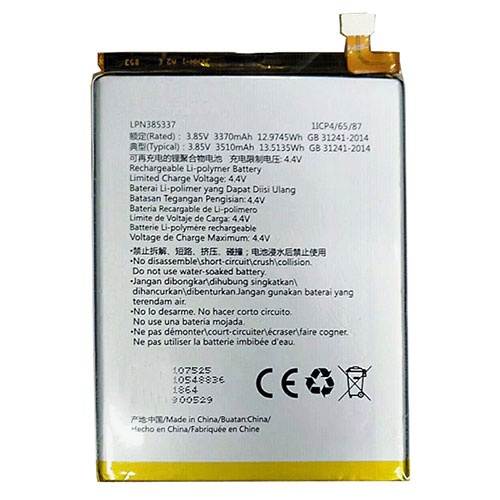
Find the right battery for Hisense Smartphone to solve your power issues. Our HISENSE LPN385337 batteries are manufactured to precisely fit just as your original battery.

We use the highest quality Li-ion cells and components that are lighter weight, charge faster and last longer.

US HISENSE battery shop – Tech-Battery.com ! Shopping with us is safe and secure! 100% Guarantee Quality and Fully Test!

HISENSE LPN385337 Battery For HISENSE – Battery For HISENSE Cell Phone Li-ion 3370mAh/12.9745WH 3.85V/4.4V. Browse our various categories and find out why we have been the go-to source for our customers.

LPN385337
  • Chemistry: Li-ion
  • Voltage: 3370mAh/12.9745WH
  • Capacity: 3.85V/4.4V

Free shipping in most countries. click here to view detailed shipping costs.

We ship to the worldwide,please enquiry shipping & handling if you are out of united states.

What’s the total delivery time? (please use this formula to determine when your order will arrive) total delivery time = packaging time + shipping time.

Replaces the following products:

Fits the following devices:

Hisense Smartphone

HISENSE LPN385337 HISENSE battery is replacement for Hisense Smartphone. The LPN385337 batteries equivalent is guaranteed to meet or exceed HISENSE original specifications. All HISENSE LPN385337 Battery are brand new, 1 year Warranty, 100% Guarantee Quality and Fully Test!

We deliver quality HISENSE Cell Phone extended batteries online. Purchase your HISENSE Cell Phone battery here.

HISENSE LPN385337 HISENSE Batteries

  • 100% OEM Compatible with your HISENSE Cell Phone.
  • Lithium Ion battery technology
  • Convenient and secure online purchasing
  • Dependable high quality HISENSE batteries
  • Satisfaction guaranteed or your money back
  • 1 Year Warranty on all HISENSE Cell Phone Replacement Batteries

6 tips to increase LPN385337 HISENSE Battery lifetime

The performance of your HISENSE depends largely on the performance of your battery. And his time of life depends on its users, and that you are. These are the principles that have guided the HISENSE , at the head, so you can optimize the performance of HISENSE Cell Phone battery.
New battery still fully charged LPN385337 sold. You must be on the first wheel to be conditioned for optimum performance. Loading and unloading of the battery 4 or 5 times is enough to determine.
The memory effect completely to avoid a full charge and discharge the battery, HISENSE LPN385337 twice a month.
The dirt on the HISENSE LPN385337 contacts of the battery can power the HISENSE Cell Phone batteries. Clean with alcohol and cotton can look like and function like new.
This method is recommended for those using the AC adapter for long periods. We recommend that you use the HISENSE LPN385337 battery at least once in two weeks. Batteries lose its charge when stored for a long time and you need the battery if it does break.
If he does not use a length of time, the HISENSE LPN385337 battery will be stored protected from a clean, dry and cool, heat and other metals. A loss of business to charge the battery in time and need a break before reuse.
Power Management Features Battery LPN385337 enable the conservation of energy in the battery of HISENSE Cell Phone. You can control the speed of the processor off, or you can adjust the brightness of the LCD screen to a minimum to ensure low power consumption. 

Why we have been the go-to source for our customers ?

We stock a wide range of rechargeable batteries for HISENSE Cell Phone. Your HISENSE Tablet PC is part of your everyday life. Successful communications on a HISENSE begin with your battery. When purchasing a replacement battery for your HISENSE HISENSE, dependability and price are what we have to offer. We’ve been supplying reliable, high quality HISENSE batteries for over 10 years. Our goal is to provide high quality aftermarket replacement batteries at a very reasonable price. All of our rechargeable Li-Ion HISENSE batteries are backed by a one year warranty.

What is the run time of HISENSE battery?

HISENSE batteries have two main ratings on them: Volts and Amperes. Because size and weight of batteries is limited when compared to larger batteries such as car batteries, most companies show their ratings with Volts and Milliamperes. One thousand Milliamperes equals 1 Ampere. When buying a battery, select batteries with the most Milliamperes (or mAh). Batteries are also rated by Watt-Hours, perhaps the simplest rating of all. This is found by multiplying the Volts and the Amperes together. For example:

  • 14.4 Volts, 4000mAh (Note: 4000mAh is equal to 4.0 Amperes).
  • 14.4 x 4.0 = 57.60 Watt-Hours

Watt-Hours signifies the energy needed to power one watt for one hour.

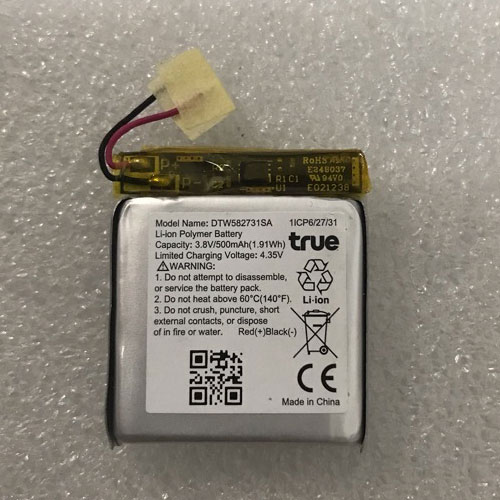
Battery DTW582731SA Replacement For TRUE Watch TRUE LSSP582731AF

Find the right battery for TRUE LSSP582731AF to solve your power issues. Our TRUE DTW582731SA batteries are manufactured to precisely fit just as your original battery.

We use the highest quality Li-ion cells and components that are lighter weight, charge faster and last longer.

US TRUE battery shop – Tech-Battery.com ! Shopping with us is safe and secure! 100% Guarantee Quality and Fully Test!

TRUE DTW582731SA Battery For TRUE – Battery For TRUE Watch Li-ion 500mAh/1.91WH 3.8V/4.35V. Browse our various categories and find out why we have been the go-to source for our customers.

DTW582731SA
  • Chemistry: Li-ion
  • Voltage: 500mAh/1.91WH
  • Capacity: 3.8V/4.35V

Free shipping in most countries. click here to view detailed shipping costs.

We ship to the worldwide,please enquiry shipping & handling if you are out of united states.

What’s the total delivery time? (please use this formula to determine when your order will arrive) total delivery time = packaging time + shipping time.

Replaces the following products:

Fits the following devices:

TRUE LSSP582731AF

TRUE DTW582731SA TRUE battery is replacement for TRUE LSSP582731AF. The DTW582731SA batteries equivalent is guaranteed to meet or exceed TRUE original specifications. All TRUE DTW582731SA Battery are brand new, 1 year Warranty, 100% Guarantee Quality and Fully Test!

We deliver quality TRUE Watch extended batteries online. Purchase your TRUE Watch battery here.

TRUE DTW582731SA TRUE Batteries

  • 100% OEM Compatible with your TRUE Watch.
  • Lithium Ion battery technology
  • Convenient and secure online purchasing
  • Dependable high quality TRUE batteries
  • Satisfaction guaranteed or your money back
  • 1 Year Warranty on all TRUE Watch Replacement Batteries

6 tips to increase DTW582731SA TRUE Battery lifetime

The performance of your TRUE depends largely on the performance of your battery. And his time of life depends on its users, and that you are. These are the principles that have guided the TRUE , at the head, so you can optimize the performance of TRUE Watch battery.
New battery still fully charged DTW582731SA sold. You must be on the first wheel to be conditioned for optimum performance. Loading and unloading of the battery 4 or 5 times is enough to determine.
The memory effect completely to avoid a full charge and discharge the battery, TRUE DTW582731SA twice a month.
The dirt on the TRUE DTW582731SA contacts of the battery can power the TRUE Watch batteries. Clean with alcohol and cotton can look like and function like new.
This method is recommended for those using the AC adapter for long periods. We recommend that you use the TRUE DTW582731SA battery at least once in two weeks. Batteries lose its charge when stored for a long time and you need the battery if it does break.
If he does not use a length of time, the TRUE DTW582731SA battery will be stored protected from a clean, dry and cool, heat and other metals. A loss of business to charge the battery in time and need a break before reuse.
Power Management Features Battery DTW582731SA enable the conservation of energy in the battery of TRUE Watch. You can control the speed of the processor off, or you can adjust the brightness of the LCD screen to a minimum to ensure low power consumption. 

Why we have been the go-to source for our customers ?

We stock a wide range of rechargeable batteries for TRUE Watch. Your TRUE Tablet PC is part of your everyday life. Successful communications on a TRUE begin with your battery. When purchasing a replacement battery for your TRUE TRUE, dependability and price are what we have to offer. We’ve been supplying reliable, high quality TRUE batteries for over 10 years. Our goal is to provide high quality aftermarket replacement batteries at a very reasonable price. All of our rechargeable Li-Ion TRUE batteries are backed by a one year warranty.

What is the run time of TRUE battery?

TRUE batteries have two main ratings on them: Volts and Amperes. Because size and weight of batteries is limited when compared to larger batteries such as car batteries, most companies show their ratings with Volts and Milliamperes. One thousand Milliamperes equals 1 Ampere. When buying a battery, select batteries with the most Milliamperes (or mAh). Batteries are also rated by Watt-Hours, perhaps the simplest rating of all. This is found by multiplying the Volts and the Amperes together. For example:

  • 14.4 Volts, 4000mAh (Note: 4000mAh is equal to 4.0 Amperes).
  • 14.4 x 4.0 = 57.60 Watt-Hours

Watt-Hours signifies the energy needed to power one watt for one hour.

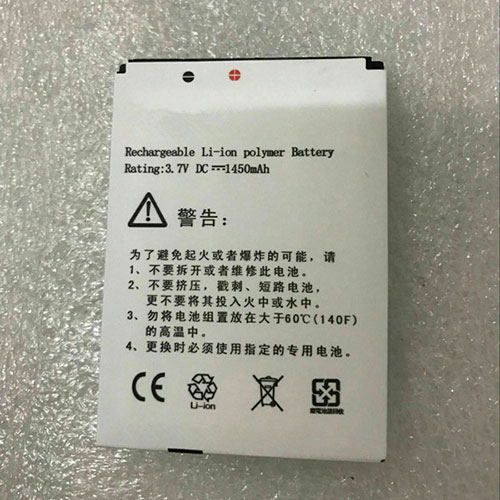
Battery X431 Replacement For Launch Scanner Launch Diagun

Find the right battery for Launch Diagun to solve your power issues. Our Launch X431 batteries are manufactured to precisely fit just as your original battery.

We use the highest quality Li-ion cells and components that are lighter weight, charge faster and last longer.

US Launch battery shop – Tech-Battery.com ! Shopping with us is safe and secure! 100% Guarantee Quality and Fully Test!

Launch X431 Battery For Launch – Battery For Launch Scanner Li-ion 1450mAh 3.7V/4.2V. Browse our various categories and find out why we have been the go-to source for our customers.

X431
  • Chemistry: Li-ion
  • Voltage: 1450mAh
  • Capacity: 3.7V/4.2V

Free shipping in most countries. click here to view detailed shipping costs.

We ship to the worldwide,please enquiry shipping & handling if you are out of united states.

What’s the total delivery time? (please use this formula to determine when your order will arrive) total delivery time = packaging time + shipping time.

Replaces the following products:

Fits the following devices:

Launch Diagun

Launch X431 Launch battery is replacement for Launch Diagun. The X431 batteries equivalent is guaranteed to meet or exceed Launch original specifications. All Launch X431 Battery are brand new, 1 year Warranty, 100% Guarantee Quality and Fully Test!

We deliver quality Launch Scanner extended batteries online. Purchase your Launch Scanner battery here.

Launch X431 Launch Batteries

  • 100% OEM Compatible with your Launch Scanner.
  • Lithium Ion battery technology
  • Convenient and secure online purchasing
  • Dependable high quality Launch batteries
  • Satisfaction guaranteed or your money back
  • 1 Year Warranty on all Launch Scanner Replacement Batteries

6 tips to increase X431 Launch Battery lifetime

The performance of your Launch depends largely on the performance of your battery. And his time of life depends on its users, and that you are. These are the principles that have guided the Launch , at the head, so you can optimize the performance of Launch Scanner battery.
New battery still fully charged X431 sold. You must be on the first wheel to be conditioned for optimum performance. Loading and unloading of the battery 4 or 5 times is enough to determine.
The memory effect completely to avoid a full charge and discharge the battery, Launch X431 twice a month.
The dirt on the Launch X431 contacts of the battery can power the Launch Scanner batteries. Clean with alcohol and cotton can look like and function like new.
This method is recommended for those using the AC adapter for long periods. We recommend that you use the Launch X431 battery at least once in two weeks. Batteries lose its charge when stored for a long time and you need the battery if it does break.
If he does not use a length of time, the Launch X431 battery will be stored protected from a clean, dry and cool, heat and other metals. A loss of business to charge the battery in time and need a break before reuse.
Power Management Features Battery X431 enable the conservation of energy in the battery of Launch Scanner. You can control the speed of the processor off, or you can adjust the brightness of the LCD screen to a minimum to ensure low power consumption. 

Why we have been the go-to source for our customers ?

We stock a wide range of rechargeable batteries for Launch Scanner. Your Launch Tablet PC is part of your everyday life. Successful communications on a Launch begin with your battery. When purchasing a replacement battery for your Launch Launch, dependability and price are what we have to offer. We’ve been supplying reliable, high quality Launch batteries for over 10 years. Our goal is to provide high quality aftermarket replacement batteries at a very reasonable price. All of our rechargeable Li-Ion Launch batteries are backed by a one year warranty.

What is the run time of Launch battery?

Launch batteries have two main ratings on them: Volts and Amperes. Because size and weight of batteries is limited when compared to larger batteries such as car batteries, most companies show their ratings with Volts and Milliamperes. One thousand Milliamperes equals 1 Ampere. When buying a battery, select batteries with the most Milliamperes (or mAh). Batteries are also rated by Watt-Hours, perhaps the simplest rating of all. This is found by multiplying the Volts and the Amperes together. For example:

  • 14.4 Volts, 4000mAh (Note: 4000mAh is equal to 4.0 Amperes).
  • 14.4 x 4.0 = 57.60 Watt-Hours

Watt-Hours signifies the energy needed to power one watt for one hour.

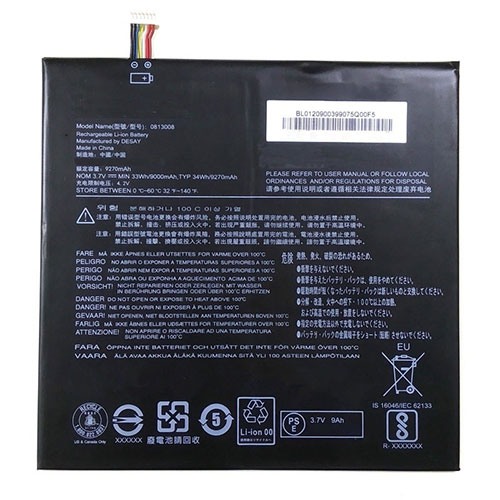
Battery 0813008 Replacement For LENOVO Tablet Lenovo 0813008 Tablet Pad

Find the right battery for Lenovo 0813008 Tablet Pad to solve your power issues. Our LENOVO 0813008 batteries are manufactured to precisely fit just as your original battery.

We use the highest quality Li-ion cells and components that are lighter weight, charge faster and last longer.

US LENOVO battery shop – Tech-Battery.com ! Shopping with us is safe and secure! 100% Guarantee Quality and Fully Test!

LENOVO 0813008 Battery For LENOVO – Battery For LENOVO Tablet Li-ion 9270mAh/34WH 3.7V/4.2V. Browse our various categories and find out why we have been the go-to source for our customers.

0813008
  • Chemistry: Li-ion
  • Voltage: 9270mAh/34WH
  • Capacity: 3.7V/4.2V

Free shipping in most countries. click here to view detailed shipping costs.

We ship to the worldwide,please enquiry shipping & handling if you are out of united states.

What’s the total delivery time? (please use this formula to determine when your order will arrive) total delivery time = packaging time + shipping time.

Replaces the following products:

Fits the following devices:

Lenovo 0813008 Tablet Pad

LENOVO 0813008 LENOVO battery is replacement for Lenovo 0813008 Tablet Pad. The 0813008 batteries equivalent is guaranteed to meet or exceed LENOVO original specifications. All LENOVO 0813008 Battery are brand new, 1 year Warranty, 100% Guarantee Quality and Fully Test!

We deliver quality LENOVO Tablet extended batteries online. Purchase your LENOVO Tablet battery here.

LENOVO 0813008 LENOVO Batteries

  • 100% OEM Compatible with your LENOVO Tablet.
  • Lithium Ion battery technology
  • Convenient and secure online purchasing
  • Dependable high quality LENOVO batteries
  • Satisfaction guaranteed or your money back
  • 1 Year Warranty on all LENOVO Tablet Replacement Batteries

6 tips to increase 0813008 LENOVO Battery lifetime

The performance of your LENOVO depends largely on the performance of your battery. And his time of life depends on its users, and that you are. These are the principles that have guided the LENOVO , at the head, so you can optimize the performance of LENOVO Tablet battery.
New battery still fully charged 0813008 sold. You must be on the first wheel to be conditioned for optimum performance. Loading and unloading of the battery 4 or 5 times is enough to determine.
The memory effect completely to avoid a full charge and discharge the battery, LENOVO 0813008 twice a month.
The dirt on the LENOVO 0813008 contacts of the battery can power the LENOVO Tablet batteries. Clean with alcohol and cotton can look like and function like new.
This method is recommended for those using the AC adapter for long periods. We recommend that you use the LENOVO 0813008 battery at least once in two weeks. Batteries lose its charge when stored for a long time and you need the battery if it does break.
If he does not use a length of time, the LENOVO 0813008 battery will be stored protected from a clean, dry and cool, heat and other metals. A loss of business to charge the battery in time and need a break before reuse.
Power Management Features Battery 0813008 enable the conservation of energy in the battery of LENOVO Tablet. You can control the speed of the processor off, or you can adjust the brightness of the LCD screen to a minimum to ensure low power consumption. 

Why we have been the go-to source for our customers ?

We stock a wide range of rechargeable batteries for LENOVO Tablet. Your LENOVO Tablet PC is part of your everyday life. Successful communications on a LENOVO begin with your battery. When purchasing a replacement battery for your LENOVO LENOVO, dependability and price are what we have to offer. We’ve been supplying reliable, high quality LENOVO batteries for over 10 years. Our goal is to provide high quality aftermarket replacement batteries at a very reasonable price. All of our rechargeable Li-Ion LENOVO batteries are backed by a one year warranty.

What is the run time of LENOVO battery?

LENOVO batteries have two main ratings on them: Volts and Amperes. Because size and weight of batteries is limited when compared to larger batteries such as car batteries, most companies show their ratings with Volts and Milliamperes. One thousand Milliamperes equals 1 Ampere. When buying a battery, select batteries with the most Milliamperes (or mAh). Batteries are also rated by Watt-Hours, perhaps the simplest rating of all. This is found by multiplying the Volts and the Amperes together. For example:

  • 14.4 Volts, 4000mAh (Note: 4000mAh is equal to 4.0 Amperes).
  • 14.4 x 4.0 = 57.60 Watt-Hours

Watt-Hours signifies the energy needed to power one watt for one hour.

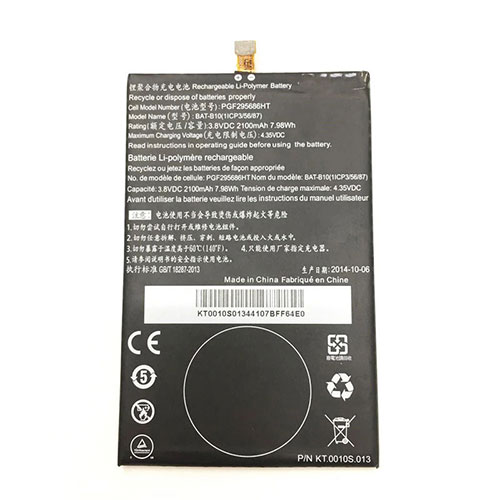
Battery BAT-B10 Replacement For ACER Cell Phone Acer Liquid Jade / Liquid Jadeplus / S55

Find the right battery for Acer Liquid Jade / Liquid Jadeplus / S55 to solve your power issues. Our ACER BAT-B10 batteries are manufactured to precisely fit just as your original battery.

We use the highest quality Li-ion cells and components that are lighter weight, charge faster and last longer.

US ACER battery shop – Tech-Battery.com ! Shopping with us is safe and secure! 100% Guarantee Quality and Fully Test!

ACER BAT-B10 Battery For ACER – Battery For ACER Cell Phone Li-ion 2100mAh/7.98WH 3.8V/4.35V. Browse our various categories and find out why we have been the go-to source for our customers.

BAT-B10
  • Chemistry: Li-ion
  • Voltage: 2100mAh/7.98WH
  • Capacity: 3.8V/4.35V

Free shipping in most countries. click here to view detailed shipping costs.

We ship to the worldwide,please enquiry shipping & handling if you are out of united states.

What’s the total delivery time? (please use this formula to determine when your order will arrive) total delivery time = packaging time + shipping time.

Replaces the following products:

Fits the following devices:

Acer Liquid Jade / Liquid Jadeplus / S55

ACER BAT-B10 ACER battery is replacement for Acer Liquid Jade / Liquid Jadeplus / S55. The BAT-B10 batteries equivalent is guaranteed to meet or exceed ACER original specifications. All ACER BAT-B10 Battery are brand new, 1 year Warranty, 100% Guarantee Quality and Fully Test!

We deliver quality ACER Cell Phone extended batteries online. Purchase your ACER Cell Phone battery here.

ACER BAT-B10 ACER Batteries

  • 100% OEM Compatible with your ACER Cell Phone.
  • Lithium Ion battery technology
  • Convenient and secure online purchasing
  • Dependable high quality ACER batteries
  • Satisfaction guaranteed or your money back
  • 1 Year Warranty on all ACER Cell Phone Replacement Batteries

6 tips to increase BAT-B10 ACER Battery lifetime

The performance of your ACER depends largely on the performance of your battery. And his time of life depends on its users, and that you are. These are the principles that have guided the ACER , at the head, so you can optimize the performance of ACER Cell Phone battery.
New battery still fully charged BAT-B10 sold. You must be on the first wheel to be conditioned for optimum performance. Loading and unloading of the battery 4 or 5 times is enough to determine.
The memory effect completely to avoid a full charge and discharge the battery, ACER BAT-B10 twice a month.
The dirt on the ACER BAT-B10 contacts of the battery can power the ACER Cell Phone batteries. Clean with alcohol and cotton can look like and function like new.
This method is recommended for those using the AC adapter for long periods. We recommend that you use the ACER BAT-B10 battery at least once in two weeks. Batteries lose its charge when stored for a long time and you need the battery if it does break.
If he does not use a length of time, the ACER BAT-B10 battery will be stored protected from a clean, dry and cool, heat and other metals. A loss of business to charge the battery in time and need a break before reuse.
Power Management Features Battery BAT-B10 enable the conservation of energy in the battery of ACER Cell Phone. You can control the speed of the processor off, or you can adjust the brightness of the LCD screen to a minimum to ensure low power consumption. 

Why we have been the go-to source for our customers ?

We stock a wide range of rechargeable batteries for ACER Cell Phone. Your ACER Tablet PC is part of your everyday life. Successful communications on a ACER begin with your battery. When purchasing a replacement battery for your ACER ACER, dependability and price are what we have to offer. We’ve been supplying reliable, high quality ACER batteries for over 10 years. Our goal is to provide high quality aftermarket replacement batteries at a very reasonable price. All of our rechargeable Li-Ion ACER batteries are backed by a one year warranty.

What is the run time of ACER battery?

ACER batteries have two main ratings on them: Volts and Amperes. Because size and weight of batteries is limited when compared to larger batteries such as car batteries, most companies show their ratings with Volts and Milliamperes. One thousand Milliamperes equals 1 Ampere. When buying a battery, select batteries with the most Milliamperes (or mAh). Batteries are also rated by Watt-Hours, perhaps the simplest rating of all. This is found by multiplying the Volts and the Amperes together. For example:

  • 14.4 Volts, 4000mAh (Note: 4000mAh is equal to 4.0 Amperes).
  • 14.4 x 4.0 = 57.60 Watt-Hours

Watt-Hours signifies the energy needed to power one watt for one hour.

AirPods Pro 2 price and features just leaked — and there’s bad news

Apple released the AirPods Pro last October, improving on the standard AirPods with features like active noise cancelation, water resistance and silicon tips. Apple is now tipped to be working on an AirPods Pro 2 with even better features, but a new leak suggests that the new earbuds might not be the upgrade you want. 

The information comes from LeaksApplePro over on Twitter, who claims that the second-generation AirPods Pro will have better battery life, improved noise cancelling, ambient light sensors, and the same $249 price tag as the current AirPods Pro.

If this leak is accurate, it means there isn’t a huge amount of difference between the two types of AirPods Pro. Better battery life and noise cancelling are always welcome though, especially when they don’t come with a price increase.

The light sensors are a bit of an odd choice, and it’s not clear what those are for. In the past it’s been rumoured that light sensors may appear in AirPods, possibly to track things such as your heart rate or other health statistics. It’s not beyond the realm of possibility, given Apple’s increased focus on health and fitness features in recent years, and we’ve already seen other wireless earbuds read heart rate using a similar method.

By adding fitness tracking into the AirPods it also means that the Apple Health app could more accurately track your workouts, especially if you’re not interested in buying an Apple Watch.

Other rumours claim the AirPods Pro 2 may come with air-gestures, though optical sensors wouldn’t be particularly effective in that capacity. If true, that suggests Apple has much grander plans for the future of AirPods, and a lot more functionality than this leak lets on.

Unfortunately this leak predicts a Q4 2021 or Q1 2022 release date, which means the AirPods Pro 2 are at least a year off. Apple’s next big audio release will likely be the AirPods Studio, a set of premium over-ear headphones that could compete with the likes of Bose and Sony as soon as this fall.

Fujitsu LifeBook UH-X is a 1.4 pound laptop with a 13.3 inch screen

Japanese electronics company Fujitsu has a history of making ridiculously lightweight laptops, but the new Fujitsu LifeBook UH-X/E3 takes things to extreme.

It’s a notebook with a 13.3 inch full HD display, an Intel Tiger Lake processor with Intel Xe graphics and full-sized Ethernet and HDMI ports. But the laptop measures just 0.61 inches thick and weighs just 1.4 pounds.

Of course, something’s got to give, and in this case it’s the battery.

The Fujitsu LifeBook UH-X/E3 has a 25Wh lithium-ion battery, which is pretty anemic by modern standards. Fujitsu says you can expect up to 11 hours of battery life under ideal conditions, but I suspect you should probably cut that number in half in real-world conditions.

The RAM is also soldered to the motherboard and there’s no way to upgrade it.

Fujitsu does offer a similar laptop called the LifeBook UH90/E3 with a 50W battery, but that model has a starting weight of 1.8 pounds.

Finally, an Affordable Wireless Mechanical Keyboard for Macs

Apple may have done away with godawful butterfly switches earlier this year, but I legitimately cannot stand the Magic Keyboard. It’s so…flat. I’m not super swole but I know I can snap that thing in two over my knee. It somehow costs $100. And while the scissor switches are fine on my actual MacBook Pro, I prefer mechanical keyboards for long typing sessions at my desk. The only problem is most mechanical keyboards that don’t cost a fortune are optimized for Windows.

It fucking sucks, and I’ve put up with it for years. I’ve tried workarounds, like remapping keys via third-party software or even just trying to memorize the differences when that felt like “too much” work. It’s not that mechanical keyboards for Macs don’t exist—they do. It’s not that wireless keyboards don’t exist for Macs—they do. It’s finding the perfect wireless and mechanical keyboard that doesn’t cost $100 or more. After all, there’s plenty of affordable, sub $100 mechanical keyboards, wired and wireless, for Windows users and gamers.

Around Christmas last year, a keyboard enthusiast friend of mine recommended the Keychron K2 Version 1. Wireless? Check. Mac keyboard layout and media keys? Check. Tenkeyless? Check. Under $100? Check. My eyes bugged out of my skull. There was only one hitch. It was sold out everywhere. Then earlier this summer, I saw Keychron had put out a second version of the K2. I pounced.

At the same time, I was wondering why the name Keychron seemed familiar. As it turns out, the K2 isn’t Keychron’s first Bluetooth mechanical keyboard for Mac computers. That was the K1, a $74 mechanical keyboard that got its start two years ago on Kickstarter. It looked fine, but perusing the Kickstarter listing reminded me why I’d passed on the K1 at the time. It was limited to Blue switches, which I’m not a fan of, and the flat low-profile keys hewed a bit too close to the Magic Keyboard for my liking. Since then, Keychron’s been busy—in addition to the K1 and K2, there’s also the K4, K6, K8, and a forthcoming K3.

The main difference between all these keyboards is size, keycaps, and which keys are included or omitted. The Keychron K2 Version 2 is a compact, 75% tenkeyless keyboard with 84 keys. The keycaps have a height of 30mm in the front, and 41mm in the rear. You can use it wired or with Bluetooth, and by default, it comes with a Mac layout and Mac-specific media controls. It does come with Windows keycaps and a keycap puller as well—so if you dig the look but are on PC, or if you switch between Windows and Mac, you can still use this thing on up to three devices. There’s even a small toggle on the left side that lets you switch between PC/Android and Mac/iOS.

For switches, you can choose between Gatreon red, blue, and brown. You also have options between lighting options. If you opt for only white backlighting, it’s a bit cheaper at $70 on Keychron’s website, while the RGB version costs $80. If you want the RGB version with an aluminum frame, that goes for $90. If you don’t like the available key switches here’s also a hot-swappable version for either $80 or $100, depending on if you want RGB. You’ll have to provide your own switches, but you won’t have to solder them onto the board. In any case, whatever you pick will be either cheaper or on par with Apple’s Magic Keyboard.

I’ve been testing the K2 for about two months now and I’m a fan. I opted for brown switches, which are appropriately tactile but not so loud as to annoy my husband. (Loud, clicky keyboards are officially banned from our apartment.) One thing that I really appreciate is, as you’d expect, the layout. I no longer have to readjust every time I switch from typing on my laptop to typing on the keyboard. It sounds like a small thing, but it makes a difference—especially since I fucking hate the TouchBar and the Houdini act it does on function keys. I love that I have a specific screencap button. It comes in handy, especially when I’m covering fast-paced events.

Also, I like that this keyboard comes with several RGB lighting options that don’t require me to download extra software. This is more common for gaming mechanical keyboards, but I’ve yet to enjoy the process of customizing my dumb rainbow lights with proprietary software. The lighting effects themselves are pretty standard. You have your typical color wave and breathing effects, as well as more static backlighting. Still, there’s enough variety that you should find something you like and not get bored. You can also just disable lighting entirely, if for some reason you have no soul and hate RGB.

Which brings me to another thing. Because the Keychron K2 is compact, it’s not going to satisfy people who absolutely need a num pad. Though you do get the arrow keys at least. (If you really need a num pad, Keychron’s K1 Keyboard has one and is only $2 more expensive; their K4 Keyboard also has one, albeit in a more compact form factor, and ranges from $64-$84, depending on materials and types of backlighting.) You’re also not going to get extra programmable macro keys here, so if that’s an absolute must, you’re out of luck. Keychron also doesn’t have an official program to remap keys, but you can use other third-party software like Karabiner for Windows and Sharp Keys for Mac.

For the most part, the lack of native software isn’t a huge deal. There’s just a bit of a learning curve when it comes to remembering shortcuts. While there’s a specific lighting key, you have to press fn and either the right or left arrow key to change colors. The same is true for Bluetooth pairing—you have to hold fn + 1, as well as switch a toggle on the left side to Bluetooth. You can also press fn + X + L for four seconds to switch between function and multimedia keys. There are shortcuts for things like turning off auto-sleep mode, switching between paired devices, factory resets and turning off backlighting. None of this is hard, but I personally had to write some of them down on a sticky note for reference.

In terms of Bluetooth connectivity, I was pleased. I had no problems with pairing, and never had to re-pair the keyboard to my MacBook Pro, which I sometimes have to do with other Bluetooth peripherals. For battery life, the K2 is packing a 4,000mAh rechargeable battery with an estimated 240 hours of typing time with the backlighting off. With it on, you can get anywhere from 68-72 hours. How much you get out of a single charge will depend on how you use it. That said, I used the keyboard with RGB lighting and set to automatically sleep after 10 minutes of inactivity—and I got a little over two weeks of daily use before needing to recharge. It’s a lot better than what I got with the Razer Pro Type keyboard, which only got about 12 hours with LED lighting and required nightly charging. There’s an indicator light that lets you know when you’re at 15% battery or lower, but otherwise, there’s not really a good way to know how much battery you’ve got left.

For the price and feature set, the Keychron K2 offers up great value, particularly if you’re not too picky or new to the world of mechanical keyboards. Sure, it’s way more expensive than a wireless membrane keyboard, but as far as Mac-specific mechanical keyboards go, it’s pretty dang affordable. It’s also much, much, much more enjoyable to type on than the Magic Keyboard—throw that flat piece of overpriced trash in the fiery pits of hell. And while some keyboard snobs might turn their nose up because the K2 isn’t the fanciest keyboard around, I frankly do not give a damn. I’m not one of those mechanical keyboard enthusiasts who would willingly plop down over $300 for the perfect keyboard. I am unapologetically cheap and don’t like keyboards that much. I’m just someone who wants a reasonably priced, non-mushy wireless keyboard for my Mac—and the Keychron K2 is perfect for that.
AMD Ryzen 9 5950X & Ryzen 9 5900X “Zen 3” CPU Benchmarks Leak Out, 16 Cores At 5 GHz & Huge Single-Threaded Performance Jump

The latest benchmarks of AMD’s upcoming Ryzen 9 5950X and Ryzen 9 5900X “Zen 3” CPUs have leaked out in the Geekbench database (via TUM_APISAK). The Ryzen 9 series processors will feature the highest core count available in the Ryzen 5000 series lineup and will be aimed at the enthusiast gaming market.

AMD Ryzen 9 5950X 16 Core & Ryzen 9 5900X 12 Core CPU Benchmarks Leak Out, Huge Boost In Single-Core Performance

The benchmarks for the AMD Ryzen 9 5950X and Ryzen 9 5900X show both chips running at close to 5 GHz frequencies which is pretty impressive for such high core count chips. Both Ryzen 9 chips were running on different platforms. The Ryzen 9 5950X was featured on an ASUS ROG STRIX X570I Gaming motherboard with 16 GB (DDR4-3866) memory while the Ryzen 9 5900X was featured on MSI’s X570 GODLIKE motherboard with 16 GB (DDR4-3600) memory.

In Geekbench 5, the AMD Ryzen 9 5950X scored 1575 points in the single-threaded &13,605 points in the multi-threaded tests. The chip was running at clock speeds close to the 5 GHz mark with the maximum reported clock speed hitting 4.983 GHz in the multi-threaded test while the CPU hit 5.01 GHz in the single-core test.

The AMD Ryzen 9 5900X scored 1605 points in the single-threaded &12,869 points in the multi-threaded tests. Once again, the chip was boosting beyond its rated boost clocks with the highest core clock reported at 4.947 GHz in the multi-threaded and 4.95 GHz in the single-threaded test.

When it comes to performance comparison, the AMD Ryzen 9 5950X is around 20% faster than the AMD Ryzen 9 3950X in the single-threaded and around 10% faster in multi-threaded tests. AMD’s Ryzen 9 5900X is also around 20-25% faster in single-core but only around 6-8% faster on average in multi-core tests compared to its predecessor, the Ryzen 9 3900X.

Compared to Intel’s flagship Core i9-10900K CPU, the AMD Ryzen 9 5900X offers a 15-20% single-core performance bump and around a 15% performance bump in multi-threaded tests.

AMD Ryzen 9 5950X “Zen 3” Desktop CPU – 16 Cores / 32 Threads Up To 4.9 GHz For $799 US

Starting off with the top of the line parts, AMD is announcing the Ryzen 9 series which is made up of the Ryzen 9 5950X. The Ryzen 9 5950X is the flagship 16 core part which is aimed at users demanding heavy multi-threading performance on AM4 sockets.

The chip has a total cache of 72 MB and a TDP of 105W. The chip features a boost clock of up to 4.9 GHz boost which when put together is just stunning for a 16 core part. The AMD Ryzen 9 5950X is going to cost $799 US and will be available on the 5th of November like the rest of the lineup.

AMD Ryzen 9 5900X “Zen 3” Desktop CPU – 12 Cores / 24 Threads Up To 4.8 GHz For $549 US

Next up, we have the Ryzen 9 5900X which is a 12 core part that is aimed at users demanding heavy multi-threading performance on AM4 sockets. The chip has a total cache of 70 MB and a TDP of 105W. The chip features a base clock of 3.7 GHz and a boost clock of up to 4.8 GHz boost which is faster than the Ryzen 9 3900XT. The AMD Ryzen 9 5900X will feature a retail price of $549 US which is $50 US higher than the MSRP of the Ryzen 9 3900XT while delivering significantly faster performance.

In performance comparisons, the AMD Ryzen 9 5900X completely obliterates the Intel Core i9-10900K, delivering insane amounts of up to 15% single-threaded performance jump over the competing chip within Cinebench R20. The same goes for gaming performance where the AMD Ryzen 9 5900X delivers up to 21% performance gains over the Core i9-10900K.

The AMD Ryzen 5000 Desktop CPUs, codenamed Vermeer, will be launching on the 5th of November. The launch lineup will include the 16 core Ryzen 9 5950X, the 12 core Ryzen 9 5900X, the 8 core Ryzen 7 5800X, and the 6 core Ryzen 5 5600X. You can learn more about these SKUs here.

All 500 series motherboards (X570/B550) will be receiving BIOS updates to support the next-gen lineup so if you’re planning to get a Ryzen 5000 CPU at launch, you better head over to this link and grab one that’s supported for your motherboard (do note that 400-series support comes later around January 2021).