Dell’s XPS 17 Proves Big-Screen Laptops Are Back, and They’re Awesome

A few years back, a lot of major laptop makers began quietly paring down the number of 17-inch laptops they made (aside from monstrously large gaming rigs), with Apple and Dell dropping the 17-inch MacBook Pro and XPS 17 respectively. However, thanks to improvements like smaller bezels and improved energy efficiency, thin and light laptops with plus-sized screens and big performance are making a comeback.

After Apple re-envisioned its big-format laptop as the 16-inch MacBook Pro in 2019, Dell made a similar move by bringing back the XPS 17 this year. While the circumstances are different this time around (especially considering 2020 is a tire fire of a year), the revival of Dell’s flagship 17-inch laptop couldn’t have come at a better time. Big-screen laptops are back, baby, and they’re even better than before.

For the big reintroduction of the XPS 17, Dell didn’t deviate too much from the classic XPS design. The XPS 17 has a tapered wedge-shaped body with a silver aluminum lid, a big carbon fiber deck in the middle, and another aluminum tub on bottom. Despite its overall size (14.74 x 9.76 x 0.77 inches) and weight (5.53 pounds), the XPS 17 still manages to feel quite sleek and surprisingly portable—until you stack an XPS 15 on top and see how big the difference really is. In some ways, the size and design of the XPS 17 feels like a mirage, because when you open it up, you can’t help but appreciate how much display you get from a system that seems smaller than it is, especially when you consider the last time we saw the XPS 17 was back in 2012, when it weighed more than eight pounds instead of five.

Along its sides, the XPS 17 comes with an ample assortment of ports, including four USB-C ports with Thunderbolt 3 (all support charging, too), a headphone jack, and a full-size SD card reader. The only ports you might be missing are HDMI and USB-A, though Dell has that covered too with an included dongle.

Inside, Dell maximizes the XPS 17’s display (which comes in a multitude of options, from a 1900 x 1200 non-touch panel to a 4K UHD+ screen), with razor-thin bezels. Dell’s super tiny webcam and IR camera module, which sits above the screen, are exactly where you want them. The built-in IR camera offers support for Windows Hello face login, while the 720p HD webcam is meant to handle all your video-calling needs, though I must say that the XPS 17’s webcam image quality and resolution aren’t quite as high as I’d like.

Below on its deck, Dell flanks the keyboard with large stereo speakers that feature a 2.5-watt woofer and 1.5-watt tweeter on each side capable of delivering rich, room-filling sound. And as for the keyboard itself, Dell wisely hasn’t messed with the feel of the XPS 17’s keys, which are crisp and bouncy. I’m not gonna call them perfect, but the XPS 17’s keyboard is pretty much my platonic ideal of how keys on a laptop should feel. And finally, there’s that huge 6 x 3.5-inch matte touchpad, which leaves just enough room for your wrists on either side while providing accurate gesture recognition and more mousing room than most people probably need.

The one potential oddity about the XPS 17’s deck is Dell’s decision not to include a dedicated numpad like you sometimes see on 17-inch gaming systems. Some might bemoan that call, but on a well-rounded system like this, I think sacrificing the numpad for bigger speakers and an overall cleaner design was ultimately the right choice.

And then there’s that screen. Our review unit features the upgraded 4K 3840 x 2400 touchscreen, and I just can’t get enough. It puts out over 450 nits of brightness and has some of the richest and most vivid colors you can get from a laptop LCD panel today. If you’re intending to buy an XPS 17 to edit photos or videos, I would highly recommend upgrading to the 4K screen instead of the base FHD+ panel. Furthermore, with its 16:10 aspect ratio, the XPS 17 also provides a bit more vertical screen real estate, which is exactly what you want from a big all-purpose laptop.

The XPS 17 ain’t no slouch when it comes to performance, either. The base config comes with a 10th-gen Intel Core i5-10300H CPU, but our more expensive review unit came upgraded with a Core i7-10875H CPU, and it absolutely flies. In our CPU rendering test in Blender, the XPS 17 took almost four minutes less to render the same image (4:40) as MSI’s Creator 15 (8:33), despite the smaller Creator 15 having the same CPU.

And when it comes to graphics performance, it’s a similar story, with the XPS 17 (6:26) beating the MSI Creator 15 (8:36) by more than two minutes in our Blender GPU rendering test, once again with both systems featuring an RTX 2060 GPU. This kind of performance makes the XPS 17 a great choice for content creators, and while it’s not intended to be a competitive gaming machine, the XPS 17 is able to pump out more than 80 fps in Shadow of the Tomb Raider at 1080p with all the graphics bells and whistles turned on, so it’s not a bad fragging machine either. Thermal headroom also seems quite respectable, because while the XPS 17 will throttle itself a bit when maxed out, I didn’t notice any major lag or dips in performance during more normal loads.

Even the XPS 17’s battery life is pretty solid for a system this big, with it lasting just shy of 9 hours (8:58) on our video rundown test, nearly two hours longer than the MSI Creator 15 and an hour longer than HP’s ZBook Create G7.

After using the XPS 17 for several weeks, I only really have one complaint: its price. Because even though it starts at just $1,350 for a 17-inch FHD+ screen, Core i5 CPU, 8GB of RAM, 256GB SSD, and integrated graphics, when you start upgrading components, the cost balloons quite quickly. So in comparison, our review unit, which features a 4K touchscreen, Core i7 10875H CPU, 32GB of RAM, 1TB SSD, and RTX 2060 GPU, costs more than double the price at around $2,750. And annoyingly, if you want to cut back on a few components like RAM or storage to save money, currently the cheapest model with an RTX 2060 card starts at $2,450. Thankfully, if you’re less concerned with graphics, you can split the difference for a system with a GTX 1650 Ti GPU, which starts at around $1,800, and if you’re looking for the best balance between price and performance, that’s where I’d start.

But for me the biggest takeaway about the XPS 17 is the way it fits into 2020. While a lot of people wait for the world to get back to normal, I feel like it’s also important to think about what normal even means. Right now there are millions of people who have to work or learn from home, and even when things start opening up again, a lot of people won’t be returning to the same buildings or positions they were in before. This makes it even more important to consider what you need from a personal computer.

For years, 15-inch systems have been the most popular laptop size, as they generally offered the best balance between price, power, and portability. However, if you’re the kind of person who is only going to travel with their laptop a handful of times every year (or less considering the ongoing pandemic), a bigger system like the XPS 17 suddenly becomes a very intriguing option. Not only does its bigger screen translate into more productivity (or better movie-watching) when you’re stuck at home, you also get more ports and a wider range of upgradable components.

Meanwhile, the XPS 17 doesn’t suffer from being tied to a desk or table like a normal desktop or all-in-one. And all of this comes in a package that’s not that much larger (or much more expensive) than an XPS 15. (Though you will want to make sure you have something to carry it in, because the XPS 17 definitely doesn’t fit in my normal messenger bag.) So in a strange way, 2020 was sort of the perfect time for Dell to bring back the XPS 17. You get a bigger, more powerful system from one of the best laptop lines on the market, but in a body that’s way less of a burden than its predecessors from the not-too-distant past. So even if a 17-inch laptop might not be in your immediate future, the XPS 17 has demonstrated why they’re making a comeback, and it’s done so with power and style.
ASUS ROG STRIX SCAR 15 REVIEW: POWERFUL PORTABLE GAMING

If you’re looking for the absolute most powerful gaming hardware out there… well, you don’t want the Asus ROG Strix Scar 15. You want a desktop or a laptop that weighs seven pounds, requires multiple power bricks, and is basically a desktop. But if you still want something you can realistically carry around, the Strix is about as powerful as it gets.

We’ve reviewed a number of Asus laptops this year that are members of the ROG Zephyrus gaming line — powerful, while still portable and attractive. You’d buy a Zephyrus if you want decent gaming results but also want an everyday work machine you could bring into the office or class. The Strix line eschews the latter role. These are gaming laptops. They are just for games. They’re not cheap, they’re not subtle, and they hold nothing back.

That’s where the Strix Scar 15 stands out. Every aspect is designed with the gaming enthusiast in mind, and there are a number of unique features for those customers. Of course, those also come with a few trade-offs — and folks who might need to use their machine for tasks besides gaming should consider other options.

The Strix Scar 15 starts at $2,199.99 on the Asus store. The base model comes with a Core i7-10875H, an Nvidia GeForce RTX 2070 Super, 1GB of SSD storage, and a 240Hz screen. The model we’re looking at today is a significant step up from that: it costs $2,799.99 and is powered by Intel’s eight-core Core i9-10980HK and an RTX 2070 Super, which are joined by 32GB of RAM, 2TB of storage, and a 1920 x 1080 300Hz screen (3ms response time). The 10980HK is a workhorse — it’s one of the most powerful mobile chips on the market — and 300Hz is the fastest display you can get on a 15-inch laptop.

If you clicked on this review, you’re probably most curious about the frame rates this laptop is putting up. Suffice to say: they’re good.

On CS:GO at maximum settings, the Strix Scar averaged 248fps. Thanks to this model’s 300Hz screen, the chips aren’t just rendering 248fps; you’re actually seeing 248fps. You’ll see a frame rate difference between this system and an identical one with a 240Hz display, albeit a small one. (But to folks who play a lot of esports and first-person shooters, a small difference can matter.)

Overall, CS:GO was a smooth experience. The Scar only dipped below 100fps once when I was running through a thick flurry of dust.

Not all titles are able to take full advantage of the 300Hz screen, unless you plan on bumping the quality settings down. The Strix put up 67fps on Shadow of the Tomb Raider’s highest settings with ray tracing on Ultra. On Red Dead Redemption II (one of the most demanding games out there) cranked up to Ultra, the Scar averaged 54fps. Both games were quite playable on those settings, without any stuttering or slowdown. Those results are right on par with the MSI GE66 Raider (which put up 50fps on Red Dead and 70fps on Tomb Raider) and beat the smaller Zephyrus G14 by a significant margin.

It’s worth noting that while I was letting the Scar rip in Turbo mode (the highest power profile available) the 10980HK got quite hot throughout my gaming session, spending a chunk of time in the mid-90s and even hitting 99 degrees Celsius a couple of times. When I swapped to the regular Performance profile, the CPU spent more time in the mid-high 80s, and I only saw a 1-2fps difference as a result. So if you’re worried about frying your hardware, you won’t miss much if you stay on the Performance profile.

Moving on to other laptop stuff. Apart from its chips, what distinguishes the Strix Scar 15 as a gaming laptop is the design. It features a customizable per-key RGB keyboard, a luminous logo on the lid, and a bright LED strip around the front three sides. A glowing strip may seem obnoxious, but this one is actually more subdued than strips you may have seen on gaming rigs like MSI’s GE66 Raider. It wraps around the underside of the deck, so you don’t see it full-on; the effect is less garish gamer than the GE66 Raider and more fancy nightclub. (You can turn all of the RGB stuff off, of course. But then, what’s the point?)

Another cool thing is the deck design, which is printed with what Asus calls “Cybertext.” Basically, Republic of Gamers is written all over it in an urban-chic sort of font. It’s subtle and far from distracting, but it gives the whole product a subtle sci-fi vibe.

Speaking of the keyboard deck: the palm rests are coated in a unique “soft-touch paint.” It’s much smoother than your typical palm rest (you can very much feel the difference when you touch the rest of the chassis) and is quite nice to lay your hands on.

Asus keyboards are often among my favorites, and the Strix Scar’s keyboard is no exception. I love typing on this. I feel like my fingers are flying while using it. There’s a satisfying click with very little resistance. And I especially appreciate the convenient row of hotkeys at the top, which includes volume controls, a microphone mute, one that changes the performance profile, and another button that brings up Armoury Crate (Asus’ app where you can adjust various settings and features).

If you’d rather plug in your own peripherals, you have a good port selection at your disposal. There are three USB 3.2 Gen 1 Type-A ports and an audio jack on the left side, while the back houses one USB 3.2 Gen 2 Type-C port (which supports DisplayPort, but not PD charging), the charging port, one LAN RJ-45, and one HDMI 2.0. That’s most of what you’ll need but there’s one glaring omission: Thunderbolt. Plenty of people may not care about this, but it’s a port I’m disappointed not to see on a $2,799 laptop.

On the right side is a Keystone II reader. A Keystone II is a physical key on which you can save personal settings. You can also use it to access a private storage space, which Asus refers to as a “shadow drive.” This can be encrypted if you have Windows 10 Pro. (Only this model ships with that operating system. You’ll need to upgrade from Windows 10 Home if you buy the base configuration.)

The Keystone II is a neat idea considering how many settings and profiles there are to keep track of on the Strix. In the ROG app GameVisual, you can choose between color presets for different types of games (FPS mode enhances brightness and contrast, RPG mode prioritizes vivid colors, etc.). In Aura Creator, you can customize your keyboard’s colors and animation. In GameFirst VI, you can prioritize bandwidth between the programs you have running; there are presets like Gaming First, Live Streaming First, and Multimedia First.

One more thing I like: the speakers. Music sounded great, with a nice surround quality. The Strix won’t replace a good external speaker and percussion was a bit tinny. But vocals were quite clear, and at maximum volume, I never heard distortion. The laptop’s fans get quite loud during gaming, but I had no trouble hearing my games’ audio over them. (You can also switch to the Silent profile if the whine is bothering you.)

There’s lots of good stuff on the Strix, as you can see. But there are trade-offs, too. Most of them aren’t super relevant to gaming (and thus, forgivable on a laptop like the Strix), but they’re worth bearing in mind nonetheless.

For one: there’s no webcam. It’s not a deal-breaker — streamers will be using their own equipment anyway — but it’s a big minus for anyone who would otherwise use the Strix for an occasional work meeting or virtual catch-up with friends.

I also have a couple of issues with the trackpad. It has discrete clickers, which require a bit more skittering around to press than integrated buttons. I like these particular clickers more than most, but they’re still easy to miss and I sometimes found myself whacking chassis when trying to click. Generally, I found it less responsive and less accurate than I wanted it to be. Occasionally, it thought I was clicking when I wasn’t, causing me to accidentally drag things everywhere.

The touchpad also has a nifty feature where it can morph into an LED number pad if you press an integrated NumLock button in the top-right corner — but I hit this button with my palm while typing and accidentally activated the Numpad several times. Unlike with Asus’ ZenBooks that also have this feature, you can’t navigate with the touchpad while the Numpad is up, so I kept having to interrupt my workflow to deactivate it. (You can disable the touchpad itself with F10, but there’s not an easy way to disable the NumPad without disabling the touchpad.)

The biggest downside, though, is battery life. I averaged two hours and 28 minutes of sustained multitasking and office work with the Strix on the Battery Saver profile with the screen around 200 nits of brightness. (With all the battery-saving features off and a slightly heavier load, I got as low as one hour.) The Strix is a gaming laptop, so I wasn’t expecting hours upon hours of juice. Still, plenty of competitors do better: The MSI GE66 Raider (also powering an LED strip and RGB keyboard) made it through four hours of that same workload.

AGREE TO CONTINUE: ASUS ROG STRIX SCAR 15

Every smart device now requires you to agree to a series of terms and conditions before you can use it — contracts that no one actually reads. It’s impossible for us to read and analyze every single one of these agreements. But we started counting exactly how many times you have to hit “agree” to use devices when we review them since these are agreements most people don’t read and definitely can’t negotiate.

As with other Windows 10 computers, the Asus ROG Strix Scar 15 presents you with multiple things to agree to or decline upon setup.

The mandatory policies, for which an agreement is required, are:

A request for your region and keyboard layout

Windows 10 License Agreement and Asus privacy agreement

A PIN

In addition, there is a slew of optional things to agree to:

Wi-Fi network

Microsoft account

Device privacy settings: online speech recognition, Find My Device, Inking and Typing, Advertising ID, Location, Diagnostic data, Tailored experiences

Customize your device for various purposes (gaming, schoolwork, creativity, entertainment, family, and/or business)

Link your Android smartphone

OneDrive backup

Office 365

Allow Microsoft to access your location, location history, contacts, voice input, speech and handwriting patterns, typing history, search history, calendar details, messages, apps, and Edge browsing history to aid Cortana’s personalized experiences and suggestions

Asus member registration

Set up McAfee account

That’s five mandatory agreements and 16 optional ones.

Gaming on battery is possible, but not great. Red Dead ran mostly in the high teens and low 20s. I got an hour and 15 minutes of the game on a charge, but I started to see stuttering when the Strix was down to 60 percent (about half an hour in) and the game became unplayable at 10 percent. Realistically, if you plan on bringing the Scar anywhere, you’ll need to bring the massive 280W adapter and spend some time charging the device. (It took 45 minutes to charge up to 60 percent during very light Chrome use.)

Overall, these nitpicks emphasize Asus’ priority with the Scar. It’s not a laptop that’s meant to double as a travel companion or a work-from-home driver — don’t buy it to be your primary PC.

But that doesn’t mean the Scar isn’t great at what it’s supposed to be great at, which is gaming. Its results are on par with those of the best 15-inch rigs on the market, and it offers useful customization software with a unique colorful design to boot. If you need the best frame rates and the fastest screen, the Strix Scar 15 is a fine purchase.

Samsung Galaxy Chromebook 2 specs leak: QLED, 12+ hours battery, no fingerprint, & alleged price

Following a render leak on Monday, key specs for the Samsung Galaxy Chromebook 2 have now emerged with a possible starting price. This comes from a slide tweeted by Microsoft leaker WalkingCat (@h0x0d) today.

The original model announced this January uses a 4K AMOLED touchscreen, and Samsung is now following that up with a QLED (Quantum dot LED) screen at 13.3 inches. Samsung calls it a “world’s first” for Chromebooks, and a “tested” badge touts “Color Volume 100% acc. to DCI-P3.”

Meanwhile, the next big improvement is “targeted battery life” of over 12 hours. This should greatly address the current model’s inability to get through a day of without needing a recharge. We then see that this Galaxy Chromebook 2 will be offered with an Intel 10th Gen i3 processor compared to the i5-10210U today. Wi-Fi 6 Gigabit ac is also touted.

Samsung also touts “premium sound” that is 178% louder, while the “ultra slim profile” is slightly heavier at 2.75 pounds versus just 2.2.

From this image, there does not appear to be a fingerprint sensor in the top-right corner. The first-generation had a raised, blank space on the keyboard, but a regular black key is all that’s visible here. The earlier render confirms that, though the angle makes it harder to notice, in an unfortunate reversal for Chrome OS devices.

Lastly, this specs leak reveals that the Galaxy Chromebook 2 will be launching at Best Buy and Samsung.com in February 2021. In a follow-up tweet, WalkingCat says it will be priced at $699. This presumably refers to the entry model, but the exact configuration is unknown. In moving away from the very premium — for a Chromebook — $999 price point, Samsung is clearly targeting a broader audience this time round.

Battery EL-616380PH Replacement For Nomu Cell Phone Nomu LMCV1 S30

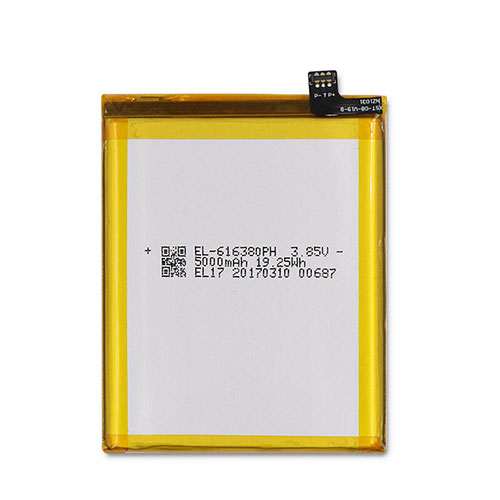
Find the right battery for Nomu LMCV1 S30 to solve your power issues. Our Nomu EL-616380PH batteries are manufactured to precisely fit just as your original battery.

We use the highest quality Li-ion cells and components that are lighter weight, charge faster and last longer.

US Nomu battery shop – Tech-Battery.com ! Shopping with us is safe and secure! 100% Guarantee Quality and Fully Test!

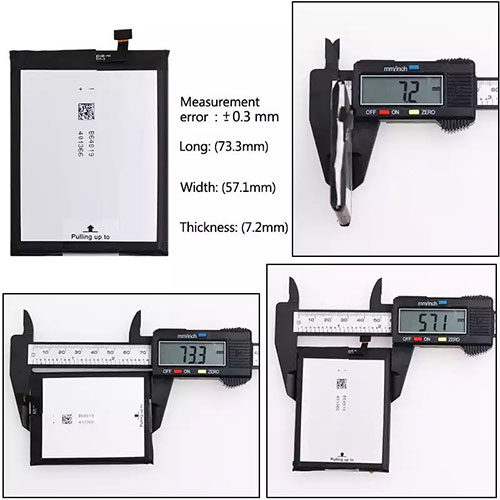
Nomu EL-616380PH Battery For Nomu – Battery For Nomu Cell Phone Li-ion 5000mAh/19.25WH 3.85V. Browse our various categories and find out why we have been the go-to source for our customers.

EL-616380PH
  • Chemistry: Li-ion
  • Voltage: 5000mAh/19.25WH
  • Capacity: 3.85V

Free shipping in most countries. click here to view detailed shipping costs.

We ship to the worldwide,please enquiry shipping & handling if you are out of united states.

What’s the total delivery time? (please use this formula to determine when your order will arrive) total delivery time = packaging time + shipping time.

Replaces the following products:

Fits the following devices:

Nomu LMCV1 S30

Nomu EL-616380PH Nomu battery is replacement for Nomu LMCV1 S30. The EL-616380PH batteries equivalent is guaranteed to meet or exceed Nomu original specifications. All Nomu EL-616380PH Battery are brand new, 1 year Warranty, 100% Guarantee Quality and Fully Test!

We deliver quality Nomu Cell Phone extended batteries online. Purchase your Nomu Cell Phone battery here.

Nomu EL-616380PH Nomu Batteries

  • 100% OEM Compatible with your Nomu Cell Phone.
  • Lithium Ion battery technology
  • Convenient and secure online purchasing
  • Dependable high quality Nomu batteries
  • Satisfaction guaranteed or your money back
  • 1 Year Warranty on all Nomu Cell Phone Replacement Batteries

6 tips to increase EL-616380PH Nomu Battery lifetime

The performance of your Nomu depends largely on the performance of your battery. And his time of life depends on its users, and that you are. These are the principles that have guided the Nomu , at the head, so you can optimize the performance of Nomu Cell Phone battery.
New battery still fully charged EL-616380PH sold. You must be on the first wheel to be conditioned for optimum performance. Loading and unloading of the battery 4 or 5 times is enough to determine.
The memory effect completely to avoid a full charge and discharge the battery, Nomu EL-616380PH twice a month.
The dirt on the Nomu EL-616380PH contacts of the battery can power the Nomu Cell Phone batteries. Clean with alcohol and cotton can look like and function like new.
This method is recommended for those using the AC adapter for long periods. We recommend that you use the Nomu EL-616380PH battery at least once in two weeks. Batteries lose its charge when stored for a long time and you need the battery if it does break.
If he does not use a length of time, the Nomu EL-616380PH battery will be stored protected from a clean, dry and cool, heat and other metals. A loss of business to charge the battery in time and need a break before reuse.
Power Management Features Battery EL-616380PH enable the conservation of energy in the battery of Nomu Cell Phone. You can control the speed of the processor off, or you can adjust the brightness of the LCD screen to a minimum to ensure low power consumption. 

Why we have been the go-to source for our customers ?

We stock a wide range of rechargeable batteries for Nomu Cell Phone. Your Nomu Tablet PC is part of your everyday life. Successful communications on a Nomu begin with your battery. When purchasing a replacement battery for your Nomu Nomu, dependability and price are what we have to offer. We’ve been supplying reliable, high quality Nomu batteries for over 10 years. Our goal is to provide high quality aftermarket replacement batteries at a very reasonable price. All of our rechargeable Li-Ion Nomu batteries are backed by a one year warranty.

What is the run time of Nomu battery?

Nomu batteries have two main ratings on them: Volts and Amperes. Because size and weight of batteries is limited when compared to larger batteries such as car batteries, most companies show their ratings with Volts and Milliamperes. One thousand Milliamperes equals 1 Ampere. When buying a battery, select batteries with the most Milliamperes (or mAh). Batteries are also rated by Watt-Hours, perhaps the simplest rating of all. This is found by multiplying the Volts and the Amperes together. For example:

  • 14.4 Volts, 4000mAh (Note: 4000mAh is equal to 4.0 Amperes).
  • 14.4 x 4.0 = 57.60 Watt-Hours

Watt-Hours signifies the energy needed to power one watt for one hour.

Battery V715874P Replacement For DOOGEE Cell Phone DOOGEE S55 S55 LITE

Find the right battery for DOOGEE S55 S55 LITE to solve your power issues. Our DOOGEE V715874P batteries are manufactured to precisely fit just as your original battery.

We use the highest quality Li-ion cells and components that are lighter weight, charge faster and last longer.

US DOOGEE battery shop – Tech-Battery.com ! Shopping with us is safe and secure! 100% Guarantee Quality and Fully Test!

DOOGEE V715874P Battery For DOOGEE – Battery For DOOGEE Cell Phone Li-ion 5500mAh 3.8V. Browse our various categories and find out why we have been the go-to source for our customers.

V715874P
  • Chemistry: Li-ion
  • Voltage: 5500mAh
  • Capacity: 3.8V

Free shipping in most countries. click here to view detailed shipping costs.

We ship to the worldwide,please enquiry shipping & handling if you are out of united states.

What’s the total delivery time? (please use this formula to determine when your order will arrive) total delivery time = packaging time + shipping time.

Replaces the following products:

Fits the following devices:

DOOGEE S55 S55 LITE

DOOGEE V715874P DOOGEE battery is replacement for DOOGEE S55 S55 LITE. The V715874P batteries equivalent is guaranteed to meet or exceed DOOGEE original specifications. All DOOGEE V715874P Battery are brand new, 1 year Warranty, 100% Guarantee Quality and Fully Test!

We deliver quality DOOGEE Cell Phone extended batteries online. Purchase your DOOGEE Cell Phone battery here.

DOOGEE V715874P DOOGEE Batteries

  • 100% OEM Compatible with your DOOGEE Cell Phone.
  • Lithium Ion battery technology
  • Convenient and secure online purchasing
  • Dependable high quality DOOGEE batteries
  • Satisfaction guaranteed or your money back
  • 1 Year Warranty on all DOOGEE Cell Phone Replacement Batteries

6 tips to increase V715874P DOOGEE Battery lifetime

The performance of your DOOGEE depends largely on the performance of your battery. And his time of life depends on its users, and that you are. These are the principles that have guided the DOOGEE , at the head, so you can optimize the performance of DOOGEE Cell Phone battery.
New battery still fully charged V715874P sold. You must be on the first wheel to be conditioned for optimum performance. Loading and unloading of the battery 4 or 5 times is enough to determine.
The memory effect completely to avoid a full charge and discharge the battery, DOOGEE V715874P twice a month.
The dirt on the DOOGEE V715874P contacts of the battery can power the DOOGEE Cell Phone batteries. Clean with alcohol and cotton can look like and function like new.
This method is recommended for those using the AC adapter for long periods. We recommend that you use the DOOGEE V715874P battery at least once in two weeks. Batteries lose its charge when stored for a long time and you need the battery if it does break.
If he does not use a length of time, the DOOGEE V715874P battery will be stored protected from a clean, dry and cool, heat and other metals. A loss of business to charge the battery in time and need a break before reuse.
Power Management Features Battery V715874P enable the conservation of energy in the battery of DOOGEE Cell Phone. You can control the speed of the processor off, or you can adjust the brightness of the LCD screen to a minimum to ensure low power consumption. 

Why we have been the go-to source for our customers ?

We stock a wide range of rechargeable batteries for DOOGEE Cell Phone. Your DOOGEE Tablet PC is part of your everyday life. Successful communications on a DOOGEE begin with your battery. When purchasing a replacement battery for your DOOGEE DOOGEE, dependability and price are what we have to offer. We’ve been supplying reliable, high quality DOOGEE batteries for over 10 years. Our goal is to provide high quality aftermarket replacement batteries at a very reasonable price. All of our rechargeable Li-Ion DOOGEE batteries are backed by a one year warranty.

What is the run time of DOOGEE battery?

DOOGEE batteries have two main ratings on them: Volts and Amperes. Because size and weight of batteries is limited when compared to larger batteries such as car batteries, most companies show their ratings with Volts and Milliamperes. One thousand Milliamperes equals 1 Ampere. When buying a battery, select batteries with the most Milliamperes (or mAh). Batteries are also rated by Watt-Hours, perhaps the simplest rating of all. This is found by multiplying the Volts and the Amperes together. For example:

  • 14.4 Volts, 4000mAh (Note: 4000mAh is equal to 4.0 Amperes).
  • 14.4 x 4.0 = 57.60 Watt-Hours

Watt-Hours signifies the energy needed to power one watt for one hour.

Battery K6 Replacement For OUKITEL Cell Phone OUKITEL K6

Find the right battery for OUKITEL K6 to solve your power issues. Our OUKITEL K6 batteries are manufactured to precisely fit just as your original battery.

We use the highest quality Li-ion cells and components that are lighter weight, charge faster and last longer.

US OUKITEL battery shop – Tech-Battery.com ! Shopping with us is safe and secure! 100% Guarantee Quality and Fully Test!

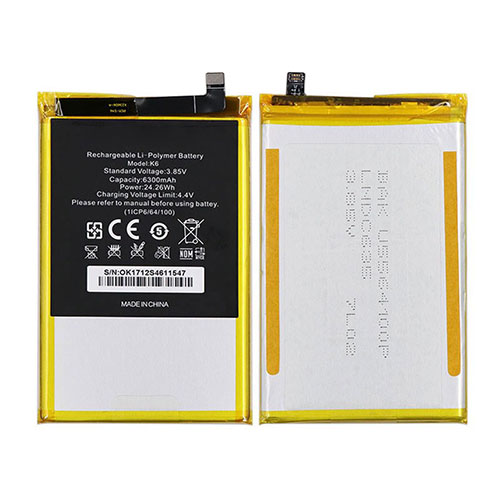
OUKITEL K6 Battery For OUKITEL – Battery For OUKITEL Cell Phone Li-ion 6300mAh/24.26WH 3.85V/4.4V. Browse our various categories and find out why we have been the go-to source for our customers.

K6
  • Chemistry: Li-ion
  • Voltage: 6300mAh/24.26WH
  • Capacity: 3.85V/4.4V

Free shipping in most countries. click here to view detailed shipping costs.

We ship to the worldwide,please enquiry shipping & handling if you are out of united states.

What’s the total delivery time? (please use this formula to determine when your order will arrive) total delivery time = packaging time + shipping time.

Replaces the following products:

Fits the following devices:

OUKITEL K6

OUKITEL K6 OUKITEL battery is replacement for OUKITEL K6. The K6 batteries equivalent is guaranteed to meet or exceed OUKITEL original specifications. All OUKITEL K6 Battery are brand new, 1 year Warranty, 100% Guarantee Quality and Fully Test!

We deliver quality OUKITEL Cell Phone extended batteries online. Purchase your OUKITEL Cell Phone battery here.

OUKITEL K6 OUKITEL Batteries

  • 100% OEM Compatible with your OUKITEL Cell Phone.
  • Lithium Ion battery technology
  • Convenient and secure online purchasing
  • Dependable high quality OUKITEL batteries
  • Satisfaction guaranteed or your money back
  • 1 Year Warranty on all OUKITEL Cell Phone Replacement Batteries

6 tips to increase K6 OUKITEL Battery lifetime

The performance of your OUKITEL depends largely on the performance of your battery. And his time of life depends on its users, and that you are. These are the principles that have guided the OUKITEL , at the head, so you can optimize the performance of OUKITEL Cell Phone battery.
New battery still fully charged K6 sold. You must be on the first wheel to be conditioned for optimum performance. Loading and unloading of the battery 4 or 5 times is enough to determine.
The memory effect completely to avoid a full charge and discharge the battery, OUKITEL K6 twice a month.
The dirt on the OUKITEL K6 contacts of the battery can power the OUKITEL Cell Phone batteries. Clean with alcohol and cotton can look like and function like new.
This method is recommended for those using the AC adapter for long periods. We recommend that you use the OUKITEL K6 battery at least once in two weeks. Batteries lose its charge when stored for a long time and you need the battery if it does break.
If he does not use a length of time, the OUKITEL K6 battery will be stored protected from a clean, dry and cool, heat and other metals. A loss of business to charge the battery in time and need a break before reuse.
Power Management Features Battery K6 enable the conservation of energy in the battery of OUKITEL Cell Phone. You can control the speed of the processor off, or you can adjust the brightness of the LCD screen to a minimum to ensure low power consumption. 

Why we have been the go-to source for our customers ?

We stock a wide range of rechargeable batteries for OUKITEL Cell Phone. Your OUKITEL Tablet PC is part of your everyday life. Successful communications on a OUKITEL begin with your battery. When purchasing a replacement battery for your OUKITEL OUKITEL, dependability and price are what we have to offer. We’ve been supplying reliable, high quality OUKITEL batteries for over 10 years. Our goal is to provide high quality aftermarket replacement batteries at a very reasonable price. All of our rechargeable Li-Ion OUKITEL batteries are backed by a one year warranty.

What is the run time of OUKITEL battery?

OUKITEL batteries have two main ratings on them: Volts and Amperes. Because size and weight of batteries is limited when compared to larger batteries such as car batteries, most companies show their ratings with Volts and Milliamperes. One thousand Milliamperes equals 1 Ampere. When buying a battery, select batteries with the most Milliamperes (or mAh). Batteries are also rated by Watt-Hours, perhaps the simplest rating of all. This is found by multiplying the Volts and the Amperes together. For example:

  • 14.4 Volts, 4000mAh (Note: 4000mAh is equal to 4.0 Amperes).
  • 14.4 x 4.0 = 57.60 Watt-Hours

Watt-Hours signifies the energy needed to power one watt for one hour.

Battery S5420AP Replacement For NOKIA Cell Phone Nokia S5420AP

Find the right battery for Nokia S5420AP to solve your power issues. Our NOKIA S5420AP batteries are manufactured to precisely fit just as your original battery.

We use the highest quality Li-ion cells and components that are lighter weight, charge faster and last longer.

US NOKIA battery shop – Tech-Battery.com ! Shopping with us is safe and secure! 100% Guarantee Quality and Fully Test!

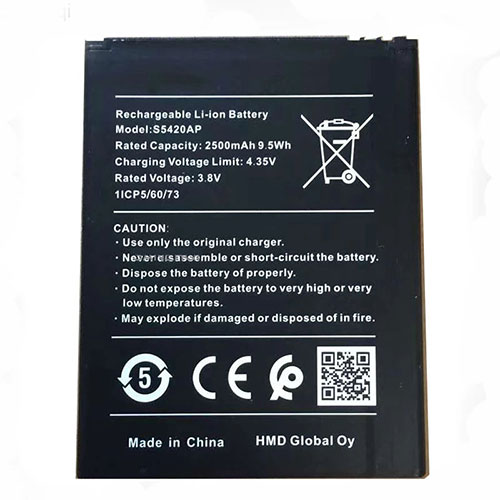
NOKIA S5420AP Battery For NOKIA – Battery For NOKIA Cell Phone Li-ion 2500mAh/9.5WH 3.8V/4.35V. Browse our various categories and find out why we have been the go-to source for our customers.

S5420AP
  • Chemistry: Li-ion
  • Voltage: 2500mAh/9.5WH
  • Capacity: 3.8V/4.35V

Free shipping in most countries. click here to view detailed shipping costs.

We ship to the worldwide,please enquiry shipping & handling if you are out of united states.

What’s the total delivery time? (please use this formula to determine when your order will arrive) total delivery time = packaging time + shipping time.

Replaces the following products:

Fits the following devices:

Nokia S5420AP

NOKIA S5420AP NOKIA battery is replacement for Nokia S5420AP. The S5420AP batteries equivalent is guaranteed to meet or exceed NOKIA original specifications. All NOKIA S5420AP Battery are brand new, 1 year Warranty, 100% Guarantee Quality and Fully Test!

We deliver quality NOKIA Cell Phone extended batteries online. Purchase your NOKIA Cell Phone battery here.

NOKIA S5420AP NOKIA Batteries

  • 100% OEM Compatible with your NOKIA Cell Phone.
  • Lithium Ion battery technology
  • Convenient and secure online purchasing
  • Dependable high quality NOKIA batteries
  • Satisfaction guaranteed or your money back
  • 1 Year Warranty on all NOKIA Cell Phone Replacement Batteries

6 tips to increase S5420AP NOKIA Battery lifetime

The performance of your NOKIA depends largely on the performance of your battery. And his time of life depends on its users, and that you are. These are the principles that have guided the NOKIA , at the head, so you can optimize the performance of NOKIA Cell Phone battery.
New battery still fully charged S5420AP sold. You must be on the first wheel to be conditioned for optimum performance. Loading and unloading of the battery 4 or 5 times is enough to determine.
The memory effect completely to avoid a full charge and discharge the battery, NOKIA S5420AP twice a month.
The dirt on the NOKIA S5420AP contacts of the battery can power the NOKIA Cell Phone batteries. Clean with alcohol and cotton can look like and function like new.
This method is recommended for those using the AC adapter for long periods. We recommend that you use the NOKIA S5420AP battery at least once in two weeks. Batteries lose its charge when stored for a long time and you need the battery if it does break.
If he does not use a length of time, the NOKIA S5420AP battery will be stored protected from a clean, dry and cool, heat and other metals. A loss of business to charge the battery in time and need a break before reuse.
Power Management Features Battery S5420AP enable the conservation of energy in the battery of NOKIA Cell Phone. You can control the speed of the processor off, or you can adjust the brightness of the LCD screen to a minimum to ensure low power consumption. 

Why we have been the go-to source for our customers ?

We stock a wide range of rechargeable batteries for NOKIA Cell Phone. Your NOKIA Tablet PC is part of your everyday life. Successful communications on a NOKIA begin with your battery. When purchasing a replacement battery for your NOKIA NOKIA, dependability and price are what we have to offer. We’ve been supplying reliable, high quality NOKIA batteries for over 10 years. Our goal is to provide high quality aftermarket replacement batteries at a very reasonable price. All of our rechargeable Li-Ion NOKIA batteries are backed by a one year warranty.

What is the run time of NOKIA battery?

NOKIA batteries have two main ratings on them: Volts and Amperes. Because size and weight of batteries is limited when compared to larger batteries such as car batteries, most companies show their ratings with Volts and Milliamperes. One thousand Milliamperes equals 1 Ampere. When buying a battery, select batteries with the most Milliamperes (or mAh). Batteries are also rated by Watt-Hours, perhaps the simplest rating of all. This is found by multiplying the Volts and the Amperes together. For example:

  • 14.4 Volts, 4000mAh (Note: 4000mAh is equal to 4.0 Amperes).
  • 14.4 x 4.0 = 57.60 Watt-Hours

Watt-Hours signifies the energy needed to power one watt for one hour.

Battery BN56 Replacement For Xiaomi Cell Phone Xiaomi Redmi 9A 9C POCO M2 Pro

Find the right battery for Xiaomi Redmi 9A 9C POCO M2 Pro to solve your power issues. Our Xiaomi BN56 batteries are manufactured to precisely fit just as your original battery.

We use the highest quality Li-ion cells and components that are lighter weight, charge faster and last longer.

US Xiaomi battery shop – Tech-Battery.com ! Shopping with us is safe and secure! 100% Guarantee Quality and Fully Test!

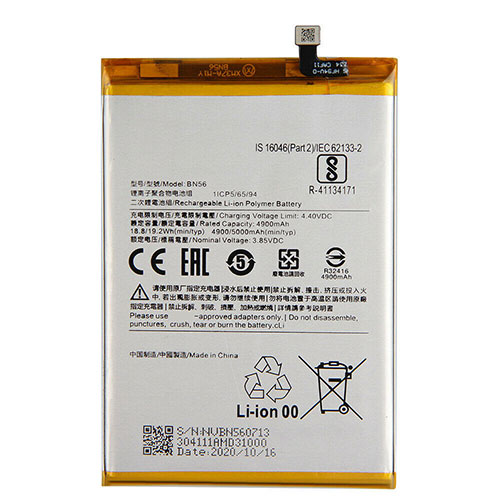
Xiaomi BN56 Battery For Xiaomi – Battery For Xiaomi Cell Phone Li-ion 4900mAh/18.8WH 3.85V/4.4V. Browse our various categories and find out why we have been the go-to source for our customers.

BN56
  • Chemistry: Li-ion
  • Voltage: 4900mAh/18.8WH
  • Capacity: 3.85V/4.4V

Free shipping in most countries. click here to view detailed shipping costs.

We ship to the worldwide,please enquiry shipping & handling if you are out of united states.

What’s the total delivery time? (please use this formula to determine when your order will arrive) total delivery time = packaging time + shipping time.

Replaces the following products:

Fits the following devices:

Xiaomi Redmi 9A 9C POCO M2 Pro

Xiaomi BN56 Xiaomi battery is replacement for Xiaomi Redmi 9A 9C POCO M2 Pro. The BN56 batteries equivalent is guaranteed to meet or exceed Xiaomi original specifications. All Xiaomi BN56 Battery are brand new, 1 year Warranty, 100% Guarantee Quality and Fully Test!

We deliver quality Xiaomi Cell Phone extended batteries online. Purchase your Xiaomi Cell Phone battery here.

Xiaomi BN56 Xiaomi Batteries

  • 100% OEM Compatible with your Xiaomi Cell Phone.
  • Lithium Ion battery technology
  • Convenient and secure online purchasing
  • Dependable high quality Xiaomi batteries
  • Satisfaction guaranteed or your money back
  • 1 Year Warranty on all Xiaomi Cell Phone Replacement Batteries

6 tips to increase BN56 Xiaomi Battery lifetime

The performance of your Xiaomi depends largely on the performance of your battery. And his time of life depends on its users, and that you are. These are the principles that have guided the Xiaomi , at the head, so you can optimize the performance of Xiaomi Cell Phone battery.
New battery still fully charged BN56 sold. You must be on the first wheel to be conditioned for optimum performance. Loading and unloading of the battery 4 or 5 times is enough to determine.
The memory effect completely to avoid a full charge and discharge the battery, Xiaomi BN56 twice a month.
The dirt on the Xiaomi BN56 contacts of the battery can power the Xiaomi Cell Phone batteries. Clean with alcohol and cotton can look like and function like new.
This method is recommended for those using the AC adapter for long periods. We recommend that you use the Xiaomi BN56 battery at least once in two weeks. Batteries lose its charge when stored for a long time and you need the battery if it does break.
If he does not use a length of time, the Xiaomi BN56 battery will be stored protected from a clean, dry and cool, heat and other metals. A loss of business to charge the battery in time and need a break before reuse.
Power Management Features Battery BN56 enable the conservation of energy in the battery of Xiaomi Cell Phone. You can control the speed of the processor off, or you can adjust the brightness of the LCD screen to a minimum to ensure low power consumption. 

Why we have been the go-to source for our customers ?

We stock a wide range of rechargeable batteries for Xiaomi Cell Phone. Your Xiaomi Tablet PC is part of your everyday life. Successful communications on a Xiaomi begin with your battery. When purchasing a replacement battery for your Xiaomi Xiaomi, dependability and price are what we have to offer. We’ve been supplying reliable, high quality Xiaomi batteries for over 10 years. Our goal is to provide high quality aftermarket replacement batteries at a very reasonable price. All of our rechargeable Li-Ion Xiaomi batteries are backed by a one year warranty.

What is the run time of Xiaomi battery?

Xiaomi batteries have two main ratings on them: Volts and Amperes. Because size and weight of batteries is limited when compared to larger batteries such as car batteries, most companies show their ratings with Volts and Milliamperes. One thousand Milliamperes equals 1 Ampere. When buying a battery, select batteries with the most Milliamperes (or mAh). Batteries are also rated by Watt-Hours, perhaps the simplest rating of all. This is found by multiplying the Volts and the Amperes together. For example:

  • 14.4 Volts, 4000mAh (Note: 4000mAh is equal to 4.0 Amperes).
  • 14.4 x 4.0 = 57.60 Watt-Hours

Watt-Hours signifies the energy needed to power one watt for one hour.

Asus RT-AX82U review

Two-minute review

Asus has a very extensive range of networking products, which includes its specialist Republic of Gamers (RoG) brand that offers seriously high-end gaming products, such as its Rapture router, which pushes the envelope at close to $530/£400/AU$700. 

The Asus RT-AX82U isn’t in quite the same league, but this dual-band Wi-Fi 6 router is still far faster than conventional 802.11ac routers and is designed to appeal to a more casual gaming audience, as well as providing additional features for busy households that need fast and reliable Wi-Fi.

You can’t buy the RT-AX82U direct from Asus, and the online pricing seems to be somewhat inconsistent, but Asus says the RRP is £180 ($230/AU$310), so it’s worth taking the time to shop around before buying. 

Asus has clearly got its eye on the latest gaming consoles and mobile devices that support Wi-Fi 6, but that’s still a competitive price for a next-gen router such as this, making the RT-AX82U an affordable upgrade even for non-gamers. 

And, of course, new Wi-Fi 6 routers are also compatible with older devices that still use the 802.11ac version of Wi-Fi, so you don’t have to worry about compatibility problems if you decide to upgrade your router.

Design and features

It may not fall under the Republic of Gamers banner, but the Asus RT-AX82U has certainly got the right look for a gaming router, with a low-profile, sharply angular design and four large antennae stabbing out from the back panel. And, on the front panel, there’s a pair of ‘eyes’ – two small LED panels that glow with smouldering colours. You can even use the Asus app to choose a variety of ‘auras’ that strobe through different colour sequences. 

Gaming gimmickry aside, the RT-AX82U gets all the basics right, offering dual-band Wi-Fi 6 (aka 802.11ax) with a top speed of 5400Mbps (5.4Gbps). 

There are faster Wi-Fi 6 routers – including the RoG Rapture which boasts a massive 11Gbps – but that’s a good speed for a router in this price range. The RT-AX82U doesn’t include a modem, so it provides a dedicated Gigabit Ethernet port for connecting to your existing modem or router in order to use your broadband connection. 

There are also four additional Gigabit Ethernet ports for devices, such as a games console or a smart-TV, that work better with a lag-free wired connection, with one of those being designated as the ‘gaming port and taking priority over devices connected to the other Ethernet ports. And, finally, there’s a single USB 3.1 port for sharing a USB storage device on your home network.

Set-up and performance

The Asus RT-AX82U strikes a good balance between ease-of-use for beginners, and advanced features for gamers and more experienced users. 

The printed manual included in the box gives you two options for setting the router up, with the quick and easy option being the Asus Router app for iOS and Android devices, while a more advanced web browser interface is also available for people who don’t mind delving more deeply into their wi-fi and network settings.

We started with the Asus Router app and were pleased to see that it starts by giving you the option of setting up separate networks on the 2.4GHz and 5.0GHz bands, or merging the two bands together into a single network. 

The only minor oddity here is that the router’s default Wi-Fi network isn’t initially protected by a password, so you need to move through the set-up process and assign a password fairly quickly in order to keep your new network secure.

Most people will find that the basic app provides all the features they need, including the ability to set up a guest network, and extensive parental controls that include content filters for a wide range of unsuitable material. 

There’s also a security feature called AiProtection that monitors your network for malware and hacking attempts from malicious web sites – and, thankfully, this doesn’t require an additional subscription as some routers do.

The Asus Router app provides a Mobile Gaming mode that prioritises mobile devices for maximum performance, but you can also select specific tasks, such as video streaming, that you might want to prioritise as well. And, if you’re prepared to delve into the web browser interface, you can select other devices for gaming priority, and even use that USB port to set up a hard drive for Time Machine back-ups on a Mac.

Performance is also very strong for a mid-price router such as this. Devices in the same room as the Asus RT-AX82U managed to coax our normal 100Mbps broadband connection up to 103Mbps using the Ookla speed test on both the 2.4GHz and 5.0GHz bands, with Steam downloads also impressively steady at 12.5MB/s on both bands. 

Moving further away to a back office didn’t faze the RT-AX82U either, with the 5.0GHz band having no trouble maintaining those speeds, while the slower 2.4GHz band dipped only slightly to 98Mbs on Ookla and 11.7MB/s for Steam downloads. 

It’s hard to fault that sort of performance at this price, and with the Asus app and browser interface providing versatile features and controls that are suitable for both gamers and non-gamers, the Asus RT-AX82U is an excellent option for any household that needs a fast and affordable Wi-Fi upgrade.

Buy it if…

You’re a casual gamer
The competitive price of the Asus RT-AX82U is very much intended to attract casual gamers who enjoy playing on consoles and mobile devices, especially with features such as the ‘Mobile Gaming’ mode that is specifically designed for iOS and Android devices.

You’ve got kids
There are lots of high-speed routers that fall down when it comes to parental controls. However, the RT-AX82U provides good controls for protecting your kids, including content filters for unsuitable material, and a scheduling option to limit the time your sprogs spend online.

You’re getting a new phone for Christmas
Existing devices that use 802.11ac Wi-Fi (aka Wi-Fi 5) will still work with new Wi-Fi 6 routers. However, you’ll need a new smartphone, tablet or other device that supports Wi-Fi 6 in order to get the full speed and other benefits of this next-gen Wi-Fi.

Don’t buy it if…

You’re on a budget
The RT-AX82U is good value for money, but if your broadband connection is less than 100Mbps then you probably don’t need the full speed of a Wi-Fi 6 router. There are plenty of less expensive 802.11ac routers that will handle your home broadband.

You’re not a gamer
Many of the features of the RT-AX82U are specifically designed for gaming. If you just want faster Wi-Fi for watching Netflix or Baby Yoda then a more conventional router – without glowing eyes and lots of pointy antennae – will do the trick.

Your gaming den needs a boost

If you’ve just got one room – such as a bedroom or gaming den – that has weak Wi-Fi then you might not need to buy an entirely new router. An affordable ‘range extender’ can boost your existing Wi-Fi network into an upstairs bedroom or downstairs den for less than $100.

MSI Introduces the Optix MAG301CR2 Widescreen Monitor

MSI has introduced a new version of its Optix MAG301CR widescreen monitor. This new version is called the Optix MAG301CR2 Widescreen monitor, which features a curvature of 1500R, a WFHD resolution, and a refresh rate of up to 200 Hz. MSI has already created a product page for this new monitor, listing some of its features.

The Optix MAG301CR2 Ultra-wide screen gaming monitor features a price of 30″ and a maximum refresh rate of up to 200 Hz

MSI has announced the Optix MAG301CR2 Ultra-Widescreen gaming monitor offering a WFHD resolution, a curvature of 1500R, and a 1 ms response time. This monitor has a maximum refresh rate of up to 200 Hz and HDR support, allowing for smooth gameplay and fantastic visuals. These technical specifications allow for this gaming monitor a perfect choice for any gaming setup. This monitor’s panel size is 29.5″ with a maximum brightness of 300 nits and support for FreeSync Premium, and this technology allows for smooth and tear-free while gaming at a refresh rate of up to 200 Hz.

The Optix MAG301CR2 gaming monitor offers Wide Color Gamut, which has more coverage than standard gaming monitors; this Wide Color Gamut allows for a much more immersive gaming experience, gameplay colors looking much more refined and realistic. This monitor also features HDR support, which produces images with more details and appears similar to what is seen by the human eye when compared to traditional monitors.

This monitor using a VA panel to supply both the high refresh rate and a 1 ms response time, making it perfect for gamers who enjoy first-person shoots, racing sims, and sports games. This gaming monitor’s included stand allows for height adjustment, tilt, swivel, and pivot adjustments, and this monitor also features 75 mm x 75 mm mounting holes. For connectivity, this monitor features a single DisplayPort 1.2, two HDMI 2.0 ports, and a single Type-C port; alongside the video inputs, there are two USB Type-A ports.

MSI has yet to release information regarding when the Optix MAG301CR2 gaming monitor will be available for purchase or this widescreen monitor’s price. This monitor will most likely be priced similarly to the MSI Optix MAG301CR gaming monitor, which features a price of $349.99 on Amazon.