Battery FC40 Replacement For Motorola Cell Phone Motorola Moto G 3rd Gen G3 XT1540 XT1548 XT1541

Find the right battery for Motorola Moto G 3rd Gen G3 XT1540 XT1548 XT1541 to solve your power issues. Our Motorola FC40 batteries are manufactured to precisely fit just as your original battery.

We use the highest quality Li-ion cells and components that are lighter weight, charge faster and last longer.

US Motorola battery shop – Tech-Battery.com ! Shopping with us is safe and secure! 100% Guarantee Quality and Fully Test!

Motorola FC40 Battery For Motorola – Battery For Motorola Cell Phone Li-ion 2315mAh 3.8V/4.2V. Browse our various categories and find out why we have been the go-to source for our customers.
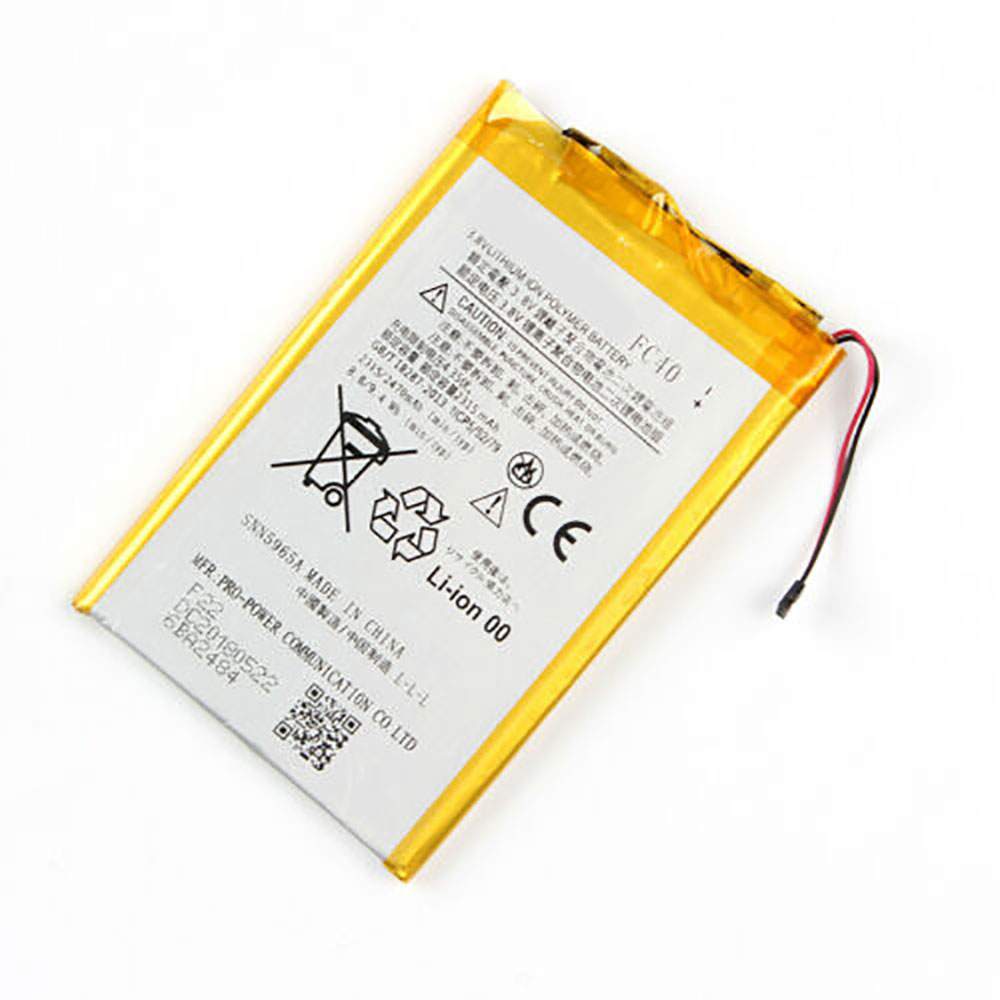
FC40
  • Chemistry: Li-ion
  • Voltage: 2315mAh
  • Capacity: 3.8V/4.2V

Free shipping in most countries. click here to view detailed shipping costs.

We ship to the worldwide,please enquiry shipping & handling if you are out of united states.

What’s the total delivery time? (please use this formula to determine when your order will arrive) total delivery time = packaging time + shipping time.

Replaces the following products:

Fits the following devices:

Motorola Moto G 3rd Gen G3 XT1540 XT1548 XT1541

Motorola FC40 Motorola battery is replacement for Motorola Moto G 3rd Gen G3 XT1540 XT1548 XT1541. The FC40 batteries equivalent is guaranteed to meet or exceed Motorola original specifications. All Motorola FC40 Battery are brand new, 1 year Warranty, 100% Guarantee Quality and Fully Test!

We deliver quality Motorola Cell Phone extended batteries online. Purchase your Motorola Cell Phone battery here.

Motorola FC40 Motorola Batteries

  • 100% OEM Compatible with your Motorola Cell Phone.
  • Lithium Ion battery technology
  • Convenient and secure online purchasing
  • Dependable high quality Motorola batteries
  • Satisfaction guaranteed or your money back
  • 1 Year Warranty on all Motorola Cell Phone Replacement Batteries

6 tips to increase FC40 Motorola Battery lifetime

The performance of your Motorola depends largely on the performance of your battery. And his time of life depends on its users, and that you are. These are the principles that have guided the Motorola , at the head, so you can optimize the performance of Motorola Cell Phone battery.
New battery still fully charged FC40 sold. You must be on the first wheel to be conditioned for optimum performance. Loading and unloading of the battery 4 or 5 times is enough to determine.
The memory effect completely to avoid a full charge and discharge the battery, Motorola FC40 twice a month.
The dirt on the Motorola FC40 contacts of the battery can power the Motorola Cell Phone batteries. Clean with alcohol and cotton can look like and function like new.
This method is recommended for those using the AC adapter for long periods. We recommend that you use the Motorola FC40 battery at least once in two weeks. Batteries lose its charge when stored for a long time and you need the battery if it does break.
If he does not use a length of time, the Motorola FC40 battery will be stored protected from a clean, dry and cool, heat and other metals. A loss of business to charge the battery in time and need a break before reuse.
Power Management Features Battery FC40 enable the conservation of energy in the battery of Motorola Cell Phone. You can control the speed of the processor off, or you can adjust the brightness of the LCD screen to a minimum to ensure low power consumption. 

Why we have been the go-to source for our customers ?

We stock a wide range of rechargeable batteries for Motorola Cell Phone. Your Motorola Tablet PC is part of your everyday life. Successful communications on a Motorola begin with your battery. When purchasing a replacement battery for your Motorola Motorola, dependability and price are what we have to offer. We’ve been supplying reliable, high quality Motorola batteries for over 10 years. Our goal is to provide high quality aftermarket replacement batteries at a very reasonable price. All of our rechargeable Li-Ion Motorola batteries are backed by a one year warranty.

What is the run time of Motorola battery?

Motorola batteries have two main ratings on them: Volts and Amperes. Because size and weight of batteries is limited when compared to larger batteries such as car batteries, most companies show their ratings with Volts and Milliamperes. One thousand Milliamperes equals 1 Ampere. When buying a battery, select batteries with the most Milliamperes (or mAh). Batteries are also rated by Watt-Hours, perhaps the simplest rating of all. This is found by multiplying the Volts and the Amperes together. For example:

  • 14.4 Volts, 4000mAh (Note: 4000mAh is equal to 4.0 Amperes).
  • 14.4 x 4.0 = 57.60 Watt-Hours

Watt-Hours signifies the energy needed to power one watt for one hour.
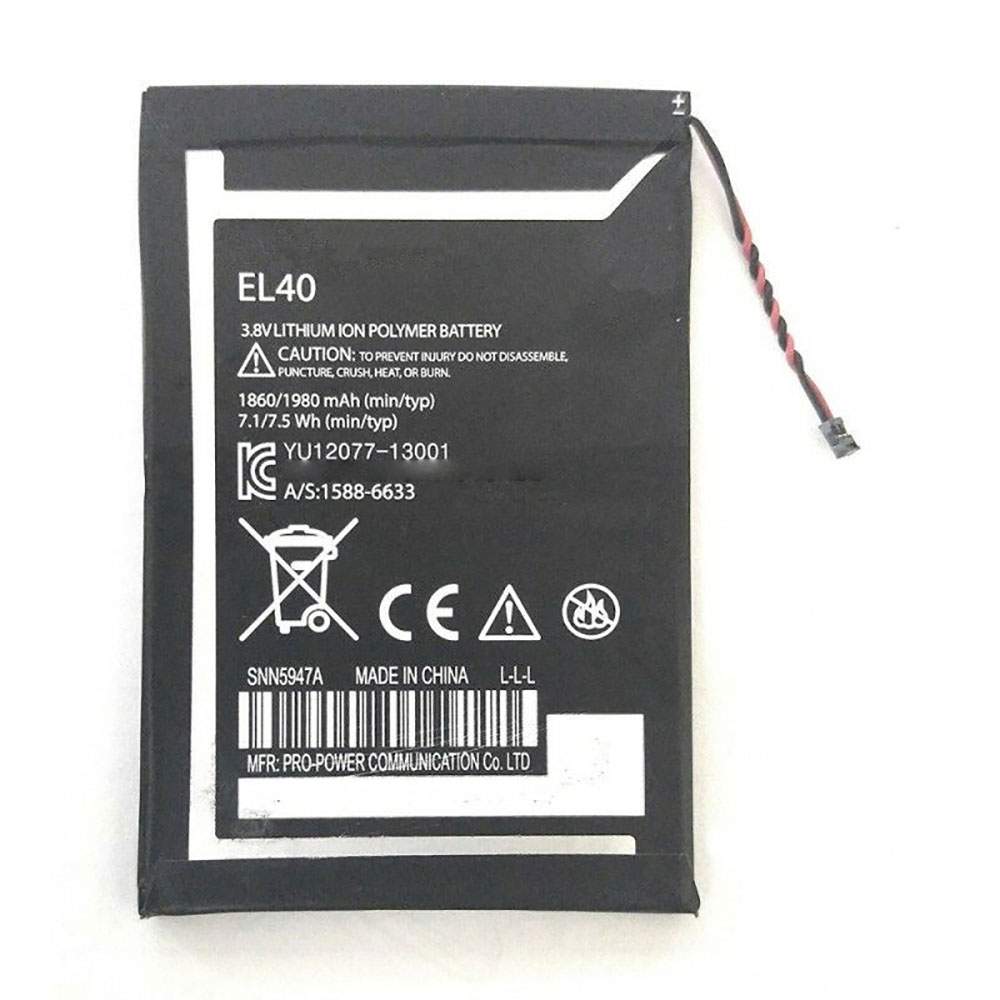
Battery EL40 Replacement For Motorola Cell Phone Motorola E 1st Gen XT1021 XT1022 XT1025 XT830C

Find the right battery for Motorola E 1st Gen XT1021 XT1022 XT1025 XT830C to solve your power issues. Our Motorola EL40 batteries are manufactured to precisely fit just as your original battery.

We use the highest quality Li-ion cells and components that are lighter weight, charge faster and last longer.

US Motorola battery shop – Tech-Battery.com ! Shopping with us is safe and secure! 100% Guarantee Quality and Fully Test!

Motorola EL40 Battery For Motorola – Battery For Motorola Cell Phone Li-ion 1980mAh 3.8V/4.3V. Browse our various categories and find out why we have been the go-to source for our customers.

EL40
  • Chemistry: Li-ion
  • Voltage: 1980mAh
  • Capacity: 3.8V/4.3V

Free shipping in most countries. click here to view detailed shipping costs.

We ship to the worldwide,please enquiry shipping & handling if you are out of united states.

What’s the total delivery time? (please use this formula to determine when your order will arrive) total delivery time = packaging time + shipping time.

Replaces the following products:

Fits the following devices:

Motorola E 1st Gen XT1021 XT1022 XT1025 XT830C

Motorola EL40 Motorola battery is replacement for Motorola E 1st Gen XT1021 XT1022 XT1025 XT830C. The EL40 batteries equivalent is guaranteed to meet or exceed Motorola original specifications. All Motorola EL40 Battery are brand new, 1 year Warranty, 100% Guarantee Quality and Fully Test!

We deliver quality Motorola Cell Phone extended batteries online. Purchase your Motorola Cell Phone battery here.

Motorola EL40 Motorola Batteries

  • 100% OEM Compatible with your Motorola Cell Phone.
  • Lithium Ion battery technology
  • Convenient and secure online purchasing
  • Dependable high quality Motorola batteries
  • Satisfaction guaranteed or your money back
  • 1 Year Warranty on all Motorola Cell Phone Replacement Batteries

6 tips to increase EL40 Motorola Battery lifetime

The performance of your Motorola depends largely on the performance of your battery. And his time of life depends on its users, and that you are. These are the principles that have guided the Motorola , at the head, so you can optimize the performance of Motorola Cell Phone battery.
New battery still fully charged EL40 sold. You must be on the first wheel to be conditioned for optimum performance. Loading and unloading of the battery 4 or 5 times is enough to determine.
The memory effect completely to avoid a full charge and discharge the battery, Motorola EL40 twice a month.
The dirt on the Motorola EL40 contacts of the battery can power the Motorola Cell Phone batteries. Clean with alcohol and cotton can look like and function like new.
This method is recommended for those using the AC adapter for long periods. We recommend that you use the Motorola EL40 battery at least once in two weeks. Batteries lose its charge when stored for a long time and you need the battery if it does break.
If he does not use a length of time, the Motorola EL40 battery will be stored protected from a clean, dry and cool, heat and other metals. A loss of business to charge the battery in time and need a break before reuse.
Power Management Features Battery EL40 enable the conservation of energy in the battery of Motorola Cell Phone. You can control the speed of the processor off, or you can adjust the brightness of the LCD screen to a minimum to ensure low power consumption. 

Why we have been the go-to source for our customers ?

We stock a wide range of rechargeable batteries for Motorola Cell Phone. Your Motorola Tablet PC is part of your everyday life. Successful communications on a Motorola begin with your battery. When purchasing a replacement battery for your Motorola Motorola, dependability and price are what we have to offer. We’ve been supplying reliable, high quality Motorola batteries for over 10 years. Our goal is to provide high quality aftermarket replacement batteries at a very reasonable price. All of our rechargeable Li-Ion Motorola batteries are backed by a one year warranty.

What is the run time of Motorola battery?

Motorola batteries have two main ratings on them: Volts and Amperes. Because size and weight of batteries is limited when compared to larger batteries such as car batteries, most companies show their ratings with Volts and Milliamperes. One thousand Milliamperes equals 1 Ampere. When buying a battery, select batteries with the most Milliamperes (or mAh). Batteries are also rated by Watt-Hours, perhaps the simplest rating of all. This is found by multiplying the Volts and the Amperes together. For example:

  • 14.4 Volts, 4000mAh (Note: 4000mAh is equal to 4.0 Amperes).
  • 14.4 x 4.0 = 57.60 Watt-Hours

Watt-Hours signifies the energy needed to power one watt for one hour.
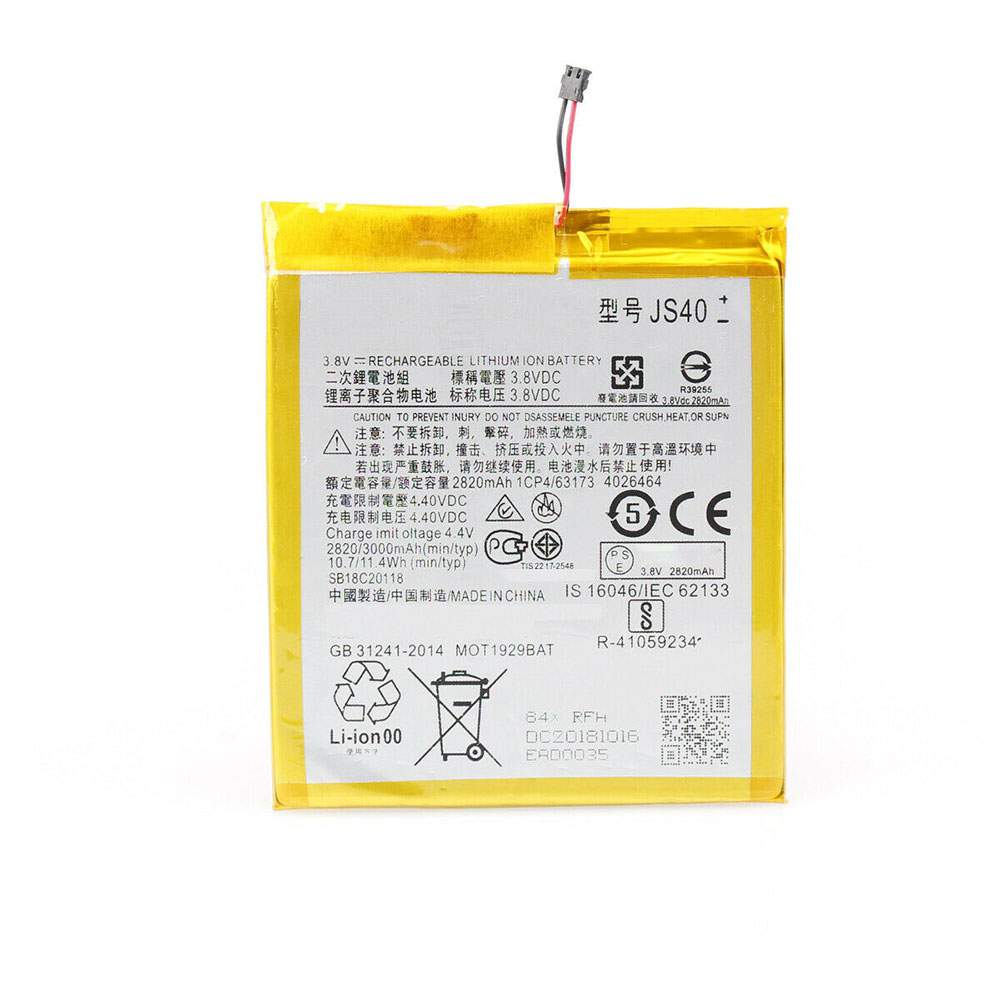
Battery JS40 Replacement For Motorola Cell Phone Motorola Moto Z3 Play XT1929-1 XT1929-4 XT1929-5 XT1929-6 ect

Find the right battery for Motorola Moto Z3 Play XT1929-1 XT1929-4 XT1929-5 XT1929-6 ect to solve your power issues. Our Motorola JS40 batteries are manufactured to precisely fit just as your original battery.

We use the highest quality Li-ion cells and components that are lighter weight, charge faster and last longer.

US Motorola battery shop – Tech-Battery.com ! Shopping with us is safe and secure! 100% Guarantee Quality and Fully Test!

Motorola JS40 Battery For Motorola – Battery For Motorola Cell Phone Li-ion 2820mAh 3.8V/4.4V. Browse our various categories and find out why we have been the go-to source for our customers.

JS40
  • Chemistry: Li-ion
  • Voltage: 2820mAh
  • Capacity: 3.8V/4.4V

Free shipping in most countries. click here to view detailed shipping costs.

We ship to the worldwide,please enquiry shipping & handling if you are out of united states.

What’s the total delivery time? (please use this formula to determine when your order will arrive) total delivery time = packaging time + shipping time.

Replaces the following products:

Fits the following devices:

Motorola Moto Z3 Play XT1929-1 XT1929-4 XT1929-5 XT1929-6 ect

Motorola JS40 Motorola battery is replacement for Motorola Moto Z3 Play XT1929-1 XT1929-4 XT1929-5 XT1929-6 ect. The JS40 batteries equivalent is guaranteed to meet or exceed Motorola original specifications. All Motorola JS40 Battery are brand new, 1 year Warranty, 100% Guarantee Quality and Fully Test!

We deliver quality Motorola Cell Phone extended batteries online. Purchase your Motorola Cell Phone battery here.

Motorola JS40 Motorola Batteries

  • 100% OEM Compatible with your Motorola Cell Phone.
  • Lithium Ion battery technology
  • Convenient and secure online purchasing
  • Dependable high quality Motorola batteries
  • Satisfaction guaranteed or your money back
  • 1 Year Warranty on all Motorola Cell Phone Replacement Batteries

6 tips to increase JS40 Motorola Battery lifetime

The performance of your Motorola depends largely on the performance of your battery. And his time of life depends on its users, and that you are. These are the principles that have guided the Motorola , at the head, so you can optimize the performance of Motorola Cell Phone battery.
New battery still fully charged JS40 sold. You must be on the first wheel to be conditioned for optimum performance. Loading and unloading of the battery 4 or 5 times is enough to determine.
The memory effect completely to avoid a full charge and discharge the battery, Motorola JS40 twice a month.
The dirt on the Motorola JS40 contacts of the battery can power the Motorola Cell Phone batteries. Clean with alcohol and cotton can look like and function like new.
This method is recommended for those using the AC adapter for long periods. We recommend that you use the Motorola JS40 battery at least once in two weeks. Batteries lose its charge when stored for a long time and you need the battery if it does break.
If he does not use a length of time, the Motorola JS40 battery will be stored protected from a clean, dry and cool, heat and other metals. A loss of business to charge the battery in time and need a break before reuse.
Power Management Features Battery JS40 enable the conservation of energy in the battery of Motorola Cell Phone. You can control the speed of the processor off, or you can adjust the brightness of the LCD screen to a minimum to ensure low power consumption. 

Why we have been the go-to source for our customers ?

We stock a wide range of rechargeable batteries for Motorola Cell Phone. Your Motorola Tablet PC is part of your everyday life. Successful communications on a Motorola begin with your battery. When purchasing a replacement battery for your Motorola Motorola, dependability and price are what we have to offer. We’ve been supplying reliable, high quality Motorola batteries for over 10 years. Our goal is to provide high quality aftermarket replacement batteries at a very reasonable price. All of our rechargeable Li-Ion Motorola batteries are backed by a one year warranty.

What is the run time of Motorola battery?

Motorola batteries have two main ratings on them: Volts and Amperes. Because size and weight of batteries is limited when compared to larger batteries such as car batteries, most companies show their ratings with Volts and Milliamperes. One thousand Milliamperes equals 1 Ampere. When buying a battery, select batteries with the most Milliamperes (or mAh). Batteries are also rated by Watt-Hours, perhaps the simplest rating of all. This is found by multiplying the Volts and the Amperes together. For example:

  • 14.4 Volts, 4000mAh (Note: 4000mAh is equal to 4.0 Amperes).
  • 14.4 x 4.0 = 57.60 Watt-Hours

Watt-Hours signifies the energy needed to power one watt for one hour.
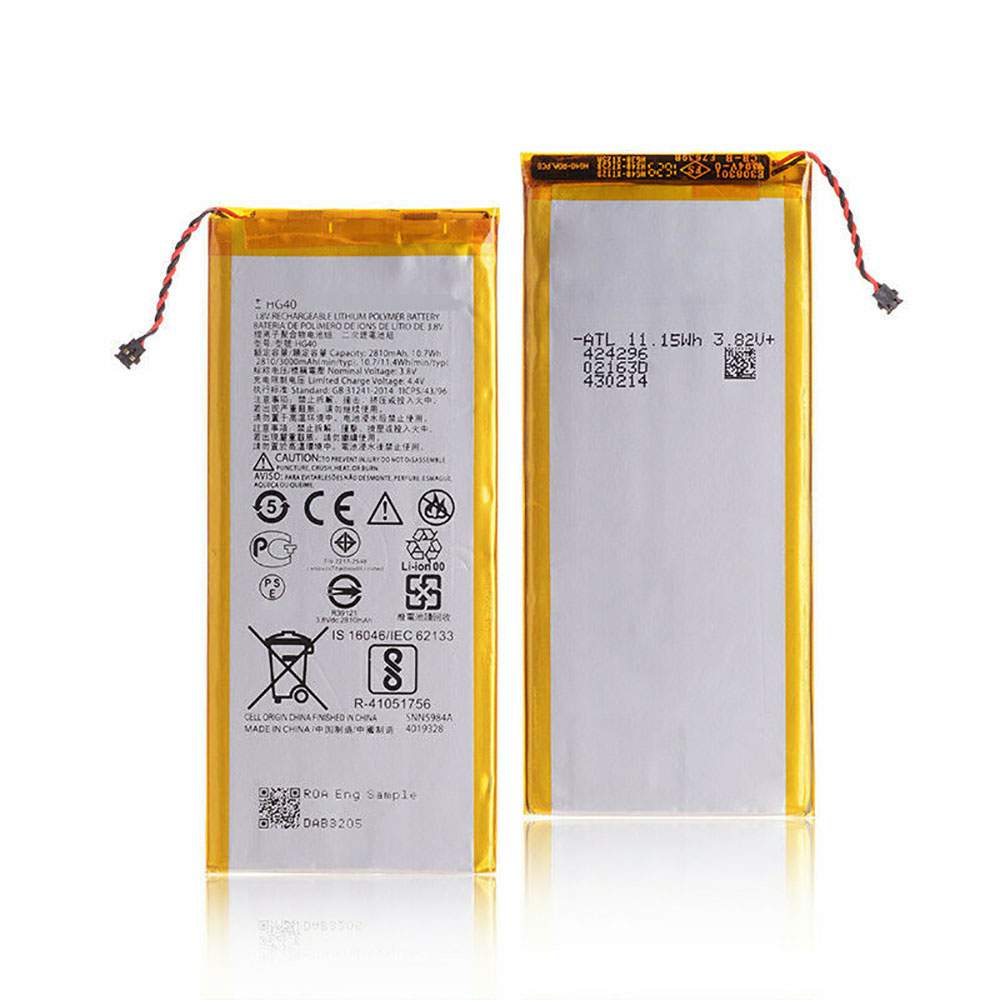
Battery HG40 Replacement For Motorola Cell Phone Motorola Moto G5 Plus XT1684 XT1685 XT1687

Find the right battery for Motorola Moto G5 Plus XT1684 XT1685 XT1687 to solve your power issues. Our Motorola HG40 batteries are manufactured to precisely fit just as your original battery.

We use the highest quality Li-ion cells and components that are lighter weight, charge faster and last longer.

US Motorola battery shop – Tech-Battery.com ! Shopping with us is safe and secure! 100% Guarantee Quality and Fully Test!

Motorola HG40 Battery For Motorola – Battery For Motorola Cell Phone Li-ion 2810MAH 3.8V/4.4V. Browse our various categories and find out why we have been the go-to source for our customers.

HG40
  • Chemistry: Li-ion
  • Voltage: 2810MAH
  • Capacity: 3.8V/4.4V

Free shipping in most countries. click here to view detailed shipping costs.

We ship to the worldwide,please enquiry shipping & handling if you are out of united states.

What’s the total delivery time? (please use this formula to determine when your order will arrive) total delivery time = packaging time + shipping time.

Replaces the following products:

Fits the following devices:

Motorola Moto G5 Plus XT1684 XT1685 XT1687

Motorola HG40 Motorola battery is replacement for Motorola Moto G5 Plus XT1684 XT1685 XT1687. The HG40 batteries equivalent is guaranteed to meet or exceed Motorola original specifications. All Motorola HG40 Battery are brand new, 1 year Warranty, 100% Guarantee Quality and Fully Test!

We deliver quality Motorola Cell Phone extended batteries online. Purchase your Motorola Cell Phone battery here.

Motorola HG40 Motorola Batteries

  • 100% OEM Compatible with your Motorola Cell Phone.
  • Lithium Ion battery technology
  • Convenient and secure online purchasing
  • Dependable high quality Motorola batteries
  • Satisfaction guaranteed or your money back
  • 1 Year Warranty on all Motorola Cell Phone Replacement Batteries

6 tips to increase HG40 Motorola Battery lifetime

The performance of your Motorola depends largely on the performance of your battery. And his time of life depends on its users, and that you are. These are the principles that have guided the Motorola , at the head, so you can optimize the performance of Motorola Cell Phone battery.
New battery still fully charged HG40 sold. You must be on the first wheel to be conditioned for optimum performance. Loading and unloading of the battery 4 or 5 times is enough to determine.
The memory effect completely to avoid a full charge and discharge the battery, Motorola HG40 twice a month.
The dirt on the Motorola HG40 contacts of the battery can power the Motorola Cell Phone batteries. Clean with alcohol and cotton can look like and function like new.
This method is recommended for those using the AC adapter for long periods. We recommend that you use the Motorola HG40 battery at least once in two weeks. Batteries lose its charge when stored for a long time and you need the battery if it does break.
If he does not use a length of time, the Motorola HG40 battery will be stored protected from a clean, dry and cool, heat and other metals. A loss of business to charge the battery in time and need a break before reuse.
Power Management Features Battery HG40 enable the conservation of energy in the battery of Motorola Cell Phone. You can control the speed of the processor off, or you can adjust the brightness of the LCD screen to a minimum to ensure low power consumption. 

Why we have been the go-to source for our customers ?

We stock a wide range of rechargeable batteries for Motorola Cell Phone. Your Motorola Tablet PC is part of your everyday life. Successful communications on a Motorola begin with your battery. When purchasing a replacement battery for your Motorola Motorola, dependability and price are what we have to offer. We’ve been supplying reliable, high quality Motorola batteries for over 10 years. Our goal is to provide high quality aftermarket replacement batteries at a very reasonable price. All of our rechargeable Li-Ion Motorola batteries are backed by a one year warranty.

What is the run time of Motorola battery?

Motorola batteries have two main ratings on them: Volts and Amperes. Because size and weight of batteries is limited when compared to larger batteries such as car batteries, most companies show their ratings with Volts and Milliamperes. One thousand Milliamperes equals 1 Ampere. When buying a battery, select batteries with the most Milliamperes (or mAh). Batteries are also rated by Watt-Hours, perhaps the simplest rating of all. This is found by multiplying the Volts and the Amperes together. For example:

  • 14.4 Volts, 4000mAh (Note: 4000mAh is equal to 4.0 Amperes).
  • 14.4 x 4.0 = 57.60 Watt-Hours

Watt-Hours signifies the energy needed to power one watt for one hour.

ZOTAC introduces new mini PCs ahead of CES 2020

We’ve already seen a few announcements from big companies ahead of CES 2020, but smaller hardware vendors also have things to show off. ZOTAC, the Hong Kong manufacturer of PC components as well as its own PCs, has expanded its lineup of mini PCs ahead of the event.

There are plenty of new products, starting with a brand new line called Inspire Studio, which is aimed at media creators. It’s a white box with a desktop variant ZOTAC’s own variants of GeForce RTX SUPER cards, as well as 65W 8-core Intel processors up to a Core i7, though the generation is not specified. The PC has 32GB of RAM, 512GB of SSD storage, a 2TB HDD, dual Ethernet connectivity, and Wi-Fi 6 support. It comes with Windows 10 Pro.

Next up us the new ZBOX edge line, an “ultra-thin form factor”, which has up to an Intel Core i5. There are two devices in this line, starting with the ZBOX M series edge MI643. It’s 1.12 inches (28.5mm) thick, one of the thinnest with an Intel Core processor. The chassis has plenty of ventilation holes, and it can be mounted on a wall with VESA mounts. It has 802.11ac Wi-Fi, Bluetooth 5, and dual gigabit Ethernet ports. It has up to 64GB of DDR4 memory and has two M.2 SSD slots for storage.

Then there’s the ZBOX C series edge CI341, which is similar, except it’s passively cooled. It’s slightly larger, with 1.26 inches (32.1mm) of thickness, and it’s not as powerful, with a Celeron N4100 processor.

ZOTAC is also renewing the MAGNUS lineup with GeForce RTX SUPER graphics. In addition to desktop-size of its own RTX SUPER cards, the MAGNUS EC72070S and EC52060S have 45W Intel Core i5 or i7 processors – also lacking any sort of generational denomination currently -, and up to 64GB of DDR4 RAM. The MAGNUS EN92080V opts for an RTX 2080, but comes with an Intel Core i9 processor instead.

The ZBOX nano lineup is also getting a refresh, and for the first time since 2015, there are models available with AMD CPUs. The two models are the ZBOX M Series MA621 nano and the ZBOX C series CA621 nano, which are the same except the M series model is actively cooled, while the C series model relies on passive cooling. They’re both powered by the AMD Ryzen 3 3200U with Radeon Vega 3 graphics, or by your choice of 10th-generation 15W Intel Core processors, all the way up to a Core i7.

Finally, ZOTAC is announcing the VR GO 3.0 backpack PC, featuring an RTX 2070 GPU and an Intel Core i7 processor. It comes in a similar design to the VR GO 2.0, but now with support for SPECTRA 2.0 RGB. The backpack uses sweatproof material to make maintenance easier.

All of these products will be available to check out at CES 2020, but ZOTAC’s announcement didn’t include pricing or availability details.

MSI launches the 27″ Optix MAG272QR Gaming Monitor, 1440p & 165Hz

MSI has added a new monitor to the current line of MAG gaming displays, the Optix MAG272QR. This monitor features a VA panel with a WQHD 2560×1440 resolution and a speedy 1 ms response time. This faster response time, along with the higher resolution and a 165 Hz refresh rate, makes this monitor a good choice for gamers for a price of $349.99.

The Optix MAG272QR is a fantastic 27-inch, 1440p monitor for $349.

The features of this monitor are:

165 Hz refresh rate This monitor offers a refresh rate of 165 Hz, which has an increased benefit in fast-moving game genres such as FPS (or first-person shooter), fighters, and sports. These types of games require swift and precise movement, which an ultra-high refresh rate monitor will give you an advantage.

This monitor also offers AMD Freesynce technology, which syncs the monitors refresh rate to your AMD GPU, which eliminates screen tearing and screen stuttering.

WQHD resolution This 27″ monitor has an excellent resolution of 2560 x 1440, and this allows for much finer details while playing the games or watching movies.

Being just 2 ft away from the monitor, you will see a significant increase in picture quality if you are moving up from a 1080p monitor.

Mystic Light The Optix gaming monitor’s RGB lights provide a soft ambient light that can be synced with other MSI products that offer RGB lights.

These lights can be changed and selected through both the MSI app and the software itself.

Gaming OSD Ease of use This software allows the player to control the monitor’s settings using the keyboard and mouse.

Link to profile This software also allows specific settings to be saved as presets and linked to certain games, and this means that the next time the game is loaded up, these settings will be set, creating much less work for the end-user.

Hotkey This software allows for the brightness level, crosshair, and the blackness tuner to be configured in-game by setting a hotkey.

Split window The split window software allows more than one window to be open at any given point.

Remote display The remote display features allow you to not only turn your monitor on and off from your phone but also allows you to change the input from the same app on your phone.

Those are just some of the features of this monitor, and the Optix MAG272QR is a monitor that would be perfect for any gaming setup as long as you can afford the $349.99 on Amazon.

Intel Xe DG1 GPU might not be so discrete a graphics card after all

One of the most important specs for the first Intel Xe discrete graphics card, the DG1, has now been confirmed by development kit listed on the EEC database. The post confirms the rumoured 96 execution units previously speculated as the base configuration for the initial Xe GPU, the same as has been found in the upcoming top Tiger Lake processors.

The Intel Xe graphics cards are launching this year. It’s pretty wild being able to type that safe in the knowledge that it’s probably true. The first of the Intel Xe discrete GPUs will appear on the the DG1 card expected to be released in the summer. And, with the latest iterations of development kits looking closer to final launch spec cards, it definitely seem like Intel is still on track to deliver by the middle of 2020.

Interestingly, the latest listings (via Komachi) don’t just detail the individual DG1 cards going out to developers in the wild, there are also two full software development platform kits too. One with an eight-core CPU and another with a six-core chip inside it. And that could suggest something far more interesting than Xe’s DG1 being just another low-end graphics card…

The solo DG1 developer kit makes sense, enabling folk to create software or driver stacks for their systems that work with Intel’s new discrete GPU. But why would Intel need to ship out software development platforms (SDP) with both an eight-core and a six-core CPU? My suggestion is that it’s because these are unreleased processors designed to work especially well with the new GPU architecture. Maybe those are engineering samples of eight- and six-core Tiger Lake CPUs, and maybe the Xe GPU isn’t always quite as discrete as we once thought.

We’ve previously seen Intel developers talking about having to rewrite driver code to support multiple GPUs, which has lead to speculation that multi-GPU support could be the killer feature for Intel’s Xe graphics card. If you can double the available GPU hardware by seamlessly linking the DG1’s 96 execution units with a Tiger Lake CPU’s own 96 EUs then you’re looking at a far more tantalising gaming prospect.

That could make both the Tiger Lake CPUs and Xe GPUs far more attractive options if they’re both better together. A 192 EU graphics pool could make for a genuinely powerful array for high-end 1080p gaming. It probably needs to be said that this isn’t really a desktop platform – Intel’s Tiger Lake is the successor to the current 10nm Ice Lake mobile range. But pairing these laptop chips with a Xe GPU could make for a genuinely powerful little gaming ultrabook setup.

The Intel DG1 chip is said to be designed with a 25W TDP, and if that little extra juice enables you to double your graphics array you could end up with some tasty little notebooks with serious gaming chops. And if Intel wants to wrest the mid-range gaming laptop market away from either Nvidia or AMD then offering the Xe GPU for a bargain price to bolster design wins seems like a smart play.

A 96 EU discrete DG1 card on the desktop, however, is going to look like pretty weak sauce. Dropped into a standard PC it’s not exactly going to set the world alight, and with the Gen12 Xe GPU architecture not filtering into desktop processor graphics any time soon, any potential multi-GPU shenanigans Intel wants to pull in the laptop space aren’t going to work on the desktop.

So maybe DG1 is a mobile-only part? That would make a whole lot more sense than shipping an add-in board that no-one wants.

But all this potentially positive Xe promise is predicated on Intel actually being able to get multiple graphics chips working together seamlessly. And that’s something neither AMD or Nvidia have been able to do successfully in all their years making GPUs.

Making the dividing line between discrete and CPU graphics invisible is the vital component in taking the burden of support away from game developers… which is where the other two graphics giants have placed it since effectively retiring both SLI and Crossfire. And that approach has basically killed any reason for creating a dual-GPU system today.

If Intel can’t make the 192 EU pool of graphics goodness appear as a single addressable graphics chip, however, then Xe’s multi-GPU feature will end up being DOA. Intel might be able to convince (read: pay) one developer to code support for the feature, but without a larger install base it would struggle to encourage other devs to spend the time and money necessary to factor it into their games.

And then it will just be another one of those Intel features that gets championed around launch, and is never seen again…

HUAWEI MATEBOOK D15 RYZEN EDITION GOES ON SALE FOR 3999 YUAN

After announcing it almost two months back, the Huawei MateBook D15 Ryzen Edition goes finally on sale today in China at the price of 3,999 yuan; around $570 at the current exchange rates.

The MateBook D15 Ryzen Edition packs a large 15.6-inch FHD display with a screen ratio of 87%, an screen aspect ratio of 16: 9 and ultra-thin 5.3mm bezels around the display. Meanwhile its entire body has a thickness of 16.9mm and a weight of about 1.62kg.

Inside the larger screen variant – there’s also a 14-inch model – we find an AMD Ryzen 5 3500U processor. The chipset is then paired with 8GB of RAM, an ultra-fast 256GB PCIe SSD, a 1TB HDD and a Radeon Vega 8 Graphics graphics card.

Additionally, MateBook D15 Ryzen Edition supports a multi-screen collaboration feature that allows it to interact with mobile phones in real time across platforms. The mobile phone interface can indeed be operated on the computer screen to enjoy the rich application ecosystem of Android. Plus there’s also drag and drop system to transfer files, pictures and whatnot.

It is also worth noting that the MateBook D15 series utilizes a dual hard disk design. There’s a solid-state drive that can be used to install the operating system and daily software; meanwhile the mechanical hard disk should be used to store large files such as pictures and videos. Basically anywhere you do not need ultra-quick loading times.

Finally, the MateBook D15 Ryzen Edition comes pre-installed with genuine a Windows copy and genuine Office Home and Student Edition; at least in China. This bundle is itself worth about 748 yuan, around $107.

Upcoming Samsung Galaxy Tab A4S pops up on FCC, revealing more key specs

Last week we got our first set of Samsung Galaxy Tab A4S specs – an upcoming mid-range tablet from the Korean manufacturer. The tablet was certified by the Bluetooth SIG bearing the SM-T307U model number and was previously spotted on the Wi-Fi alliance database.

The new certification reveals the tablet will sport an 8.39-inch display and a 4,860 mAh battery with 15W fast charging. In addition, the Tab A4S will come with GPS, LTE and dual-band Wi-Fi 802.11 ac. The tablet measures 201.9 mm by 124.4 mm and runs Android 9 Pie.

Samsung still hasn’t provided any official teasers about the Galaxy Tab A4S but according to speculation, we might see the device get unveiled at CES 2020 which is next week.

LENOVO THINKPAD T490S LAPTOP REVIEW: THIN AND LIGHT DONE RIGHT

A SLIM LAPTOP WITHOUT THE USUAL COMPROMISES

The ThinkPad T490s (note the s) is a slimmer take on the already slim ThinkPad T490, both of which are 14-inch models in Lenovo’s current ThinkPad lineup.

It seems to fit somewhere between the standard T-series and ultra thin-and-light X-series laptops from Lenovo, and any way you look at it the T490s is a slim and very lightweight business machine.

Another aspect of the T490s is the variety of display options available, from low-power FHD panel of our review sample all the way up to a WQHD option featuring Dolby HDR support.

But the best part of this design? Though it carries the ubiquitous “thin-and-light” label, the T490s actually offers legitimate I/O support in the era of USB-C-only laptops.

T490S DESIGN

The case material is the familiar ThinkPad combination of carbon fiber-reinforced plastic and magnesium alloy, and this version of the T490s measures 12.94 x 8.85 x 0.63 inches and weighs just 2.81 lbs (there is some variance based on display panel configuration).

And now for a look at the all-important I/O, which is significantly above average with the ThinkPad T490s compared to other laptops in the “thin-and-light” category. No, it’s not quite up to the level of the full-sized T-series models, but we aren’t talking about yet another slim laptop with just a pair of USB-C ports, either.

From left to right we have the USB-C AC power input, USB-C Thunderbolt 3 port, Ethernet (requires optional Ethernet Extension Adapter), USB 3.1 Gen1 port, HDMI output (1.4), and 3.5 mm headphone/mic combo port.

On the other side we see, again from left to right, an ExpressCard slot for an optional Smart Card reader, another USB 3.1 Gen1 port (this one offering Always On power for charging), and a Kensington lock slot.

The rear of the T490s is where you’ll find this model’s combo MicroSD card reader/micro-SIM slot.

The front edge of the laptop’s lid houses the slider for the physical camera cover (ThinkShutter).

While this is a not a 360-degree hinge design like the Yoga series, this ThinkPad offers a hinge that allows the display to fold nearly flat:

Next up we’ll check out the all-important input.

INPUT

Long-time ThinkPad users have very strong opinions about their laptops, particularly when it comes to input. Here I decided to compare the T490s to recent ThinkPads and other thin-and-lights that I have used.

KEYBOARD

The keyboard is comfortably wide, with slightly concave key caps that help make these feel a bit more traditional. The key travel is still fairly shallow, but still deeper than most chiclet-style options out there. I found this model to feel almost exactly like my trusty ThinkPad Yoga S1’s keyboard, which is to say it’s very, very good.

The keyboard is also spill resistant (though I was not brave enough to test this out before I had to send it back), and our review unit featured LED backlighting. I really don’t have any complaints here.

ULTRANAV AND TRACKPOINT

The buttonless touch pad (UltraNav) offers a smooth multi-touch surface that feels good, though not up to the level of the large glass touch pads on Apple machines. That unpopular Apple reference aside this did feel quite good and was very responsive, and I had zero issues with it.

For its part the TrackPoint “nub” felt like any other ThinkPad’s TrackPoint I’ve personally used. Some people will prefer this method, and you do get physical buttons for left and right click at the top of the touch pad just below the space bar. Tracking felt as precise as ever.

I found myself favoring the TrackPoint for certain types of work including photo editing, while I defaulted to the touch pad for things like web browsing, where I appreciated the solid implementation of two-finger scrolling.

DISPLAY

Without doing a thorough analysis I can only offer subjective impressions here, and the low-power FHD display on our sample was excellent. It offers a matte surface that was pretty good at rejecting glare, but I was immediately struck by its rich color and what I thought was very good accuracy out of the box (especially for a business machine that isn’t marketed toward creative professionals).

Lenovo doesn’t provide specifics about the Low Power FHD panel in our sample, other than the fact that it is IPS. I have seen it suggested that they may be using IGZO technology for this low-power variant (in the Notebook Check review), and going all the way back to 2016 when I experienced my first IGZO display (with the Dell XPS 15) that seems right. There’s just something about the color, which I would describe as a quasi-OLED effect.

PERFORMANCE

I set out evaluating this laptop by simply using it as my daily driver for a few months. I used the T490s exclusively over this past summer (keen-eyed observers may have noticed a system date from way back in July in the photos of the system), and I continued to use the machine until the end of August.

This isn’t new information, but honestly there is nothing earth-shattering about performance numbers from a notebook with an 8th-Gen Intel Core i5 mobile processor. The most important aspects of a laptop (to me, anyway) have nothing to do with compute performance, and everything to do display and input quality – and of course battery life.

I did run the PCMark 10 Extended benchmark (and a couple of others) for reference, and provide the results below for anyone interested. One thing of debatable interest was the x264 benchmark, which I’ll admit right now is a terrible idea for a mobile benchmark – just like Cinebench. How many people are rendering or transcoding with their laptop? (Unless it’s their only PC, of course.)

After the first pass of the first iteration (of four consecutive) of the x264 benchmark, the CPU performance dropped considerably as thermal/power management kicked in (from the benchmark’s text output):

Pass 1

encoded 11812 frames, 79.49 fps, 7754.22 kb/s

encoded 11812 frames, 69.55 fps, 7754.21 kb/s

encoded 11812 frames, 69.32 fps, 7754.22 kb/s

encoded 11812 frames, 69.30 fps, 7754.32 kb/s

We’re talking a drop from 79.5 to 69.5 FPS immediately, which stabilized at around that 69 FPS number after that. What does this mean? It means don’t use a laptop for video transcoding unless you have to.

In closing, performance with an 8th Gen Core i5 processor is just fine for most tasks, and you only run into problems if you want to do something very CPU or GPU intensive – particularly the latter. There is no discrete GPU option with the T490s, and a Core i5-8265U processor limits you to Intel UHD 620 graphics. This isn’t going to take you very far up the resolution/detail settings ladder, but this is a business machine after all (though it runs DOSBox like a champ, which is all that really matters anyway).

CONCLUSION

I used a number of laptops in 2019, and this ended up being my overall favorite. No, it’s not a big gaming beast with a mechanical keyboard and desktop GPU inside, nor is it an impossibly slim aluminum lifestyle accessory with zero connectivity. The ThinkPad T490s exists in this happy medium of professional machines where at least some of the I/O we used to take for granted is still built in to the device itself, and doesn’t exist only in one’s imagination (aka a series of dongles).

Can it be argued that an extra-slim T-series machine from Lenovo is really a T-series machine, considering concessions to size such as the need for an optional adapter for Ethernet? I wasn’t hung up on the branding of the laptop, so I won’t argue either way. To me it was just a solid business-oriented laptop with a great display, great input, and great battery life. And it was super lightweight. What more can you really ask for from a work laptop?

Now we come to an aspect of the T490s that I didn’t get into in the review as I was evaluating a single variant of this model: there are a lot of different configurations available. A ThinkPad T490s as reviewed is about $1700, but a T490s actually starts at around $1399, and there’s even a T495s variant with AMD processors available now (starting at ~$1050).

I would certainly recommend that anyone check out this T490s/T495s product family if they are in the market for a lightweight productivity laptop that doesn’t require carrying around a series of dongles everywhere you go. The T490s might not be what long-time T-series users think of as a “T-series” laptop (it’s probably more like a thicker X-series), but regardless of the designation it’s a damn good laptop.