Lenovo Yoga 9i 15 unboxing and first impressions

Lenovo’s Yoga 9 series (previously the Yoga C900 series, and before that the Yoga 900 series) is always a pleasure. It’s the flagship of the company’s consumer offerings, and it has some solid, well-thought-out features. One of those is the Dolby Atmos rotating soundbar, which you can see in the image above. No matter what orientation you’re using the PC, you’ve got powerful sound firing in your direction.

Lenovo sent me the 15-inch model, which is the more powerful one. There’s also a 14-inch variant that has your standard 15W processors and integrated graphics. The 15-inch one is for another level of performance though. This thing comes with 10th-generation Intel processors in the 45W variety, and it has dedicated graphics in the form of an Nvidia GeForce GTX 1650 Ti with 4GB GDDR6.

Coming in at 4.41 pounds, it’s pretty light for a 15-inch convertible with such power, and it still has a 69Whr battery. Another feature that I absolutely love is the pen garage. It’s something that debuted on ThinkPad convertibles, and eventually made its way to the consumer brand. It’s a nice and easy way to always have the pen with you and charged.

Snapdragon 875 crushes Samsung’s first 5nm chip in benchmark leak

Qualcomm’s next flagship chipset, the Snapdragon 875, will likely be unveiled on December 1. Leaker Abhishek Yadav has apparently managed to get hold of the chip’s AnTuTu scores and they are quite impressive.

The chip is apparently codenamed Lahaina and per the leaker, it scored 847,868 on the benchmarking website. This makes it around 25 percent faster than the Vivo iQOO 5 Pro, which is powered by the Snapdragon 865 and is the current top scorer, as noted by folks over at GSM Arena.

The Snapdragon 875 will reportedly be made using the 5nm process, which will give it a huge performance and power efficiency advantage over the current premium chip which is based on the 7nm fabrication technology. 

The alleged scores also leave Samsung’s first 5nm chip, the Exynos 1080, in the dust, but doesn’t really come as a surprise, as it is a mid-range chip.

The result also suggests that Snapdragon 875-powered phones will have a huge lead over Huawei phones fueled by the in-house Kirin 9000, such as the Mate 40 Pro. This again is hardly surprising as although the Kirin 9000 is also a 5nm SoC, it features older Arm cores.

The Snapdragon 875, on the other hand, will likely have the new Cortex-X1 and Cortex-A78 CPUs. Samsung’s upcoming flagship silicon, the Exynos 2100, is also expected to employ Arm’s new design, and leaked benchmark results imply the two will be pretty similar in performance.

Both chips are expected to have one Cortex-X1 core, three Cortex-A78 cores, and four Cortex-A55 cores. 

The Snapdragon 875 is also expected to have the X60 5G modem onboard. 

AMD Ryzen 5 5600X ends Intel’s hegemony in single-thread perf; 10% faster than Core i9-10900K and 23% faster than Ryzen 9 3900X

Intel has traditionally held the single-core performance crown for many generations. AMD did get close to Intel 9th gen Coffee Lake, but Comet Lake once again showed good leads in single-core and gaming. With Ryzen 5000 Zen 3, Intel may not be in a comfortable position any longer.

User /u/losh11 (@loshan1212) first posted CPU-Z results of the Ryzen 5 5600X on Reddit. The OP had since deleted the post, but the results were shared quickly to other subreddits. CPU-Z screenshots and product packaging of the Ryzen 5 5600X were subsequently reposted by @GawroskiT on Twitter.

In the CPU-Z single-thread benchmark, the Ryzen 5 5600X scored 643 points leading the Core i9-10900K by 10% and the Core i7-10700K by 15%. The Zen 3 processor also seems to be 23.4% faster than a Ryzen 9 3900X in single-core, which shows that AMD is leaving no stone unturned in the quest to extract the maximum possible peak performance from the new architecture.

The Ryzen 5 5600X seems to be no slouch in the multi-core either with the processor amassing 4,814 points — 12% faster than the Core i5-10600KF and 14% faster than the Ryzen 5 3600XT.

This is not the first demonstration of AMD’s new found single-core leads, though. Previously, we saw the AMD Ryzen 9 5950X and the Ryzen 5 5600X posting impressive single-core results beating Intel’s flagship Core i9-10900K by a significant margin.

While it is always advisable to wait for final reviews before coming to conclusions, these initial scores do indicate that AMD may have a definite winner on their hands with Zen 3 that does not compromise either in single-core or multi-core workloads.

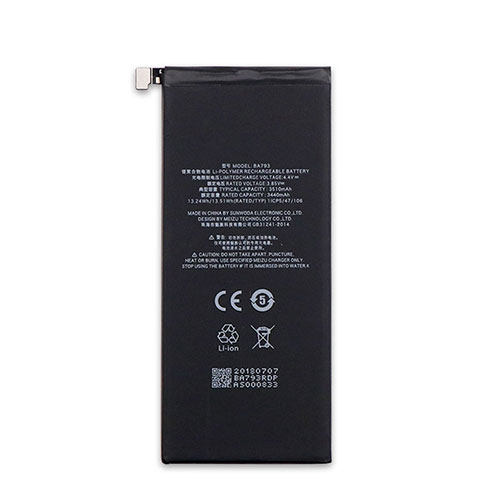
Battery BA793 Replacement For Meizu Cell Phone Meizu Pro 7 Plus Pro7Plus Pro 7

Find the right battery for Meizu Pro 7 Plus Pro7Plus Pro 7 to solve your power issues. Our Meizu BA793 batteries are manufactured to precisely fit just as your original battery.

We use the highest quality Li-ion cells and components that are lighter weight, charge faster and last longer.

US Meizu battery shop – Tech-Battery.com ! Shopping with us is safe and secure! 100% Guarantee Quality and Fully Test!

Meizu BA793 Battery For Meizu – Battery For Meizu Cell Phone Li-ion 3440mAh/13.24WH 3.85V/4.4V. Browse our various categories and find out why we have been the go-to source for our customers.

BA793
  • Chemistry: Li-ion
  • Voltage: 3440mAh/13.24WH
  • Capacity: 3.85V/4.4V

Free shipping in most countries. click here to view detailed shipping costs.

We ship to the worldwide,please enquiry shipping & handling if you are out of united states.

What’s the total delivery time? (please use this formula to determine when your order will arrive) total delivery time = packaging time + shipping time.

Replaces the following products:

Fits the following devices:

Meizu Pro 7 Plus Pro7Plus Pro 7

Meizu BA793 Meizu battery is replacement for Meizu Pro 7 Plus Pro7Plus Pro 7. The BA793 batteries equivalent is guaranteed to meet or exceed Meizu original specifications. All Meizu BA793 Battery are brand new, 1 year Warranty, 100% Guarantee Quality and Fully Test!

We deliver quality Meizu Cell Phone extended batteries online. Purchase your Meizu Cell Phone battery here.

Meizu BA793 Meizu Batteries

  • 100% OEM Compatible with your Meizu Cell Phone.
  • Lithium Ion battery technology
  • Convenient and secure online purchasing
  • Dependable high quality Meizu batteries
  • Satisfaction guaranteed or your money back
  • 1 Year Warranty on all Meizu Cell Phone Replacement Batteries

6 tips to increase BA793 Meizu Battery lifetime

The performance of your Meizu depends largely on the performance of your battery. And his time of life depends on its users, and that you are. These are the principles that have guided the Meizu , at the head, so you can optimize the performance of Meizu Cell Phone battery.
New battery still fully charged BA793 sold. You must be on the first wheel to be conditioned for optimum performance. Loading and unloading of the battery 4 or 5 times is enough to determine.
The memory effect completely to avoid a full charge and discharge the battery, Meizu BA793 twice a month.
The dirt on the Meizu BA793 contacts of the battery can power the Meizu Cell Phone batteries. Clean with alcohol and cotton can look like and function like new.
This method is recommended for those using the AC adapter for long periods. We recommend that you use the Meizu BA793 battery at least once in two weeks. Batteries lose its charge when stored for a long time and you need the battery if it does break.
If he does not use a length of time, the Meizu BA793 battery will be stored protected from a clean, dry and cool, heat and other metals. A loss of business to charge the battery in time and need a break before reuse.
Power Management Features Battery BA793 enable the conservation of energy in the battery of Meizu Cell Phone. You can control the speed of the processor off, or you can adjust the brightness of the LCD screen to a minimum to ensure low power consumption. 

Why we have been the go-to source for our customers ?

We stock a wide range of rechargeable batteries for Meizu Cell Phone. Your Meizu Tablet PC is part of your everyday life. Successful communications on a Meizu begin with your battery. When purchasing a replacement battery for your Meizu Meizu, dependability and price are what we have to offer. We’ve been supplying reliable, high quality Meizu batteries for over 10 years. Our goal is to provide high quality aftermarket replacement batteries at a very reasonable price. All of our rechargeable Li-Ion Meizu batteries are backed by a one year warranty.

What is the run time of Meizu battery?

Meizu batteries have two main ratings on them: Volts and Amperes. Because size and weight of batteries is limited when compared to larger batteries such as car batteries, most companies show their ratings with Volts and Milliamperes. One thousand Milliamperes equals 1 Ampere. When buying a battery, select batteries with the most Milliamperes (or mAh). Batteries are also rated by Watt-Hours, perhaps the simplest rating of all. This is found by multiplying the Volts and the Amperes together. For example:

  • 14.4 Volts, 4000mAh (Note: 4000mAh is equal to 4.0 Amperes).
  • 14.4 x 4.0 = 57.60 Watt-Hours

Watt-Hours signifies the energy needed to power one watt for one hour.

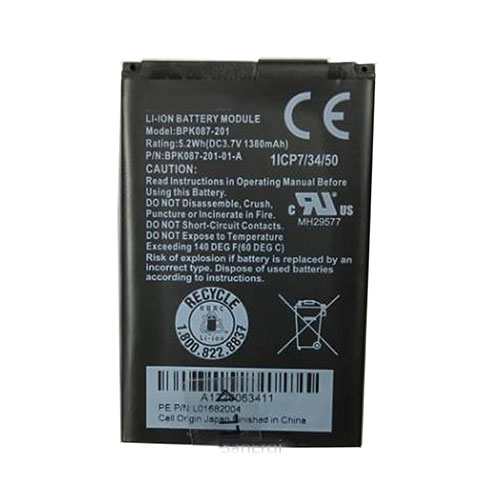
Battery BPK087-201 Replacement For Verifone Payment Terminal Verifone BPK087-201 POS

Find the right battery for Verifone BPK087-201 POS to solve your power issues. Our Verifone BPK087-201 batteries are manufactured to precisely fit just as your original battery.

We use the highest quality Li-ion cells and components that are lighter weight, charge faster and last longer.

US Verifone battery shop – Tech-Battery.com ! Shopping with us is safe and secure! 100% Guarantee Quality and Fully Test!

Verifone BPK087-201 Battery For Verifone – Battery For Verifone Payment Terminal Li-ion 1380mAh/5.2WH 3.7V. Browse our various categories and find out why we have been the go-to source for our customers.

BPK087-201
  • Chemistry: Li-ion
  • Voltage: 1380mAh/5.2WH
  • Capacity: 3.7V

Free shipping in most countries. click here to view detailed shipping costs.

We ship to the worldwide,please enquiry shipping & handling if you are out of united states.

What’s the total delivery time? (please use this formula to determine when your order will arrive) total delivery time = packaging time + shipping time.

Replaces the following products:

Fits the following devices:

Verifone BPK087-201 POS

Verifone BPK087-201 Verifone battery is replacement for Verifone BPK087-201 POS. The BPK087-201 batteries equivalent is guaranteed to meet or exceed Verifone original specifications. All Verifone BPK087-201 Battery are brand new, 1 year Warranty, 100% Guarantee Quality and Fully Test!

We deliver quality Verifone Payment Terminal extended batteries online. Purchase your Verifone Payment Terminal battery here.

Verifone BPK087-201 Verifone Batteries

  • 100% OEM Compatible with your Verifone Payment Terminal.
  • Lithium Ion battery technology
  • Convenient and secure online purchasing
  • Dependable high quality Verifone batteries
  • Satisfaction guaranteed or your money back
  • 1 Year Warranty on all Verifone Payment Terminal Replacement Batteries

6 tips to increase BPK087-201 Verifone Battery lifetime

The performance of your Verifone depends largely on the performance of your battery. And his time of life depends on its users, and that you are. These are the principles that have guided the Verifone , at the head, so you can optimize the performance of Verifone Payment Terminal battery.
New battery still fully charged BPK087-201 sold. You must be on the first wheel to be conditioned for optimum performance. Loading and unloading of the battery 4 or 5 times is enough to determine.
The memory effect completely to avoid a full charge and discharge the battery, Verifone BPK087-201 twice a month.
The dirt on the Verifone BPK087-201 contacts of the battery can power the Verifone Payment Terminal batteries. Clean with alcohol and cotton can look like and function like new.
This method is recommended for those using the AC adapter for long periods. We recommend that you use the Verifone BPK087-201 battery at least once in two weeks. Batteries lose its charge when stored for a long time and you need the battery if it does break.
If he does not use a length of time, the Verifone BPK087-201 battery will be stored protected from a clean, dry and cool, heat and other metals. A loss of business to charge the battery in time and need a break before reuse.
Power Management Features Battery BPK087-201 enable the conservation of energy in the battery of Verifone Payment Terminal. You can control the speed of the processor off, or you can adjust the brightness of the LCD screen to a minimum to ensure low power consumption. 

Why we have been the go-to source for our customers ?

We stock a wide range of rechargeable batteries for Verifone Payment Terminal. Your Verifone Tablet PC is part of your everyday life. Successful communications on a Verifone begin with your battery. When purchasing a replacement battery for your Verifone Verifone, dependability and price are what we have to offer. We’ve been supplying reliable, high quality Verifone batteries for over 10 years. Our goal is to provide high quality aftermarket replacement batteries at a very reasonable price. All of our rechargeable Li-Ion Verifone batteries are backed by a one year warranty.

What is the run time of Verifone battery?

Verifone batteries have two main ratings on them: Volts and Amperes. Because size and weight of batteries is limited when compared to larger batteries such as car batteries, most companies show their ratings with Volts and Milliamperes. One thousand Milliamperes equals 1 Ampere. When buying a battery, select batteries with the most Milliamperes (or mAh). Batteries are also rated by Watt-Hours, perhaps the simplest rating of all. This is found by multiplying the Volts and the Amperes together. For example:

  • 14.4 Volts, 4000mAh (Note: 4000mAh is equal to 4.0 Amperes).
  • 14.4 x 4.0 = 57.60 Watt-Hours

Watt-Hours signifies the energy needed to power one watt for one hour.

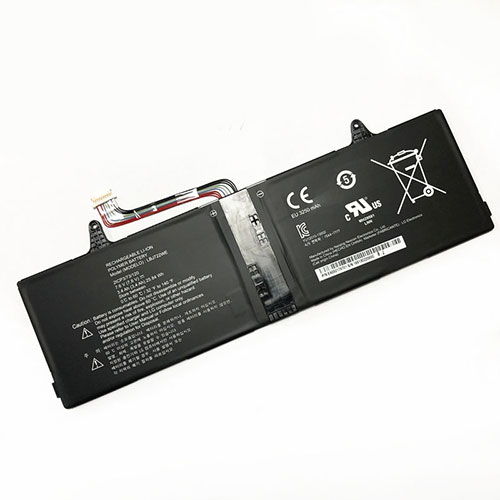
Battery LBJ722WE Replacement For lg laptop LG Slidepad 11T54 15U340 2ICP3/73/120 1544-7777

Find the right battery for LG Slidepad 11T54 15U340 2ICP3/73/120 1544-7777 to solve your power issues. Our lg LBJ722WE batteries are manufactured to precisely fit just as your original battery.

We use the highest quality Li-ion cells and components that are lighter weight, charge faster and last longer.

US lg battery shop – Tech-Battery.com ! Shopping with us is safe and secure! 100% Guarantee Quality and Fully Test!

lg LBJ722WE Battery For lg – Battery For lg laptop Li-ion 3400mAh/25.84WH 7.6V. Browse our various categories and find out why we have been the go-to source for our customers.

LBJ722WE
  • Chemistry: Li-ion
  • Voltage: 3400mAh/25.84WH
  • Capacity: 7.6V

Free shipping in most countries. click here to view detailed shipping costs.

We ship to the worldwide,please enquiry shipping & handling if you are out of united states.

What’s the total delivery time? (please use this formula to determine when your order will arrive) total delivery time = packaging time + shipping time.

Replaces the following products:

Fits the following devices:

LG Slidepad 11T54 15U340 2ICP3/73/120 1544-7777

lg LBJ722WE lg battery is replacement for LG Slidepad 11T54 15U340 2ICP3/73/120 1544-7777. The LBJ722WE batteries equivalent is guaranteed to meet or exceed lg original specifications. All lg LBJ722WE Battery are brand new, 1 year Warranty, 100% Guarantee Quality and Fully Test!

We deliver quality lg laptop extended batteries online. Purchase your lg laptop battery here.

lg LBJ722WE lg Batteries

  • 100% OEM Compatible with your lg laptop.
  • Lithium Ion battery technology
  • Convenient and secure online purchasing
  • Dependable high quality lg batteries
  • Satisfaction guaranteed or your money back
  • 1 Year Warranty on all lg laptop Replacement Batteries

6 tips to increase LBJ722WE lg Battery lifetime

The performance of your lg depends largely on the performance of your battery. And his time of life depends on its users, and that you are. These are the principles that have guided the lg , at the head, so you can optimize the performance of lg laptop battery.
New battery still fully charged LBJ722WE sold. You must be on the first wheel to be conditioned for optimum performance. Loading and unloading of the battery 4 or 5 times is enough to determine.
The memory effect completely to avoid a full charge and discharge the battery, lg LBJ722WE twice a month.
The dirt on the lg LBJ722WE contacts of the battery can power the lg laptop batteries. Clean with alcohol and cotton can look like and function like new.
This method is recommended for those using the AC adapter for long periods. We recommend that you use the lg LBJ722WE battery at least once in two weeks. Batteries lose its charge when stored for a long time and you need the battery if it does break.
If he does not use a length of time, the lg LBJ722WE battery will be stored protected from a clean, dry and cool, heat and other metals. A loss of business to charge the battery in time and need a break before reuse.
Power Management Features Battery LBJ722WE enable the conservation of energy in the battery of lg laptop. You can control the speed of the processor off, or you can adjust the brightness of the LCD screen to a minimum to ensure low power consumption. 

Why we have been the go-to source for our customers ?

We stock a wide range of rechargeable batteries for lg laptop. Your lg Tablet PC is part of your everyday life. Successful communications on a lg begin with your battery. When purchasing a replacement battery for your lg lg, dependability and price are what we have to offer. We’ve been supplying reliable, high quality lg batteries for over 10 years. Our goal is to provide high quality aftermarket replacement batteries at a very reasonable price. All of our rechargeable Li-Ion lg batteries are backed by a one year warranty.

What is the run time of lg battery?

lg batteries have two main ratings on them: Volts and Amperes. Because size and weight of batteries is limited when compared to larger batteries such as car batteries, most companies show their ratings with Volts and Milliamperes. One thousand Milliamperes equals 1 Ampere. When buying a battery, select batteries with the most Milliamperes (or mAh). Batteries are also rated by Watt-Hours, perhaps the simplest rating of all. This is found by multiplying the Volts and the Amperes together. For example:

  • 14.4 Volts, 4000mAh (Note: 4000mAh is equal to 4.0 Amperes).
  • 14.4 x 4.0 = 57.60 Watt-Hours

Watt-Hours signifies the energy needed to power one watt for one hour.

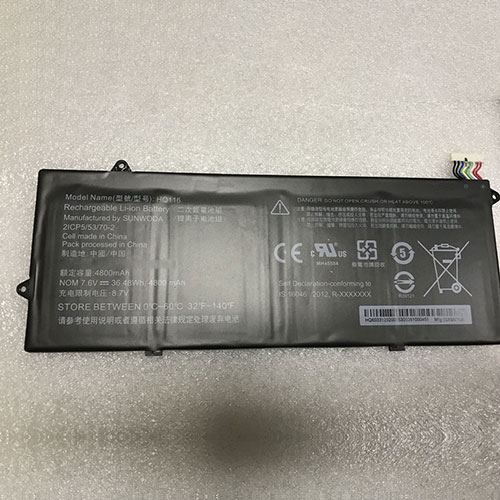
Battery HQ116 Replacement For LENOVO Tablet LENOVO HQ116 2ICP5/53/70-2

Find the right battery for LENOVO HQ116 2ICP5/53/70-2 to solve your power issues. Our LENOVO HQ116 batteries are manufactured to precisely fit just as your original battery.

We use the highest quality Li-ion cells and components that are lighter weight, charge faster and last longer.

US LENOVO battery shop – Tech-Battery.com ! Shopping with us is safe and secure! 100% Guarantee Quality and Fully Test!

LENOVO HQ116 Battery For LENOVO – Battery For LENOVO Tablet Li-ion 4800mAh/36.48WH 7.6V/8.7V. Browse our various categories and find out why we have been the go-to source for our customers.

HQ116
  • Chemistry: Li-ion
  • Voltage: 4800mAh/36.48WH
  • Capacity: 7.6V/8.7V

Free shipping in most countries. click here to view detailed shipping costs.

We ship to the worldwide,please enquiry shipping & handling if you are out of united states.

What’s the total delivery time? (please use this formula to determine when your order will arrive) total delivery time = packaging time + shipping time.

Replaces the following products:

Fits the following devices:

HQ116 2ICP5/53/70-2

LENOVO HQ116 LENOVO battery is replacement for LENOVO HQ116 2ICP5/53/70-2. The HQ116 batteries equivalent is guaranteed to meet or exceed LENOVO original specifications. All LENOVO HQ116 Battery are brand new, 1 year Warranty, 100% Guarantee Quality and Fully Test!

We deliver quality LENOVO Tablet extended batteries online. Purchase your LENOVO Tablet battery here.

LENOVO HQ116 LENOVO Batteries

  • 100% OEM Compatible with your LENOVO Tablet.
  • Lithium Ion battery technology
  • Convenient and secure online purchasing
  • Dependable high quality LENOVO batteries
  • Satisfaction guaranteed or your money back
  • 1 Year Warranty on all LENOVO Tablet Replacement Batteries

6 tips to increase HQ116 LENOVO Battery lifetime

The performance of your LENOVO depends largely on the performance of your battery. And his time of life depends on its users, and that you are. These are the principles that have guided the LENOVO , at the head, so you can optimize the performance of LENOVO Tablet battery.
New battery still fully charged HQ116 sold. You must be on the first wheel to be conditioned for optimum performance. Loading and unloading of the battery 4 or 5 times is enough to determine.
The memory effect completely to avoid a full charge and discharge the battery, LENOVO HQ116 twice a month.
The dirt on the LENOVO HQ116 contacts of the battery can power the LENOVO Tablet batteries. Clean with alcohol and cotton can look like and function like new.
This method is recommended for those using the AC adapter for long periods. We recommend that you use the LENOVO HQ116 battery at least once in two weeks. Batteries lose its charge when stored for a long time and you need the battery if it does break.
If he does not use a length of time, the LENOVO HQ116 battery will be stored protected from a clean, dry and cool, heat and other metals. A loss of business to charge the battery in time and need a break before reuse.
Power Management Features Battery HQ116 enable the conservation of energy in the battery of LENOVO Tablet. You can control the speed of the processor off, or you can adjust the brightness of the LCD screen to a minimum to ensure low power consumption. 

Why we have been the go-to source for our customers ?

We stock a wide range of rechargeable batteries for LENOVO Tablet. Your LENOVO Tablet PC is part of your everyday life. Successful communications on a LENOVO begin with your battery. When purchasing a replacement battery for your LENOVO LENOVO, dependability and price are what we have to offer. We’ve been supplying reliable, high quality LENOVO batteries for over 10 years. Our goal is to provide high quality aftermarket replacement batteries at a very reasonable price. All of our rechargeable Li-Ion LENOVO batteries are backed by a one year warranty.

What is the run time of LENOVO battery?

LENOVO batteries have two main ratings on them: Volts and Amperes. Because size and weight of batteries is limited when compared to larger batteries such as car batteries, most companies show their ratings with Volts and Milliamperes. One thousand Milliamperes equals 1 Ampere. When buying a battery, select batteries with the most Milliamperes (or mAh). Batteries are also rated by Watt-Hours, perhaps the simplest rating of all. This is found by multiplying the Volts and the Amperes together. For example:

  • 14.4 Volts, 4000mAh (Note: 4000mAh is equal to 4.0 Amperes).
  • 14.4 x 4.0 = 57.60 Watt-Hours

Watt-Hours signifies the energy needed to power one watt for one hour.

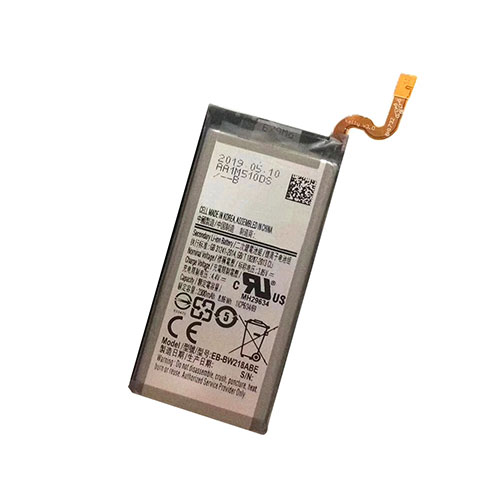
Battery EB-BW218ABE Replacement For SAMSUNG Cell Phone Samsung Galaxy Golden 5 W2018 SM-W2018

Find the right battery for Samsung Galaxy Golden 5 W2018 SM-W2018 to solve your power issues. Our SAMSUNG EB-BW218ABE batteries are manufactured to precisely fit just as your original battery.

We use the highest quality Li-ion cells and components that are lighter weight, charge faster and last longer.

US SAMSUNG battery shop – Tech-Battery.com ! Shopping with us is safe and secure! 100% Guarantee Quality and Fully Test!

SAMSUNG EB-BW218ABE Battery For SAMSUNG – Battery For SAMSUNG Cell Phone Li-ion 2300mAh/8.86WH 3.85V/4.4V. Browse our various categories and find out why we have been the go-to source for our customers.

EB-BW218ABE
  • Chemistry: Li-ion
  • Voltage: 2300mAh/8.86WH
  • Capacity: 3.85V/4.4V

Free shipping in most countries. click here to view detailed shipping costs.

We ship to the worldwide,please enquiry shipping & handling if you are out of united states.

What’s the total delivery time? (please use this formula to determine when your order will arrive) total delivery time = packaging time + shipping time.

Replaces the following products:

Fits the following devices:

Samsung Galaxy Golden 5 W2018 SM-W2018

SAMSUNG EB-BW218ABE SAMSUNG battery is replacement for Samsung Galaxy Golden 5 W2018 SM-W2018. The EB-BW218ABE batteries equivalent is guaranteed to meet or exceed SAMSUNG original specifications. All SAMSUNG EB-BW218ABE Battery are brand new, 1 year Warranty, 100% Guarantee Quality and Fully Test!

We deliver quality SAMSUNG Cell Phone extended batteries online. Purchase your SAMSUNG Cell Phone battery here.

SAMSUNG EB-BW218ABE SAMSUNG Batteries

  • 100% OEM Compatible with your SAMSUNG Cell Phone.
  • Lithium Ion battery technology
  • Convenient and secure online purchasing
  • Dependable high quality SAMSUNG batteries
  • Satisfaction guaranteed or your money back
  • 1 Year Warranty on all SAMSUNG Cell Phone Replacement Batteries

6 tips to increase EB-BW218ABE SAMSUNG Battery lifetime

The performance of your SAMSUNG depends largely on the performance of your battery. And his time of life depends on its users, and that you are. These are the principles that have guided the SAMSUNG , at the head, so you can optimize the performance of SAMSUNG Cell Phone battery.
New battery still fully charged EB-BW218ABE sold. You must be on the first wheel to be conditioned for optimum performance. Loading and unloading of the battery 4 or 5 times is enough to determine.
The memory effect completely to avoid a full charge and discharge the battery, SAMSUNG EB-BW218ABE twice a month.
The dirt on the SAMSUNG EB-BW218ABE contacts of the battery can power the SAMSUNG Cell Phone batteries. Clean with alcohol and cotton can look like and function like new.
This method is recommended for those using the AC adapter for long periods. We recommend that you use the SAMSUNG EB-BW218ABE battery at least once in two weeks. Batteries lose its charge when stored for a long time and you need the battery if it does break.
If he does not use a length of time, the SAMSUNG EB-BW218ABE battery will be stored protected from a clean, dry and cool, heat and other metals. A loss of business to charge the battery in time and need a break before reuse.
Power Management Features Battery EB-BW218ABE enable the conservation of energy in the battery of SAMSUNG Cell Phone. You can control the speed of the processor off, or you can adjust the brightness of the LCD screen to a minimum to ensure low power consumption. 

Why we have been the go-to source for our customers ?

We stock a wide range of rechargeable batteries for SAMSUNG Cell Phone. Your SAMSUNG Tablet PC is part of your everyday life. Successful communications on a SAMSUNG begin with your battery. When purchasing a replacement battery for your SAMSUNG SAMSUNG, dependability and price are what we have to offer. We’ve been supplying reliable, high quality SAMSUNG batteries for over 10 years. Our goal is to provide high quality aftermarket replacement batteries at a very reasonable price. All of our rechargeable Li-Ion SAMSUNG batteries are backed by a one year warranty.

What is the run time of SAMSUNG battery?

SAMSUNG batteries have two main ratings on them: Volts and Amperes. Because size and weight of batteries is limited when compared to larger batteries such as car batteries, most companies show their ratings with Volts and Milliamperes. One thousand Milliamperes equals 1 Ampere. When buying a battery, select batteries with the most Milliamperes (or mAh). Batteries are also rated by Watt-Hours, perhaps the simplest rating of all. This is found by multiplying the Volts and the Amperes together. For example:

  • 14.4 Volts, 4000mAh (Note: 4000mAh is equal to 4.0 Amperes).
  • 14.4 x 4.0 = 57.60 Watt-Hours

Watt-Hours signifies the energy needed to power one watt for one hour.

Seagate: We Are On Track with 20TB HAMR HDDs in December

Heat-assisted magnetic recording (HAMR) technology is expected to enable rather massive increase of hard drives capacity in the coming years. It took the industry several decades to develop this technology and its mass roll-out was delayed several times. In fact, Western Digital even decided to use energy-assisted perpendicular magnetic recording (ePMR) and microwave-assisted (MAMR) technologies before moving on to HAMR. Yet, its rival Seagate is on track to introduce HAMR-based HDDs this year. 

At its earnings conference last week Seagate reiterated plans to ship its 20 TB HAMR HDDs this December. Initially, the drives will be available to select customers as well as inside Seagate’s Lyve modular storage systems. Seagate appears to be so confident of its HAMR technology that it also reiterated plans to introduce 50 TB hard drives in 2026. 

“We remain on track to ship 20-TBHAMR drives starting in December, which is an important milestone, as we believe HAMR technology will be the industry’s path to scaling a real density and increasing drive capacities,” said Dave Mosley, CEO of Seagate. “Seagate will be the first to ship this crucial technology with a path to deliver 50-TB HAMR drives forecast in 2026.” 

At present, Western Digital offers its Ultrastar DC HC650 20 TB HDD, but this drive uses energy-assisted shingled magnetic recording (SMR) technology with all of its peculiarities when it comes to re-writing data. Therefore, Seagate’s 20 TB HAMR drives will offer numerous performance advantages when compared to their direct rival, at least for customers who can get these HDDs. 

Since HAMR HDDs will use new heads and new platters, it will take some time for Seagate to fully ramp up production of new hard drives. Furthermore, technology transition will cost money as Seagate will have to upgrade some of its manufacturing equipment.

Nvidia RTX 3070 review: AMD’s stopwatch just started ticking a lot louder

Talking about the RTX 3070, Nvidia’s latest $499 GPU launching Thursday, October 29, is tricky in terms of the timing of today’s review embargo. As of right now, the RTX 3070 is the finest GPU in this price sector by a large margin. In 24 hours, that could change—perhaps drastically.

Ahead of AMD’s big October 28 event, dedicated to its RDNA 2 GPU line, Nvidia gave us an RTX 3070 Founders Edition to test however we saw fit. This is the GPU Nvidia absolutely needed to reveal before AMD shows up in (expectedly) the same price and power range.

Inside of an Nvidia-only bubble, this new GPU is a sensation. Pretty much every major RTX 2000-series card overshot with proprietary promises instead of offering brute force worth its inflated costs. Yet without AMD nipping at its heels, Nvidia’s annoying strategy seemed to be the right call: the company established the RTX series’ exclusive bonus processing cores as a major industry option without opposition, then got to wait a full year before competing with significant power jumps and delectable price cuts.

Last month’s RTX 3080 saw that strategy bear incredible fruit—even if ordering that $699 GPU is still seemingly impossible. But what happens when Nvidia scales down the Ampere 7nm promise to a $499 product that more people can afford? And how will that compare to whatever AMD likely has to offer in the same range?

Future-proofing around the 1440p threshold

We can only answer some of those questions today. (Until Nvidia proves otherwise, we assume that availability will continue to be a massive asterisk for this and all other RTX 3000-series cards.) In good news, at least, the RTX 3070 gets off to a roaring start by rendering its 2019 sibling, the RTX 2070 Super, moot. Both debuted at $499, but the newer option typically approaches, and occasionally bests, the RTX 2080 Ti (whose $1,199 MSRP in 2018 sure feels like a kick in the ray-traced teeth nowadays).

But RTX 3070’s price-to-performance ratio comes with one significant caveat: a not-so-future-proofed VRAM capacity of 8GB, shipping in the not-as-blistering category of GDDR6. That matches the best RTX 2000-series cards but is surpassed by higher-speed GDDR6x VRAM in pricier RTX 3000-series GPUs.

The thing is, “future-proofed” for PC gaming is relative. What’s going to matter in 3D processing in the near future, both for the games you love and the systems you run them on? If you’re set on having the crispest native 4K rendering for the foreseeable future, the RTX doesn’t leapfrog over the 2080 Ti, particularly with a VRAM allotment that could stress any games that ship with 4K-specific texture packs.

But if you’re favoring a lower-resolution panel, perhaps 1440p or a widescreen 1440p variant—and Steam’s worldwide stats make that a safe assumption—then your version of future-proofing revolves more around processing power and ray-tracing potential. In those respects, the RTX 3070 currently looks like the tippy-top option for a “top-of-the-line” 1440p system… with the bonus of Nvidia’s Deep Learning Super-Sampling (DLSS) for surprisingly competitive fidelity in 4K resolutions, should gamers upgrade their monitor between now and the next GPU generation. (Until AMD shows us otherwise, Nvidia’s proprietary DLSS 2.0 pipeline remains the industry’s leading upscaling option, and game studios have started embracing it in droves.)

In other words, if you’re more interested in high frame rates on resolutions less than 4K, and you want GPU overkill for such a CPU-bound gaming scenario, the RTX 3070 is this year’s best breathing-room option for the price… at least, unless AMD announces an even more compelling proposition on October 28.

Strong, but not the 2080 Ti topper we expected

The above collection of game benchmarks mostly mirrors the ones I used for my RTX 3080 review, and once again, these tests err on the side of graphical overkill. You may have zero interest in using an RTX 3070 with 4K resolutions or maximum graphical slider values, and that’s understandable. Instead, these tests are designed to stress the GPU as much as possible to present the clearest comparisons between the listed cards. Look less at the FPS values and more at the relative percentages of difference. (The exception comes from “DLSS” tests, which I’ll get to.)

Even though this year’s $499 RTX 3070 clearly exceeds the power of last year’s $699 RTX 2080 Super, I tested it against last year’s $499 RTX 2070 Super as well to show exactly what a difference a year makes in terms of price-to-power proposition. The percentage differential between the 70-suffix GPUs varies based on what kind of software you’re testing, but the most massive surge in performance can be found when ray-tracing effects are toggled at pure 4K resolution. Wolfenstein Youngblood, in particular, sees the 3070 double the 2070 Super’s frame rates in its ray-tracing benchmarks.

While Nvidia has made benchmarking claims that put the RTX 3070 ahead of the RTX 2080 Ti, that doesn’t necessarily bear out in my testing—but this is because the RTX 2080 Ti Founders Edition shipped in 2018 with a remarkable capacity for safe overclocking. The 3070 FE, like its 2070 Super sibling, seriously lacks headroom for such safe overclocking for either its core or memory clocks, as managed by tests-at-every-step automation by programs such as EVGA X1. Testing was nearly identical on the 3070 with or without a scant EVGA X1 overclock applied, and as such, I’ve left its OC tests out of this roundup. Remember: as Nvidia’s Founders Editions go, generally, so do other vendors’ variants. So we’re not sure other vendors will squeeze much more out of the same model.

Thus, the 2080 Ti still pulls ahead in most, but not all, of the above gaming benchmarks, whether ray tracing is or isn’t enabled. When comparing both cards’ specs, this difference checks out, since the newer 3070 cuts back on certain components for efficiency’s sake (not to mention that dip in VRAM capacity). Categories like Tensor cores and RT cores are listed as “newer-generation” versions for the 3070, and the bigger 3000-series cards beat the 2080 Ti both in quantity and generation, so they get the clearer wins. The 3070 finally sees that efficiency trade fail to win out in certain testing scenarios—nothing tragic, mind you, but worth noting in case you’d hoped for across-the-board wins against the 2080 Ti. That’s 184 “third-generation” Tensor cores in the 3070, versus 544 older Tensor cores in the 2080 Ti, and 46 “second-generation” RT cores in the 3070, versus 68 older RT cores in the 2080 Ti.

Size, ports, noise

The RTX 3070’s efficiency figures into its size reduction, down to 9.5 inches in length (242mm) from the RTX 2070 Super’s 10.5 inches (but not quite as small as the original RTX 2070’s 9-inch length). Like other 3000-series FEs, the RTX 3070 utilizes what Nvidia calls a “flow-through” design that pulls cool air from below and pushes hot air out in two directions: through its “blower,” out the same side as its DisplayPort and HDMI connections, and upward in the same direction as your motherboard’s other components. Basically, the size reduction may help you cram an RTX 3070 into a smaller case, but you’ll still want to guarantee considerable airflow.

Speaking of connections, they’re identical to what you’ll find on the RTX 3080: three for DisplayPort, one for HDMI 2.1. (If you missed it, Nvidia quietly dumped the VR-friendly USB Type-C “VirtualLink” port found in most RTX 2000-series cards from this year’s GPU generation, perhaps owing to how few VR headset manufacturers bothered supporting it.) Additionally, the 3070 continues the RTX 3000-series trend of employing a smaller 12-pin connector for power, though it ships with an adapter for today’s common 8-pin PSU standard. In the 3070’s case, it only requires one 8-pin connection to a PSU, not two (or a mix of 8-pin and 6-pin), even though it maxes out at a 220W power draw. (The 2070 Super requires one 8-pin and one 6-pin connector with a power-draw maximum of 215W.)

And when Nvidia brags that the RTX 3070 runs quieter, the company means it. While I lack solid decibel-measuring equipment to tell you exactly how much quieter this card runs than its competition, it’s safe to say that its full-load mix of fan noise and operational hum probably won’t be the loudest component in your system. And with my ear directly up to it, its noticeable noise certainly wasn’t louder than, say, a PlayStation 4 Pro. (Nvidia has described its noise level as “up to 16dBA quieter” than the original RTX 2070 Founders Edition.)

Thoughts on 1440p, ray tracing, and DLSS

The above benchmarks make clear that 4K/60fps performance in newer PC games, with all settings maxed out, isn’t a given on the RTX 3070. But it’s important to note that many of these tests include overkill settings for things like anti-aliasing, shadow resolution, and even “maximum” ray-tracing effects, all meant to guarantee maximum GPU impact for the sake of accurate comparisons between the GPUs. In the real world, you can safely drop most of these from “ultra,” “extreme,” or “insane” while still exceeding most console ports’ settings and barely looking discernible from their over-the-top maximums, and the results often land darned close to 4K/60.

Scale down to a resolution like 1440p and you’ll hope for frame rates that take advantage of monitors rated for 144fps and above. One good indicator of the RTX 3070’s capabilities is Borderlands 3, a particularly demanding (and arguably inefficient) game that doesn’t leverage Nvidia-specific GPU perks while packing its scenes with dynamic lighting, alpha particle effects, cel-shaded detail, and massive draw distances. When put through its benchmark wringer at 1440p on my testing rig (i7-8700K OC’ed to 4.7GHz, 32GB DDR-3000 RAM), BL3 averages 99.5fps at the “high” settings preset or 88.0fps at “ultra.” Not 144fps, mind you, but I think of BL3 as a good “floor” for performance, easily outdone by older and more efficient 3D games.

Without ray tracing turned on in 3D games from the past few years, RTX 3070’s frame rates have easily surpassed 80fps with tons of bells and whistles enabled at 1440p resolution, and they’ve easily gone higher with every drop in settings from there. But what happens on the RTX 3070 with ray tracing turned on?

As of press time, there’s an interesting combined trend for just about everything I’ve tested with some version of DirectX Ray Tracing (DXR): the harmonious pairing of Nvidia’s latest “DLSS 2.0” standard. Should you run GPU-pounders like last year’s Control or this month’s Watch Dogs Legion at near-max settings and 1440p resolution, plus ray tracing enabled, you can expect frame rates at roughly 50 to 55fps on the RTX 3070. But a funny thing has happened with DLSS 2.0: much improved support for DLSS upscaling from 906p to 1440p. Last year, I would’ve told you that you were crazy to upscale from anything lower than 1440p, in terms of pixel smudginess.

When testing at 1440p, Control has seen its DLSS 2.0 translation of tiny details, particularly text on posters, improve compared to native rendering plus temporal anti-aliasing (TAA). Meanwhile, WDL’s benchmark is keen on adding rain to its mix, which is clever on Ubisoft’s part; this is the exact kind of detail that DLSS has struggled to render in games like Death Stranding, yet in this newer game, rain materializes almost identically when its 906p signal is upscaled with DLSS’ machine-learning wizardry.

With both of these games’ DLSS modes toggled at this 906p upscale, frame rates jump to the 78-84fps range… and that’s with ray tracing enabled (“high” RT settings in Control, “medium” RT settings in WDL).

A masterful game of GPU dominoes

Nvidia really couldn’t have set these dominoes up any better. Its RTX line of GPUs has separate components to handle the above fancy features—dedicated ray-tracing cores and dedicated “tensor” cores to handle ML-assisted computation. The way its ray-tracing cores work lines up neatly with industrywide standards like DXR, which means it’s a drop in the programming budget to implement those in ways that will work on competitors’ GPUs and on brand-new gaming consoles. And the tensor cores’ upscaling methods line up neatly with TAA, a particularly common anti-aliasing standard that Nvidia’s DLSS effectively piggybacks off. As of DLSS 2.0, the model does not require game-specific coding to work (though developers still have to partner with Nvidia to implement it). For Nvidia gamers, then, the ray-tracing proposition going forward is clear: if you want to turn it on, you’ll almost certainly have the simultaneous option of toggling the efficiency of Nvidia’s dedicated RT cores and the efficiency of their DLSS implementation. In terms of pixel fidelity, DLSS 2.0 has pretty much proven to be a wash, with games generally enjoying a mix of sharper and blurrier elements depending on the scene (with neither being egregious, with the notable exception of Death Stranding’s peskiest, super-detailed moments like cut-scene details and screen-filling rain). And that’s a wash visually, not computationally; the proof is in the frame-rate pudding.

We still don’t know if AMD can possibly compete when its future cards have their ray-tracing modes turned on. Maybe we’re in for a $500-ish scenario where AMD can beat Nvidia’s rendering performance in a game like Borderlands 3 at a better price-to-performance ratio, only to lose out on the same performance gains with ray tracing turned on. Having tested Watch Dogs Legion over the past week, I can safely say its RT perks—as slathered over a massive, open-world city full of reflective surfaces and other handsome light-bounce effects—are difficult to disable now that I have a midrange GPU that can reasonably handle said effects at “1440p.”

Meaning, I could turn them off… but I no longer want to. It’s hard to go back to plain ol’ rasterization after seeing so many light sources realistically emerge no matter what time of day or scenario I’m in. As I pilot a drone past a shiny office building, or drive in a shiny, future-London car past a beautiful landmark, I see objects in WDL reflect or bounce light in ways that acknowledge objects or light sources that otherwise aren’t on the screen. This is what ray tracing does: it accounts for every nearby light bounce, even if it’s not on screen, to render the whole world whether you can see it directly or not.

Plus, if you have dreams of one day toggling ray-tracing power at 4K with this card, WDL on an RTX 3070 at “high” settings gets up to a 58fps average in 4K resolution with RT at “medium,” so long as I use DLSS to upscale to 4K from… wait for it… 1440p native. Those upscaling results are convincingly crisp, as well.

Thus, as I said in the beginning, your definition of a “future-proofed” GPU will likely drive your interest in what the RTX 3070 has to offer for $499. We’re about to see even more interesting ray tracing in games—including at least one we’re not allowed to talk about yet. You’ll have to take our word for it, in terms of how exciting it is to live inside of some games’ ray-traced worlds.

If that’s not your bag, due to visual preferences or budgetary reasons, I get it. But it remains to be seen whether a cheaper RTX card can deliver the same future-proofing in the 1080p range or whether AMD will arrive with a perfect amount of budget-minded power and ray tracing—or even a butt-kicker of a card that skips ray tracing altogether in favor of powerful, traditional 3D rendering for a damned good price. For now, in the 1440p range, Nvidia has the clear lead… for at least 24 hour