The Asus RT-AX86U Is a Wi-Fi 6 Router That Doesn’t Sacrifice Looks for Power

Wi-Fi 6 has accelerated its creep into mainstream wireless networking, urged along by the similarly accelerating spread of gigabit internet. Until the last few months or so, purchasing a Wi-Fi 6 device has largely been a decision more about future-proofing and less about immediate gain. That’s quickly changing, however, with all manner of wireless device manufacturers releasing products boasting about blazing this and blistering that, and it’s finally time to take a serious look at 802.11ax routers.

The Asus RT-AX88U was an early entrant in the field, and the company now has several follow-ups, including our best gaming router runner-up: the RT-AX86U. There, I gave it credit for being extremely fast and for its restrained physical design. However, I took issue with Asus’s UI decisions. In the end, I concluded that I would recommend it to anyone looking for a good gaming experience. Now I’m taking an even deeper dive to find out: Is this router worth it for just any old person and not just gamers presumably reading this in a hoodie with some kind of RGB lighting and heat vents? I think so, and you should, too.

As far as the design of the Asus RT-AX86U goes, there isn’t much to say, and frankly, that’s a good thing. It’s neither a slab nor a monolith, neither an ancient alien artifact nor an air freshener chic pod (though it can be a Gundam, apparently). It’s black, it stands upright, and it has three stabby, removable, adjustable antennas jutting from the top. It has four outgoing gigabit ethernet ports—one of which is an auto-prioritizing gaming port—in the back, a gigabit WAN, and a 2.5-gigabit LAN/WAN port for those lucky enough to be able to make use of it. Two USB 3.2 Gen 1 ports give you a fast NAS if you’ve got a hard drive lying around.

Getting it set up is a quick process, refreshingly letting me choose up front whether to separate the 2.4 and 5 GHz bands. Knowing that I would need to reconfigure some real dumb smart devices, I opted for separation, and my network was up and running in about five minutes.

But it should be noted there are two ways to handle setup and management. One is via a lovely mobile app, and the other is via the browser, and I hate the browser-based UI of Asus routers. It’s just a weird, unfocused, confusing mess. If you’re the type of person who wants deep, granular control of your home network, but don’t want to shell out for expensive enterprise-grade hardware, you could do a lot worse than Asus, but prepare to hunt for the settings you need to adjust. Trudging through the settings reveals menus and submenus that stretch out seemingly to infinity, with an intimidating depth that would have most people regarding it with narrowed eyes and a feigned understanding, muttering, “Yes, I see,” as they slowly mouse up to click the X button on that tab.

The intro screen has a basic network topology map which gives you a diagram of what all is connected, and a section where you can split out your 2.4 and 5 GHz bands or update your network SSID and password. After that, you get the shiny feature-y stuff, the majority of which, like the specific data-type prioritizing Adaptive QoS, Traffic Analysis, and various media modes and security, is powered by Trend Micro.

Together they offer a host of security features in the AiProtection section, promising to block malicious sites, protect you from Distributed Denial of Service attacks, and network vulnerability attacks like Heartbleed, while also monitoring outgoing traffic for suspicious packets from virus-infected devices. Each tab under this section gives you reports of suspicious network behavior, with downloadable logs for your review. In testing at wicar.org, the router blocked all but two of 10 sites, with Safari catching the last two. It seemed to work well, though the experience is barebones, and unlike the rest of the settings for the router, there are no opportunities for customization, just toggles for each of the three categories of protection. But using this, or a few other key features powered by Trend Micro, will bring you eventually to this EULA notice:

It seems that in order to have access to Trend Micro’s features, you must agree to give them access to all kinds of data, which may include your e-mails or your web browsing history. It’s spooky stuff, as usual, but thankfully all fairly easy to opt in or out of, as well—so long as you can bear the ensuing message about the valuable capabilities you’ll lose out on. So, it’s not quite the deal with Ursula the Sea Witch I initially worried it was, and, in the end, the details in the EULA are perhaps not unexpected for security software like this. I reached out to both Asus and Trend Micro for their input on what sort of data they collect and how exactly it’s used, and we’ll update here when we get a response.

Deeper in the menus, you will find a surprisingly pleasant Open NAT section with pre-configured port reservations for specific games and consoles, and NAS options that include support for Apple’s Time Machine backup software. Most people will go wall-eyed looking at options past these, but it’s worth noting that if you want to use features like OFDMA and MU-MIMO, beamforming, and, I don’t know, the actual Wi-Fi 6 standard, you’ll want to push on into the advanced settings—just don’t expect to understand much of what you are presented with here, unless you have studied networking down to a very specific level. That said, if you have time and sufficient grit, you can sift through it and find some truly powerful options.

Now, for all the shade I throw at the browser interface, Asus actually does a pretty decent job with their mobile app. Appearance-wise, it’s far from the tidy design of most of Asus’s competitors; the app looks the way we might have imagined the UI of the future would in the early aughts or late ‘90s—all sci-fi space controls floating against a star field, complete with animations that are just there to look neat. While very silly, it’s a breath of fresh air after using the web interface, with more of the stuff you would want quick access to right there on the home screen, like Adaptive QoS mode switching, letting you quickly switch priority to games, video conferencing software, media streaming, and more.

While not quite as robust as the browser UI, the mobile app is far more user-friendly, even if it isn’t perfect. I greatly appreciated seeing signal noise shown for individual devices—also an option in the browser—which helps a lot when placing them for the best signal, which is especially important for things like smart speakers, which can be made or broken by your choices regarding network topology.

Looking at the feature list, it’s not unusual to wonder why in the hell you would want to command your router with Alexa. But, in the interest of being thorough, I grabbed my long-banished Echo Dot to test, and I did find some genuinely useful bits here—temporarily activating your guest network, for example, or pausing wifi. Perhaps the most useful of the bunch is the ability to change Adaptive QoS modes without going into the app.

The main shortcoming of Alexa Skills remains: Every command must be prefaced with “Alexa, ask my router…”, followed by a prescribed set of phrases you must memorize (or look up every time, defeating the purpose). The pricier RT-AX88U gives you a small selection of more natural-sounding phrases like, “Alexa, pause my wifi.” I tried anyway; not only did it not work, but Alexa pretended not to know who I was.

The rest of my smart home experience on this router, initial difficulties aside, was a good one—lightbulbs flicked on and off, routines ran, and my chosen smart assistant didn’t hesitate to respond to my requests.

The RT-AX86U is powered by a 1.8 GHz quad-core CPU with 1 GB of RAM and 256 MB Flash memory. Theoretically, it can transmit up to 4804 Mbps on the 5 GHz band, or up to 861 Mbps on the 2.4, but you’ll never see those speeds, nor should you expect them. It has four antennas—one of which is an internal, printed circuit board antenna, and works all the way up to the 160 MHz band, which is a key component of Wi-Fi 6, and necessary to reach the fastest speeds the router is capable of. It has a long list of other terms that describe how powerful it is.

As I’ve noted previously, the RT-AX86U is great for gaming. I wanted to take it further, so I decided to stress test the router, streaming music at the highest quality available on multiple devices, watching a 4K nature documentary on Apple TV, which is known for its high-bitrate streaming, conducting a video call with a friend, and playing CS:GO on official servers. This is a realistic scenario in my home, and the RT-AX86U aced it—I saw no sign of buffering or stuttering anywhere, my friend reported clear audio and smooth video, and in-game ping seemed unaffected. In raw numbers, I had to move into my back yard to get anything slower than the max I’m getting from my ISP, finding that I had good, usable internet even at the farthest reaches of my yard, which is about a fifth of an acre.

I tested file transfers with a 734 MB copy of Ernest Saves Christmas—a typical use case for network storage—and found the transfers to be very fast, with the limiting factor seemingly the actual read/write capability of the router. Transfer speeds reached as high as 465.79 Mbps, but averaged between 310 and 350 Mbps, and hardly budged at any distance. Write speeds were about half that.

After determining that the RT-AX86U was gross overkill for my needs, I thought I would look at Asus’s AiMesh, which lets you use multiple Asus routers to create a mesh network. Self-healing and pretty straightforward to set up, an AiMesh network can definitely get you that kind of blanketed internet plants crave.

I tested the mesh capabilities with the addition of an RT-AX82U, and for some reason, setting this up ended up actually being the only way I could finally get my “smart” bathroom light switch to join my new network. I came to this experience with the breezy setup of Eero already in mind and found it similarly easy with Asus. Network performance was as expected, with devices generally connecting to the node closest to them or, at least, with the lowest amount of signal noise, and no real noticeable changeover time. Basically, mesh networking is a revelation to anyone who hasn’t used it, and that much is true here, as well.

In the end, the Asus RT-AX86U is a great router, with speedy performance and easy setup, despite an annoying menu system. Actually getting down and dirty in the settings is a pain, thanks to confusing, incompletely explained technicals and messy organization, but basic and intermediate settings can be easily changed in the mobile app. Security and device prioritization for the router is decent, though I recommend you review the EULA before proceeding to make sure you’re comfortable with the exchange you must make to take advantage. The mesh setup was fairly painless. The RT-AX86U met and, in some cases exceeded, my expectations, at least where it counts. Of course, you’re going to pay for it, at MSRP $250—though you can find decent discounts at the usual online retailers.

Whether you just want lag-free gaming or you need something that can handle a heavy overall load, this router does it with aplomb. We are rapidly approaching the day when recommendations like this one isn’t just about future-proofing, but you will find in the RT-AX86U a router more than capable of meeting the unexpected demands put upon all of us this year. If you’ve got a smaller home that needs a lot of power and would prefer to check out mesh networking at a later date, this is absolutely the router for you.
ALLEGED OPPO RENO 5 5G LEAKED IN THE WILD

The year is almost closing, but smartphone makers are trying their best to bump the Q4 2020 sales with last-minute launches. Oppo is reportedly preparing for the launch of its Reno 5 series in China. The new smartphone series will bring a vanilla Oppo Reno 5 5G and an Oppo Reno 5 Pro 5G. Both devices have been circulating through the rumor mill recently. The vanilla model already paid a visit to 3C certification with model number PEGM00 and PEGT00.

According to the 3C listing, the device will bring 65W fast-charging support. This kind of charging seems to be a tendency for devices in the BBK group. Realme released its Realme 7 Pro and X7 Pro featuring this charging capability, OnePlus followed with the OnePlus 8T, now it’s time for the Reno 5 series to come with this crazily fast-charging tech. The device is set to come in Starry Dream, Aurora Blue, Moonlight Black, and Star Wish Red colors. Today, an alleged photo popped out in the web revealing the Oppo Reno 5 5G in its Aurora Blue colorway.

OPPO RENO 5 SERIES DOES NOT BRING A MAJOR DEPARTURE IN TERMS OF DESIGN

Although we need to recommend the usual pinch of salt, we have to say that this image is perfectly on par with the leaked renders of the Reno 5 series. It shows the rectangular camera island comprising the Quad-Camera setup and a LED flash. Well, there is something written in the cutout and if my eyes are failing me it says 64MP AI camera. But digest this with a pinch or two of salt, after all, the resolution isn’t helping us here.

On the top right part, we have the vertically aligned Oppo logo, while the bottom serves as a house for “Reno Glow” branding. Well, it seems that Oppo is borrowing the big logos that Realme introduced with its Realme X7 series. At least it does not come with a massive “DARE TO LEAP” logo here. I’m sorry Realme fans… As for the color, well it does look like Aurora Blue to me, we have a predominantly blue color in the bottom part that reaches pink tones in the top thanks to the Gradient effect.

In the end, the Reno 5 series seems to be quite similar to the Reno 4 series. So if you have been waiting for a major design overhaul, you’ll be disappointed.

OPPO RENO 5 5G SPECS

According to previous leaks, the vanilla Reno 5 5G will boast the Dimensity 800U chipset. There is no info regarding the amount of RAM and storage available, but we assume that the device will start with 6GB of RAM and 128GB of Storage. The Reno series isn’t made of affordable devices, so we assume that 4GB isn’t enough anymore for a device of this level. Of course, this is just an assumption at the moment.

The phone will pack a 6.43-inch AMOLED display with a top-left aligned punch-hole for the selfie snapper. Moving around to the back, we have a Quad-Camera array comprising a 64MP primary, 8MP, 2MP, and 2MP camera sensor.

The phone draws power from a 4,300mAh battery with 65W fast-charging. We probably have dual 2,150mAh batteries here to withstand the 65W charging rates. The phone runs Android 11 straight out of the box with ColorOS 11 running on top. The device has 159.1×73.4×7.9 mm overall dimensions.

Lenovo ThinkPad X1 Nano with 16:10 screen goes on sale in the USA

Back in late September, Lenovo announced the ultra-light ThinkPad X1 Nano Gen 1, the first ThinkPad with a 16:10 screen since 2010. It was to be released in December 2020. Fulfilling this promise, the Lenovo ThinkPad X1 Nano is orderable in the USA since today – though not with all configurations yet and not for the promised start-price.

The last thing is not unusual, however: Lenovo ThinkPad laptops are often discounted heavily, but not right after release. Costing at least $1,721, the X1 Nano Gen 1 is still well above the announced base-price of $1,599 – it will probably hit that mark in a few weeks.

Price is not the only area where waiting might still be a good idea. In terms of the available configurations, several options are still missing, such as vPro processors as well as the 5G and LTE options. LTE is said to be available at some point in December, while 5G models will not arrive till January.

When additional CPU options go on sale is unknown at this point, though we do expect to see the Intel Core i5-1140G7 and i7-1180G7 – Lenovo ThinkPad laptops are business models and usually include the Intel CPUs with vPro. At the moment, only the two Tiger Lake UP4 CPUs Intel Core i5-1130G7 and i7-1160G7 are orderable. The main difference between these is that the i5 has lower clock rates and a slightly less powerful version of the Intel Iris Xe graphics.

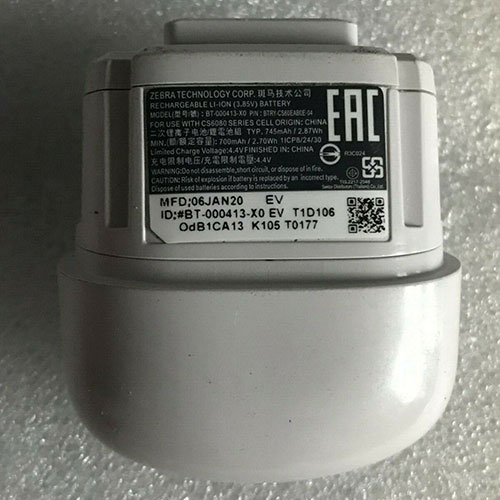
Battery BT-000413 Replacement For Zebra Scanner Zebra P/N:BTRY-CS60EAB0E-04

Find the right battery for Zebra P/N:BTRY-CS60EAB0E-04 to solve your power issues. Our Zebra BT-000413 batteries are manufactured to precisely fit just as your original battery.

We use the highest quality Li-ion cells and components that are lighter weight, charge faster and last longer.

US Zebra battery shop – Tech-Battery.com ! Shopping with us is safe and secure! 100% Guarantee Quality and Fully Test!

Zebra BT-000413 Battery For Zebra – Battery For Zebra Scanner Li-ion 745mAh 3.8V/4.4V. Browse our various categories and find out why we have been the go-to source for our customers.

BT-000413
  • Chemistry: Li-ion
  • Voltage: 745mAh
  • Capacity: 3.8V/4.4V

Free shipping in most countries. click here to view detailed shipping costs.

We ship to the worldwide,please enquiry shipping & handling if you are out of united states.

What’s the total delivery time? (please use this formula to determine when your order will arrive) total delivery time = packaging time + shipping time.

Replaces the following products:

Fits the following devices:

Zebra P/N:BTRY-CS60EAB0E-04

Zebra BT-000413 Zebra battery is replacement for Zebra P/N:BTRY-CS60EAB0E-04. The BT-000413 batteries equivalent is guaranteed to meet or exceed Zebra original specifications. All Zebra BT-000413 Battery are brand new, 1 year Warranty, 100% Guarantee Quality and Fully Test!

We deliver quality Zebra Scanner extended batteries online. Purchase your Zebra Scanner battery here.

Zebra BT-000413 Zebra Batteries

  • 100% OEM Compatible with your Zebra Scanner.
  • Lithium Ion battery technology
  • Convenient and secure online purchasing
  • Dependable high quality Zebra batteries
  • Satisfaction guaranteed or your money back
  • 1 Year Warranty on all Zebra Scanner Replacement Batteries

6 tips to increase BT-000413 Zebra Battery lifetime

The performance of your Zebra depends largely on the performance of your battery. And his time of life depends on its users, and that you are. These are the principles that have guided the Zebra , at the head, so you can optimize the performance of Zebra Scanner battery.
New battery still fully charged BT-000413 sold. You must be on the first wheel to be conditioned for optimum performance. Loading and unloading of the battery 4 or 5 times is enough to determine.
The memory effect completely to avoid a full charge and discharge the battery, Zebra BT-000413 twice a month.
The dirt on the Zebra BT-000413 contacts of the battery can power the Zebra Scanner batteries. Clean with alcohol and cotton can look like and function like new.
This method is recommended for those using the AC adapter for long periods. We recommend that you use the Zebra BT-000413 battery at least once in two weeks. Batteries lose its charge when stored for a long time and you need the battery if it does break.
If he does not use a length of time, the Zebra BT-000413 battery will be stored protected from a clean, dry and cool, heat and other metals. A loss of business to charge the battery in time and need a break before reuse.
Power Management Features Battery BT-000413 enable the conservation of energy in the battery of Zebra Scanner. You can control the speed of the processor off, or you can adjust the brightness of the LCD screen to a minimum to ensure low power consumption. 

Why we have been the go-to source for our customers ?

We stock a wide range of rechargeable batteries for Zebra Scanner. Your Zebra Tablet PC is part of your everyday life. Successful communications on a Zebra begin with your battery. When purchasing a replacement battery for your Zebra Zebra, dependability and price are what we have to offer. We’ve been supplying reliable, high quality Zebra batteries for over 10 years. Our goal is to provide high quality aftermarket replacement batteries at a very reasonable price. All of our rechargeable Li-Ion Zebra batteries are backed by a one year warranty.

What is the run time of Zebra battery?

Zebra batteries have two main ratings on them: Volts and Amperes. Because size and weight of batteries is limited when compared to larger batteries such as car batteries, most companies show their ratings with Volts and Milliamperes. One thousand Milliamperes equals 1 Ampere. When buying a battery, select batteries with the most Milliamperes (or mAh). Batteries are also rated by Watt-Hours, perhaps the simplest rating of all. This is found by multiplying the Volts and the Amperes together. For example:

  • 14.4 Volts, 4000mAh (Note: 4000mAh is equal to 4.0 Amperes).
  • 14.4 x 4.0 = 57.60 Watt-Hours

Watt-Hours signifies the energy needed to power one watt for one hour.

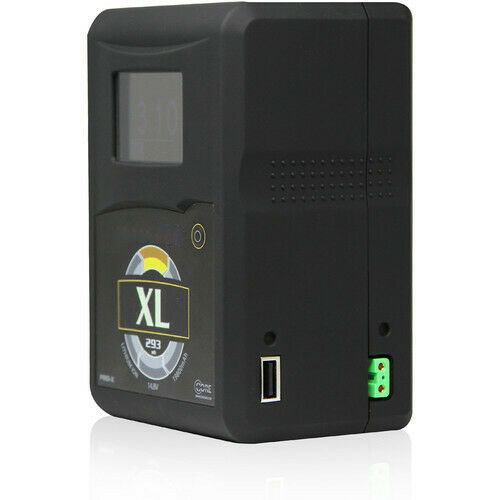
Battery XL Replacement For Hypercore Camera Core SWX Hypercore XL 14.8V 293Wh Gold Mount Battery

Find the right battery for Core SWX Hypercore XL 14.8V 293Wh Gold Mount Battery to solve your power issues. Our Hypercore XL batteries are manufactured to precisely fit just as your original battery.

We use the highest quality Li-ion cells and components that are lighter weight, charge faster and last longer.

US Hypercore battery shop – Tech-Battery.com ! Shopping with us is safe and secure! 100% Guarantee Quality and Fully Test!

Hypercore XL Battery For Hypercore – Battery For Hypercore Camera Li-ion 293Wh 14.8V. Browse our various categories and find out why we have been the go-to source for our customers.

XL
  • Chemistry: Li-ion
  • Voltage: 293Wh
  • Capacity: 14.8V

Free shipping in most countries. click here to view detailed shipping costs.

We ship to the worldwide,please enquiry shipping & handling if you are out of united states.

What’s the total delivery time? (please use this formula to determine when your order will arrive) total delivery time = packaging time + shipping time.

Replaces the following products:

Fits the following devices:

Core SWX Hypercore XL Gold Mount battery

Hypercore XL Hypercore battery is replacement for Core SWX Hypercore XL 14.8V 293Wh Gold Mount Battery. The XL batteries equivalent is guaranteed to meet or exceed Hypercore original specifications. All Hypercore XL Battery are brand new, 1 year Warranty, 100% Guarantee Quality and Fully Test!

We deliver quality Hypercore Camera extended batteries online. Purchase your Hypercore Camera battery here.

Hypercore XL Hypercore Batteries

  • 100% OEM Compatible with your Hypercore Camera.
  • Lithium Ion battery technology
  • Convenient and secure online purchasing
  • Dependable high quality Hypercore batteries
  • Satisfaction guaranteed or your money back
  • 1 Year Warranty on all Hypercore Camera Replacement Batteries

6 tips to increase XL Hypercore Battery lifetime

The performance of your Hypercore depends largely on the performance of your battery. And his time of life depends on its users, and that you are. These are the principles that have guided the Hypercore , at the head, so you can optimize the performance of Hypercore Camera battery.
New battery still fully charged XL sold. You must be on the first wheel to be conditioned for optimum performance. Loading and unloading of the battery 4 or 5 times is enough to determine.
The memory effect completely to avoid a full charge and discharge the battery, Hypercore XL twice a month.
The dirt on the Hypercore XL contacts of the battery can power the Hypercore Camera batteries. Clean with alcohol and cotton can look like and function like new.
This method is recommended for those using the AC adapter for long periods. We recommend that you use the Hypercore XL battery at least once in two weeks. Batteries lose its charge when stored for a long time and you need the battery if it does break.
If he does not use a length of time, the Hypercore XL battery will be stored protected from a clean, dry and cool, heat and other metals. A loss of business to charge the battery in time and need a break before reuse.
Power Management Features Battery XL enable the conservation of energy in the battery of Hypercore Camera. You can control the speed of the processor off, or you can adjust the brightness of the LCD screen to a minimum to ensure low power consumption. 

Why we have been the go-to source for our customers ?

We stock a wide range of rechargeable batteries for Hypercore Camera. Your Hypercore Tablet PC is part of your everyday life. Successful communications on a Hypercore begin with your battery. When purchasing a replacement battery for your Hypercore Hypercore, dependability and price are what we have to offer. We’ve been supplying reliable, high quality Hypercore batteries for over 10 years. Our goal is to provide high quality aftermarket replacement batteries at a very reasonable price. All of our rechargeable Li-Ion Hypercore batteries are backed by a one year warranty.

What is the run time of Hypercore battery?

Hypercore batteries have two main ratings on them: Volts and Amperes. Because size and weight of batteries is limited when compared to larger batteries such as car batteries, most companies show their ratings with Volts and Milliamperes. One thousand Milliamperes equals 1 Ampere. When buying a battery, select batteries with the most Milliamperes (or mAh). Batteries are also rated by Watt-Hours, perhaps the simplest rating of all. This is found by multiplying the Volts and the Amperes together. For example:

  • 14.4 Volts, 4000mAh (Note: 4000mAh is equal to 4.0 Amperes).
  • 14.4 x 4.0 = 57.60 Watt-Hours

Watt-Hours signifies the energy needed to power one watt for one hour.

Battery E51-430 Replacement For Petzl LIGHTING Petzl Accu 4

Find the right battery for Petzl Accu 4 to solve your power issues. Our Petzl E51-430 batteries are manufactured to precisely fit just as your original battery.

We use the highest quality Li-ion cells and components that are lighter weight, charge faster and last longer.

US Petzl battery shop – Tech-Battery.com ! Shopping with us is safe and secure! 100% Guarantee Quality and Fully Test!

Petzl E51-430 Battery For Petzl – Battery For Petzl LIGHTING Li-ion 5200mah/38.48Wh 7.4V. Browse our various categories and find out why we have been the go-to source for our customers.

E51-430
  • Chemistry: Li-ion
  • Voltage: 5200mah/38.48Wh
  • Capacity: 7.4V

Free shipping in most countries. click here to view detailed shipping costs.

We ship to the worldwide,please enquiry shipping & handling if you are out of united states.

What’s the total delivery time? (please use this formula to determine when your order will arrive) total delivery time = packaging time + shipping time.

Replaces the following products:

Fits the following devices:

Petzl Accu 4

Petzl E51-430 Petzl battery is replacement for Petzl Accu 4. The E51-430 batteries equivalent is guaranteed to meet or exceed Petzl original specifications. All Petzl E51-430 Battery are brand new, 1 year Warranty, 100% Guarantee Quality and Fully Test!

We deliver quality Petzl LIGHTING extended batteries online. Purchase your Petzl LIGHTING battery here.

Petzl E51-430 Petzl Batteries

  • 100% OEM Compatible with your Petzl LIGHTING.
  • Lithium Ion battery technology
  • Convenient and secure online purchasing
  • Dependable high quality Petzl batteries
  • Satisfaction guaranteed or your money back
  • 1 Year Warranty on all Petzl LIGHTING Replacement Batteries

6 tips to increase E51-430 Petzl Battery lifetime

The performance of your Petzl depends largely on the performance of your battery. And his time of life depends on its users, and that you are. These are the principles that have guided the Petzl , at the head, so you can optimize the performance of Petzl LIGHTING battery.
New battery still fully charged E51-430 sold. You must be on the first wheel to be conditioned for optimum performance. Loading and unloading of the battery 4 or 5 times is enough to determine.
The memory effect completely to avoid a full charge and discharge the battery, Petzl E51-430 twice a month.
The dirt on the Petzl E51-430 contacts of the battery can power the Petzl LIGHTING batteries. Clean with alcohol and cotton can look like and function like new.
This method is recommended for those using the AC adapter for long periods. We recommend that you use the Petzl E51-430 battery at least once in two weeks. Batteries lose its charge when stored for a long time and you need the battery if it does break.
If he does not use a length of time, the Petzl E51-430 battery will be stored protected from a clean, dry and cool, heat and other metals. A loss of business to charge the battery in time and need a break before reuse.
Power Management Features Battery E51-430 enable the conservation of energy in the battery of Petzl LIGHTING. You can control the speed of the processor off, or you can adjust the brightness of the LCD screen to a minimum to ensure low power consumption. 

Why we have been the go-to source for our customers ?

We stock a wide range of rechargeable batteries for Petzl LIGHTING. Your Petzl Tablet PC is part of your everyday life. Successful communications on a Petzl begin with your battery. When purchasing a replacement battery for your Petzl Petzl, dependability and price are what we have to offer. We’ve been supplying reliable, high quality Petzl batteries for over 10 years. Our goal is to provide high quality aftermarket replacement batteries at a very reasonable price. All of our rechargeable Li-Ion Petzl batteries are backed by a one year warranty.

What is the run time of Petzl battery?

Petzl batteries have two main ratings on them: Volts and Amperes. Because size and weight of batteries is limited when compared to larger batteries such as car batteries, most companies show their ratings with Volts and Milliamperes. One thousand Milliamperes equals 1 Ampere. When buying a battery, select batteries with the most Milliamperes (or mAh). Batteries are also rated by Watt-Hours, perhaps the simplest rating of all. This is found by multiplying the Volts and the Amperes together. For example:

  • 14.4 Volts, 4000mAh (Note: 4000mAh is equal to 4.0 Amperes).
  • 14.4 x 4.0 = 57.60 Watt-Hours

Watt-Hours signifies the energy needed to power one watt for one hour.

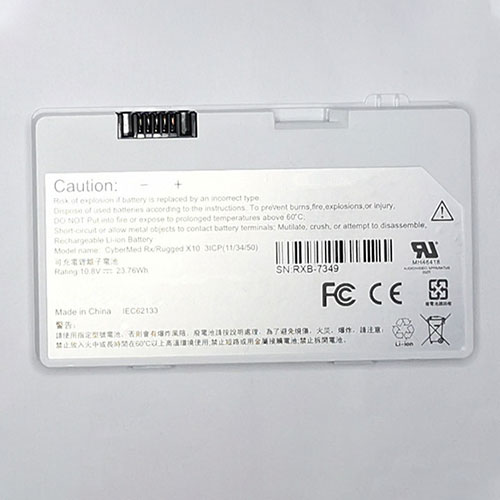
Battery RXB-7349 Replacement For CYBERNET Tablet CYBERNET Cybermed Rx Rugged X10 3ICP(11/34/50)

Find the right battery for CYBERNET Cybermed Rx Rugged X10 3ICP(11/34/50) to solve your power issues. Our CYBERNET RXB-7349 batteries are manufactured to precisely fit just as your original battery.

We use the highest quality Li-ion cells and components that are lighter weight, charge faster and last longer.

US CYBERNET battery shop – Tech-Battery.com ! Shopping with us is safe and secure! 100% Guarantee Quality and Fully Test!

CYBERNET RXB-7349 Battery For CYBERNET – Battery For CYBERNET Tablet Li-ion 23.78Wh 10.8V. Browse our various categories and find out why we have been the go-to source for our customers.

RXB-7349
  • Chemistry: Li-ion
  • Voltage: 23.78Wh
  • Capacity: 10.8V

Free shipping in most countries. click here to view detailed shipping costs.

We ship to the worldwide,please enquiry shipping & handling if you are out of united states.

What’s the total delivery time? (please use this formula to determine when your order will arrive) total delivery time = packaging time + shipping time.

Replaces the following products:

Fits the following devices:

CYBERNET Cybermed Rx Rugged X10 3ICP(11/34/50)

CYBERNET RXB-7349 CYBERNET battery is replacement for CYBERNET Cybermed Rx Rugged X10 3ICP(11/34/50). The RXB-7349 batteries equivalent is guaranteed to meet or exceed CYBERNET original specifications. All CYBERNET RXB-7349 Battery are brand new, 1 year Warranty, 100% Guarantee Quality and Fully Test!

We deliver quality CYBERNET Tablet extended batteries online. Purchase your CYBERNET Tablet battery here.

CYBERNET RXB-7349 CYBERNET Batteries

  • 100% OEM Compatible with your CYBERNET Tablet.
  • Lithium Ion battery technology
  • Convenient and secure online purchasing
  • Dependable high quality CYBERNET batteries
  • Satisfaction guaranteed or your money back
  • 1 Year Warranty on all CYBERNET Tablet Replacement Batteries

6 tips to increase RXB-7349 CYBERNET Battery lifetime

The performance of your CYBERNET depends largely on the performance of your battery. And his time of life depends on its users, and that you are. These are the principles that have guided the CYBERNET , at the head, so you can optimize the performance of CYBERNET Tablet battery.
New battery still fully charged RXB-7349 sold. You must be on the first wheel to be conditioned for optimum performance. Loading and unloading of the battery 4 or 5 times is enough to determine.
The memory effect completely to avoid a full charge and discharge the battery, CYBERNET RXB-7349 twice a month.
The dirt on the CYBERNET RXB-7349 contacts of the battery can power the CYBERNET Tablet batteries. Clean with alcohol and cotton can look like and function like new.
This method is recommended for those using the AC adapter for long periods. We recommend that you use the CYBERNET RXB-7349 battery at least once in two weeks. Batteries lose its charge when stored for a long time and you need the battery if it does break.
If he does not use a length of time, the CYBERNET RXB-7349 battery will be stored protected from a clean, dry and cool, heat and other metals. A loss of business to charge the battery in time and need a break before reuse.
Power Management Features Battery RXB-7349 enable the conservation of energy in the battery of CYBERNET Tablet. You can control the speed of the processor off, or you can adjust the brightness of the LCD screen to a minimum to ensure low power consumption. 

Why we have been the go-to source for our customers ?

We stock a wide range of rechargeable batteries for CYBERNET Tablet. Your CYBERNET Tablet PC is part of your everyday life. Successful communications on a CYBERNET begin with your battery. When purchasing a replacement battery for your CYBERNET CYBERNET, dependability and price are what we have to offer. We’ve been supplying reliable, high quality CYBERNET batteries for over 10 years. Our goal is to provide high quality aftermarket replacement batteries at a very reasonable price. All of our rechargeable Li-Ion CYBERNET batteries are backed by a one year warranty.

What is the run time of CYBERNET battery?

CYBERNET batteries have two main ratings on them: Volts and Amperes. Because size and weight of batteries is limited when compared to larger batteries such as car batteries, most companies show their ratings with Volts and Milliamperes. One thousand Milliamperes equals 1 Ampere. When buying a battery, select batteries with the most Milliamperes (or mAh). Batteries are also rated by Watt-Hours, perhaps the simplest rating of all. This is found by multiplying the Volts and the Amperes together. For example:

  • 14.4 Volts, 4000mAh (Note: 4000mAh is equal to 4.0 Amperes).
  • 14.4 x 4.0 = 57.60 Watt-Hours

Watt-Hours signifies the energy needed to power one watt for one hour.

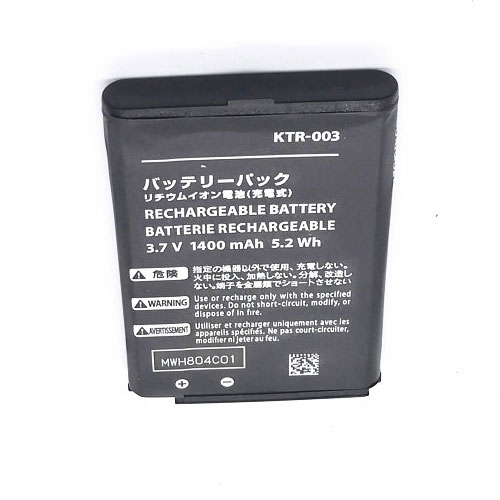
Battery KTR-003 Replacement For Nintendo Camera Nintendo 3DS N3DS

Find the right battery for Nintendo 3DS N3DS to solve your power issues. Our Nintendo KTR-003 batteries are manufactured to precisely fit just as your original battery.

We use the highest quality Li-ion cells and components that are lighter weight, charge faster and last longer.

US Nintendo battery shop – Tech-Battery.com ! Shopping with us is safe and secure! 100% Guarantee Quality and Fully Test!

Nintendo KTR-003 Battery For Nintendo – Battery For Nintendo Camera Li-ion 1400mAh/5.2Wh 3.7V/4.2V. Browse our various categories and find out why we have been the go-to source for our customers.

KTR-003
  • Chemistry: Li-ion
  • Voltage: 1400mAh/5.2Wh
  • Capacity: 3.7V/4.2V

Free shipping in most countries. click here to view detailed shipping costs.

We ship to the worldwide,please enquiry shipping & handling if you are out of united states.

What’s the total delivery time? (please use this formula to determine when your order will arrive) total delivery time = packaging time + shipping time.

Replaces the following products:

Fits the following devices:

Nintendo 3DS N3DS

Nintendo KTR-003 Nintendo battery is replacement for Nintendo 3DS N3DS. The KTR-003 batteries equivalent is guaranteed to meet or exceed Nintendo original specifications. All Nintendo KTR-003 Battery are brand new, 1 year Warranty, 100% Guarantee Quality and Fully Test!

We deliver quality Nintendo Camera extended batteries online. Purchase your Nintendo Camera battery here.

Nintendo KTR-003 Nintendo Batteries

  • 100% OEM Compatible with your Nintendo Camera.
  • Lithium Ion battery technology
  • Convenient and secure online purchasing
  • Dependable high quality Nintendo batteries
  • Satisfaction guaranteed or your money back
  • 1 Year Warranty on all Nintendo Camera Replacement Batteries

6 tips to increase KTR-003 Nintendo Battery lifetime

The performance of your Nintendo depends largely on the performance of your battery. And his time of life depends on its users, and that you are. These are the principles that have guided the Nintendo , at the head, so you can optimize the performance of Nintendo Camera battery.
New battery still fully charged KTR-003 sold. You must be on the first wheel to be conditioned for optimum performance. Loading and unloading of the battery 4 or 5 times is enough to determine.
The memory effect completely to avoid a full charge and discharge the battery, Nintendo KTR-003 twice a month.
The dirt on the Nintendo KTR-003 contacts of the battery can power the Nintendo Camera batteries. Clean with alcohol and cotton can look like and function like new.
This method is recommended for those using the AC adapter for long periods. We recommend that you use the Nintendo KTR-003 battery at least once in two weeks. Batteries lose its charge when stored for a long time and you need the battery if it does break.
If he does not use a length of time, the Nintendo KTR-003 battery will be stored protected from a clean, dry and cool, heat and other metals. A loss of business to charge the battery in time and need a break before reuse.
Power Management Features Battery KTR-003 enable the conservation of energy in the battery of Nintendo Camera. You can control the speed of the processor off, or you can adjust the brightness of the LCD screen to a minimum to ensure low power consumption. 

Why we have been the go-to source for our customers ?

We stock a wide range of rechargeable batteries for Nintendo Camera. Your Nintendo Tablet PC is part of your everyday life. Successful communications on a Nintendo begin with your battery. When purchasing a replacement battery for your Nintendo Nintendo, dependability and price are what we have to offer. We’ve been supplying reliable, high quality Nintendo batteries for over 10 years. Our goal is to provide high quality aftermarket replacement batteries at a very reasonable price. All of our rechargeable Li-Ion Nintendo batteries are backed by a one year warranty.

What is the run time of Nintendo battery?

Nintendo batteries have two main ratings on them: Volts and Amperes. Because size and weight of batteries is limited when compared to larger batteries such as car batteries, most companies show their ratings with Volts and Milliamperes. One thousand Milliamperes equals 1 Ampere. When buying a battery, select batteries with the most Milliamperes (or mAh). Batteries are also rated by Watt-Hours, perhaps the simplest rating of all. This is found by multiplying the Volts and the Amperes together. For example:

  • 14.4 Volts, 4000mAh (Note: 4000mAh is equal to 4.0 Amperes).
  • 14.4 x 4.0 = 57.60 Watt-Hours

Watt-Hours signifies the energy needed to power one watt for one hour.

Sabrent Rocket Q4 NVMe 4.0 review: Blazing fast performance for a reasonable price

Old hard drives, or “spinning rust” as some call it, are good for mass storage, but nobody will ever mistake them for high performance. SATA SSD drives are much faster than the old drives, and were a breakthrough over a decade ago, but pale in comparison to today’s NVMe SSD drives.

Today, we take a look at Sabrent’s 2TB Rocket Q4 NVMe 4.0 SSD drive.

Specifications

The Sabrent Rocket Q4 utilizes the M.2 2280 form factor, which is standard for these types of drives, has a Phison PS5016-E16 controller, and Micron 96L QLC NV memory. It’s available in 1TB, 2TB, and 4TB models. For this review, I’m looking at the 2TB version.

Rocket Q4 1TBRocket Q4 2TBRocket Q4 4TB
Form FactorM.2 2280M.2 2280M.2 2280
InterfacePCI 4.0 x4PCI 4.0 x4PCI 4.0 x4
ProtocolNVMe 1.3NVMe 1.3NVMe 1.3
ControllerPhison PS5016-E16Phison PS5016-E16Phison PS5016-E16
DRAMDDR4DDR4DDR4
NV MemoryMicron 96L QLCMicron 96L QLCMicron 96L QLC
Sequential ReadUp to 4,700 MB/sUp to 4,800 MB/sUp to 4,900 MB/s
Sequential WriteUp to 1,800 MB/sUp to 3,600 MB/sUp to 3,700 MB/s
Random ReadUp to 180,000 IOPSUp to 350,000 IOPSUp to 350,000 IOPS
Random WriteUp to 450,000 IOPSUp to 700,000 IOPSUp to 700,000 IOPS
Endurance200 TBW400 TBW800 TBW
Warranty5 years (with registration)5 years (with registration)5 years (with registration)

Performance varies based on the capacity, so the sweet spot appears to be the 2TB model, which roughly doubles the speed of writes. Current Amazon.com pricing as of this writing is $160 for the 1TB model, $320 for the 2TB version, and $750 for the 4TB drive. That equates to roughly $0.16/GB for both the 1TB and 2TB model and $0.19/GB for the 4TB model, making the 2TB version the sweet spot for both price and performance.

Utilizing QLC, the endurance of the drive is rated at 400TB, which shouldn’t be a concern for most users. The drive comes with a five year warranty, but requires registration; if you don’t register the drive, then the warranty only lasts for one year, which is pretty bad.

The drive requires PCIe 4.0 to run at maximum performance. You can use the Rocket in a PCIe 3.0 motherboard, but will obviously lose some performance by doing so.

Packaging

It’s clear that Sabrent is trying to convey that it is offering a premium product, something that the packaging helps reinforce. While the Samsung  and AData NVMe drives I have both came in plastic containers, the Sabrent Rocket Q4 sits inside a copper colored metal clamshell. Inside, the drive itself is nestled in foam padding. While I appreciate the presentation, part of me feels like it’s a waste of material. Regardless, it looks pretty nice.

The copper and white coloring is maintained on the drive itself, giving the drive a very elegant and premium look.

Testing Machine

Here are the details on the machine that I ran the test on.

  • Motherboard: Gigabyte X570 Aorus Master
  • CPU: AMD Ryzen 9 3900X
  • Memory: G.Skill Triden Z Neo CL16 2x16GB
  • Video Card: EVGA GeForce RTX 2070 SUPER XC GAMING
  • OS: Microsoft  Windows 10 Education 64-bit

Performance

So we know the Sabrent Rocket Q4 looks good and is reasonably priced, but how does it perform? To test that out, I ran a few benchmarks, including Samsung  Magician, CrystalDiskMark, and the Final Fantasy XIV benchmark tool that tests loading times.

Overall, results were very good with a few oddities and some caveats.

The machine I tested on currently has a 1TB Samsung  970 Evo Plus as the boot drive, a 2TB ADATA SX8200PNP for my games, and a 6TB Seagate IronWolf ST6000NE0021 for mass storage of music and photos. Running the Samsung  Magician benchmark showed the Rocket with a sizable lead of 60% in sequential reads and 80% in sequential writes versus the Samsung  970 EVO Plus. The read performance was even better compared to the ADATA, but write performance didn’t have similar gains – although it was still much better.

After using Samsung  Magician, I ran the Sabrent Rocket Q4 through several different CrystalDiskMark benchmarks. In addition to running them on an empty disk, I ran them again when storage was over 70% utilized, to see if there was any performance degradation due to the capacity of the drive.

As you can see from the graphs, performance differences were statistically insignificant regardless of how much storage was being used, which is good. The performance, while not matching the speed shown by Samsung  Magician, were still much higher than the other two drives in the test system.

While performance is excellent at 64MiB, read performance drops off considerably at 64GiB. This is especially curious because the ADATA drive performed the SEQ1M Q8T1 test at 3,248MB/s, and the Samsung  drive was even better, reading at 3,565MB/s. This means that transferring very large files would have a more noticeable delay on the Sabrent Rocket Q4, although it’s still extremely fast.

Comparing the three drives directly, you can see that the Sabrent Rocket Q4 is by far the fastest of the drives at 64MiB when it comes to reading, and is slightly faster than the Samsung  Evo Plus at writing. Aside from the aforementioned 64GiB test, the Sabrent Rocket Q4 either tied or beat the other two drives in all of the tests.

In addition to the raw performance tests, I also ran the Final Fantasy XIV loading time benchmark. This gives a real-world idea of how long it takes to load the game from your hard drive. It can also be used to test the overall performance of your system. The loading times for all of the NVMe drives were within a second of each other, while the “spinning rust” drive was more than 3x slower.

Temperatures

During all of the testing, the Sabrent Rocket Q4 maintained a cool temperature, averaging around 47°C. By comparison, the Samsung  drive was 54°C and the ADATA was 52°C. Temperature seemed to have little impact on performance, as testing from a cold boot provided similar results as when the machine was running Folding@Home.

Sabrent offers an optional heatsink for the drive as well.

Conclusion

The Sabrent Rocket Q4 offers excellent performance at a great price. However there are three important caveats to keep in mind.

First, the drive utilizes PCIe 4.0. If you have an older system, or a newer system that doesn’t support the latest PCI standard, your performance metrics will take a hit. The drive will still run at PCIe 3.0 speeds, but you’d be paying for speed you won’t see.

Second, the drive has QLC flash, which means the endurance will suffer, providing only 200 TB of writes per 1 TB drive. For most users, this is probably fine, especially if you use the Rocket Q4 as a gaming drive, but the endurance directly leads to our next consideration.

The warranty requires you to register your drive. If you don’t, it’s a simple one year warranty which is ridiculously low. This is an easy thing to bypass by simply registering the drive for a robust five year warranty, but make sure you don’t overlook that step.

If any of the above three caveats are issues for your particular workloads, then I recommend looking elsewhere. For most people, however, the Sabrent Rocket Q4 is a quality NVMe drive that will provide blazing speeds at competitive pricing, and I can whole-heartedly recommend it.

OPPO RENO 5 PRO 5G GETS ANOTHER CERTIFICATION, THIS TIME THE MONIKER IS CONFIRMED!

Oppo is now working on two smartphones that will expand the company’s Reno lineup. The devices have already surfaced on numerous listings with the model number PDSM00 and PDST00. While various reports claim that these two devices are the variant of Oppo Reno 5 Pro 5G, there has been no solid indication of the same. Well, that changes now as the same model number has now visited HDR10+ for the certification. Thanks to the new development, we now know that these model numbers will indeed arrive with the Reno 5 Pro moniker. This means we’re looking at at least two storage configurations of the smartphone.

OPPO RENO 5 PRO 5G WILL ARRIVE WITH 65W FAST CHARGING SUPPORT!

As you can see in the image above, the listing clearly mentions the moniker and confirms our previous reports as well. Sadly, the HDR10+ certification doesn’t really reveal any hardware aspect of the device. We already know that these devices will come with flagship hardware and specs just like other Reno devices. Thankfully, the previous listings have already revealed some key hardware. According to the previous TENAA, the device will arrive with a large 6.5-inch display with Full HD+ resolution.

The device will have a total of five cameras with a quad module on the rear and a single shooter on the front. The rear camera setup will consist of a 64MP primary sensor, an 8MP ultrawide, and two 2MP other sensors. On the front, you will find a 32MP front snapper that should be housed inside a punch-hole cutout. We already know that Reno 5 Pro 5G will make use of the Snapdragon 865 chipset under the hood. All of these will get its fuel from a 4,250 mAh battery that will support 65W fast charging capabilities for a swift top-up.

Apart from TENAA, the Reno 5 Pro 5G has previously made its way to GeekBench listing as well. The GeekBench creates some discrepancy as the device was found running on MediaTek Dimensity 1000+ chipset. The listing also mentions the Android 11 operating system with Color OS 11 on top.

With that said, there are still some discrepancies when it comes to the hardware and the same will get cleared as we will move closer to the official launch. Since the device has already appeared on TENAA and now got HDR10+ certification, we’re expecting it to launch anytime soon.